Welcome to Scarab-Runtime
Scarab-Runtime is an AI-agent-first runtime built on Linux. It provides first-class primitives for agent identity, capability-based security, tool invocation, and lifecycle management, all implemented in userspace using existing Linux kernel primitives.
What is Scarab-Runtime?
Traditional operating systems manage processes. Scarab-Runtime manages agents: long-running, LLM-driven programs that reason, plan, use tools, and communicate with each other. Agents are:
- Isolated by capability tokens, seccomp-BPF, AppArmor profiles, cgroups, and nftables rules
- Audited - every action is written to an append-only, tamper-evident log
- Observable - structured per-agent observation logs capture the full reasoning trace
- Composable - agents can spawn children, communicate over a message bus, and share state via a blackboard
Components
| Component | Binary | Purpose |
|---|---|---|
| agentd | agentd | Core daemon: agent lifecycle, tool dispatch, capability enforcement, audit logging |
| ash | ash | CLI shell for spawning, inspecting, terminating, and configuring agents |
| libagent | (library) | Shared types, manifest parser, IPC protocol, Agent SDK |
| example-agent | example-agent | Reference implementation of the Plan→Act→Observe loop |
Audiences
This documentation is written for two audiences:
- Operators - people who run
agentd, spawn agents, manage secrets, review audit logs, and approve sensitive operations. Start with Getting Started. - Agent developers - Rust programmers writing agent binaries using
libagent. Start with the Developer Guide.
Architecture
Scarab-Runtime uses a userspace-first design. Security enforcement is handled entirely by Linux kernel primitives via a swappable PlatformEnforcer abstraction, with no kernel modules required.
Component Diagram
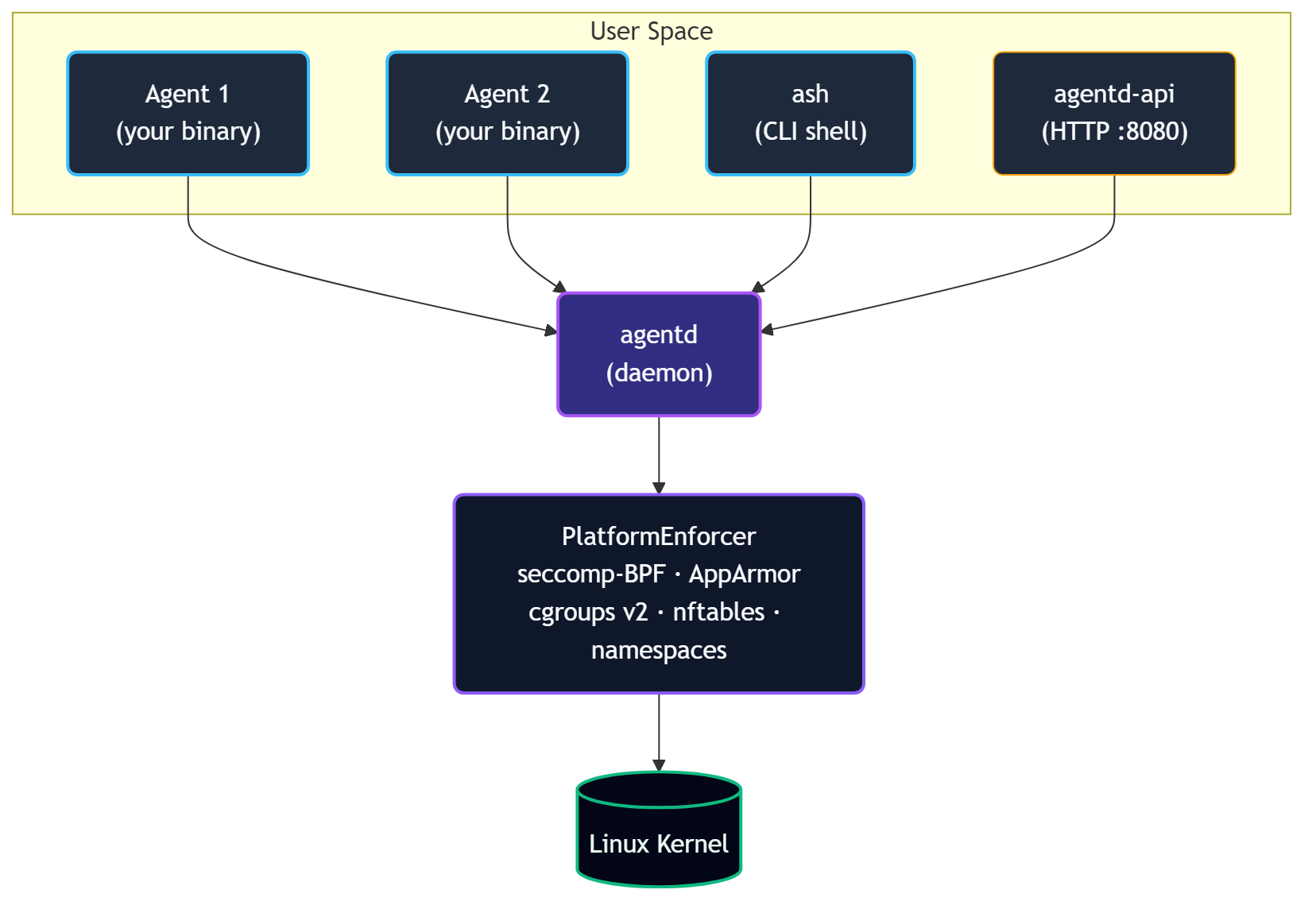
agentd: The Daemon
agentd is the trusted root of the system. It:
- Spawns agent processes from manifest files, injecting
SCARAB_AGENT_IDandSCARAB_SOCKET - Manages the lifecycle state machine (
Init → Plan → Act → Observe → Terminate) - Runs the tool registry and dispatches all tool calls
- Enforces capability checks on every IPC request
- Maintains the audit trail, memory store, observation log, and workspace snapshots
- Runs the message bus and blackboard
- Manages secrets in heap-only sealed storage
- Monitors for behavioral anomalies
- Routes escalations up the agent hierarchy
- Embeds the HTTP API gateway (
agentd-api) on127.0.0.1:8080
agentd is not an agent itself; it is the trusted root that applies security profiles to all agents.
ash: The Shell
ash is a CLI client that communicates with agentd over the same Unix socket agents use. It provides 25+ subcommand groups for every aspect of agent management.
libagent: The Library
libagent is the shared crate used by both agentd and agent binaries:
types.rs-AgentInfo,LifecycleState,TrustLevel,ResourceLimits,PlanStepcapability.rs- capability token parsing and glob matchingmanifest.rs- YAML manifest parsing and validationaudit.rs- hash-chained audit entry typesipc.rs- allRequest/Responseprotocol variantsclient.rs-AgentdClienttyped async IPC clientagent.rs-AgentSDK high-level wrapper
IPC Protocol
All communication between agents/ash and agentd uses JSON over a Unix domain socket with a 4-byte big-endian length prefix:

Default socket path: /run/agentd/agentd.sock
Override with SCARAB_SOCKET environment variable or --socket flag on ash.
Security Layers
Scarab-Runtime employs defense in depth with five independent enforcement layers:
- Tool dispatch: capability check before every tool invocation
- seccomp-BPF: per-agent syscall allowlist derived from manifest at spawn time
- AppArmor: per-agent MAC profile constraining file and network access
- cgroups v2: per-agent resource limits (memory, CPU shares, open files)
- nftables: per-agent network policy (none / local / allowlist / full)
Additionally, each agent runs in its own set of Linux namespaces (PID, network, mount) for process isolation.
Workspace Isolation
Every agent gets an overlayfs workspace. Writes go to an upper layer; the lower layer (base filesystem) is never modified. Snapshots checkpoint the upper layer. Rollback restores a previous snapshot. Commit promotes the upper layer permanently.
Design Principles
These nine principles guide every design decision in Scarab-Runtime.
1. Userspace-First
All security enforcement uses existing Linux kernel primitives: cgroups, seccomp-BPF, AppArmor, nftables, and namespaces. No kernel modules are required. This keeps the implementation portable, auditable, and maintainable. Kernel module migration remains a future option if performance demands it.
2. Capability-Based Security
There are no traditional UNIX permissions. All access is mediated by unforgeable capability tokens in the format domain.action:scope. An agent can only do what its manifest explicitly declares. Glob matching on scopes allows fine-grained path- or name-scoped permissions (e.g., fs.write:/home/agent/workspace/**).
3. Agent-Native
The agent is the first-class primitive, not the process. Every agent has an identity (UUID), a lifecycle state, an audit trail, memory, an observation log, and a workspace. The OS-level process is an implementation detail.
4. Declarative Configuration
Agent behavior is defined by YAML manifests, not imperative startup code. A manifest fully describes what an agent can do: capabilities, resource limits, network policy, allowed syscalls, secret access, and lifecycle parameters. The daemon derives all enforcement artifacts from the manifest at spawn time.
5. Defense in Depth
No single security layer is the whole story. Tool dispatch, seccomp, AppArmor, nftables, and namespaces each enforce independently. A bypass of one layer does not compromise the others.
6. Never Block, Always Gate
Agents are not hard-denied capabilities; out-of-scope actions escalate up the agent hierarchy. The human is the last resort, not the first call. Isolation and reversibility (workspace snapshots, rollback) are the safety net. This keeps human interrupt rate proportional to genuinely novel situations.
7. Kernel is the Authority
Per-agent AppArmor and seccomp profiles are derived from the manifest at spawn time and enforced by the kernel. The runtime enforces what the manifest declares; self-reported capability compliance is an audit aid, not a security boundary. An agent cannot lie to the kernel.
8. Universal Sandbox
Every agent runs in a sandbox regardless of trust level. privileged trust means privileged within the agent world, not write access to the host system (/usr, /lib, /bin, /boot are outside every agent's write scope by definition). agentd itself is not an agent; it is the trusted root that applies profiles to all agents, including the root agent.
9. Hierarchy Before Human
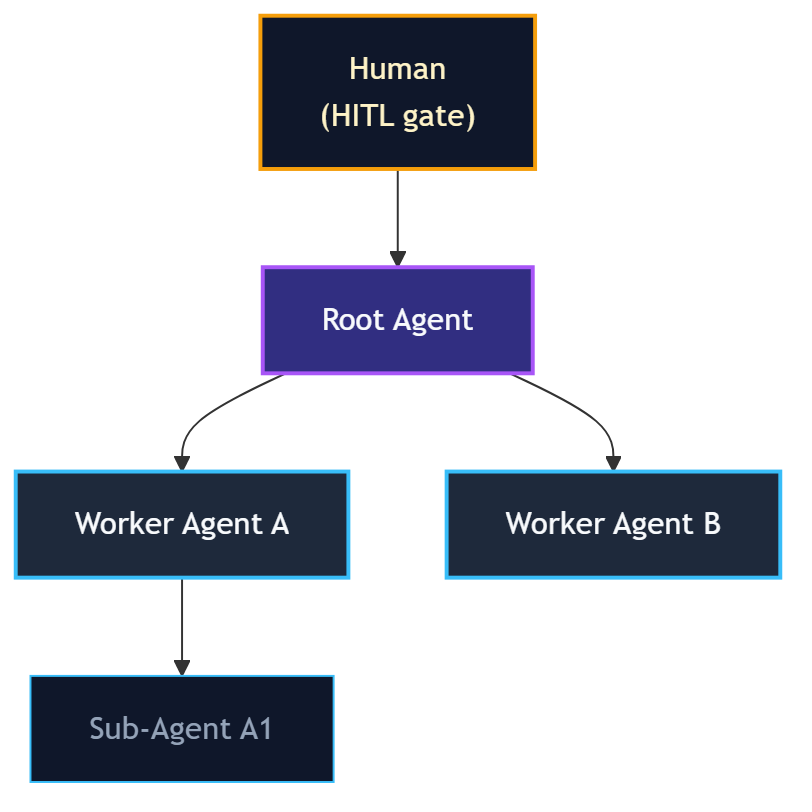
Escalations (capability grants, anomaly alerts, plan deviations) route to the requesting agent's parent first. Only the root agent (which has no parent) escalates to the human HITL gate. This keeps the human interrupt rate low and ensures escalations are resolved at the most appropriate level in the hierarchy.
Installation
Prerequisites
- Rust stable toolchain - install from rustup.rs
- Linux - required for full functionality (seccomp-BPF, AppArmor, cgroups, nftables, overlayfs)
- Recommended: Windows with WSL 2 (Debian) for development on Windows hosts
Optional tools used by specific features:
python3,node- needed forsandbox.execwith those runtimesmdbook- to build this documentation
Building from Source
# Clone the repository
git clone <repo-url> Scarab-Runtime
cd Scarab-Runtime

# Build all crates
cargo build

# Run all tests (unit + integration)
cargo test

# Run enforcement tests (requires root - validates cgroups, AppArmor, seccomp)
sudo cargo test
Build artifacts are placed in target/debug/:
| Binary | Path |
|---|---|
agentd | target/debug/agentd |
ash | target/debug/ash |
example-agent | target/debug/example-agent |
Release Build
cargo build --release
# Binaries in target/release/
System Directories
agentd expects or creates these directories at runtime:
| Path | Purpose |
|---|---|
/run/agentd/ | Unix socket (agentd.sock) |
/var/lib/scarab-runtime/ | Agent install store, SQLite memory DB |
/var/log/scarab-runtime/ | Audit log, observation logs |
For development, agentd will create these under /tmp/agentd-* if it lacks permission to write to /run/ and /var/.
OpenRouter API Key
The lm.complete and lm.embed tools route LLM requests through OpenRouter. Set your key before starting agentd:
export OPENROUTER_API_KEY=sk-or-...
Or register it as a secret so agents can reference it via handle syntax:
ash secrets add openrouter-key
Starting agentd
agentd is the daemon that manages all agents. It must be running before you can use ash or spawn any agents.
Starting the Daemon
# Development (foreground, with logging)
cargo run --bin agentd

# Or, if you built with --release
./target/release/agentd

# With verbose tracing
RUST_LOG=debug cargo run --bin agentd
agentd listens on a Unix domain socket. Default path: /run/agentd/agentd.sock
To use a custom socket path:
agentd --socket /tmp/my-agentd.sock
Then tell ash to use the same socket:
ash --socket /tmp/my-agentd.sock list
Verifying the Daemon is Running
ash ping
# Output: pong
ash status
# Output: daemon status, agent count, uptime
HTTP API Server
agentd also starts an HTTP API gateway on 127.0.0.1:8080 by default. The gateway exposes all agent management operations over REST, allowing external services and CI pipelines to interact with the daemon without a direct Unix socket connection.
Verify it is running:
curl http://127.0.0.1:8080/health
# {"status":"ok","version":"...","uptime_secs":42}
To change the bind address:
AGENTD_API_ADDR=0.0.0.0:9090 cargo run --bin agentd
See API Gateway for the full HTTP API reference, authentication setup, and CORS configuration.
Stopping the Daemon
Send SIGTERM or SIGINT (Ctrl+C in the foreground). agentd will:
- Transition all running agents to
Terminate - Flush the audit log
- Release all secrets from memory (zeroized)
- Exit cleanly
Log Output
agentd uses structured logging via the tracing crate. Control verbosity with RUST_LOG:
RUST_LOG=info   agentd   # default: info-level structured events
RUST_LOG=debug  agentd   # verbose: all tool dispatches, IPC frames
RUST_LOG=trace  agentd   # very verbose: internal state transitions
Running as a System Service
For production use, run agentd as a systemd service. Example unit file:
[Unit]
Description=Scarab-Runtime Agent Daemon
After=network.target

[Service]
ExecStart=/usr/local/bin/agentd
Restart=on-failure
Environment=RUST_LOG=info
Environment=OPENROUTER_API_KEY=sk-or-...

[Install]
WantedBy=multi-user.target
sudo cp etc/systemd/agentd.service /etc/systemd/system/
sudo systemctl enable --now agentd
Your First Agent
This tutorial walks you through spawning and interacting with a minimal agent.
Step 1: Start agentd
cargo run --bin agentd &
ash ping   # should print: pong
Step 2: Write a Manifest
Create my-agent.yaml:
apiVersion: scarab/v1
kind: AgentManifest
metadata:
  name: my-first-agent
  version: 1.0.0
  description: A minimal test agent.
spec:
  trust_level: sandboxed
  capabilities:
    - tool.invoke:echo
    - tool.invoke:agent.info
  lifecycle:
    restart_policy: never
    timeout_secs: 60
  command: /bin/sh
  args:
    - -c
    - "echo hello from my-first-agent"
Step 3: Validate the Manifest
ash validate my-agent.yaml
# Output: Manifest is valid
Validation is local; no daemon connection is required.
Step 4: Spawn the Agent
ash spawn my-agent.yaml
# Output: Spawned agent <UUID>
Step 5: List Running Agents
ash list
# ID                                    NAME              STATE    TRUST
# 550e8400-e29b-41d4-a716-446655440000  my-first-agent    Plan     sandboxed
Step 6: Inspect the Agent
ash info <UUID>
Step 7: Invoke a Tool on the Agent
ash tools invoke <UUID> echo '{"message": "hello"}'
# Output: {"message": "hello"}
Step 8: View the Audit Log
ash audit --agent <UUID>
Step 9: Terminate the Agent
ash kill <UUID>
Running the Example Agent
The example-agent binary demonstrates the full Plan→Act→Observe loop using lm.complete. It requires an OPENROUTER_API_KEY:
export OPENROUTER_API_KEY=sk-or-...
ash spawn etc/agents/example-agent.yaml
ash list
ash audit
The example agent will:
- Transition to
Plan, declare a plan step - Transition to
Act, invokelm.completewith its declared task - Append an observation with the result
- Transition to
Terminate
Next Steps
- Learn about Agent Manifests in depth
- Explore Capability Tokens
- Read the Developer Guide to write your own agent binary
Quick Reference
ash Command Cheat Sheet
Agent Lifecycle
ash spawn <manifest.yaml>          # Spawn agent from manifest
ash validate <manifest.yaml>       # Validate manifest (no daemon needed)
ash list                           # List all running agents (alias: ash ls)
ash info <agent-id>                # Show agent details
ash kill <agent-id>                # Terminate an agent
ash transition <agent-id> <state>  # Force lifecycle transition (plan/act/observe/terminate)
ash ping                           # Check daemon is alive
ash status                         # Show daemon status
Tools
ash tools list                             # List all tools
ash tools list --agent <id>                # Tools accessible to a specific agent
ash tools invoke <agent-id> <tool> <json>  # Invoke a tool
ash tools schema <tool-name>               # Show tool input/output schema
ash tools proposed                         # List pending dynamic tool proposals
ash tools approve <proposal-id>            # Approve a tool proposal
ash tools deny <proposal-id>               # Deny a tool proposal
Audit & Observations
ash audit                          # Show last 20 audit entries
ash audit --agent <id>             # Filter by agent
ash audit --limit 100              # Show more entries
ash obs query <agent-id>           # Query observation log
ash obs query <agent-id> --keyword "error" --limit 10
Secrets
ash secrets add <name>             # Register secret (echo-off prompt)
ash secrets list                   # List secret names (no values)
ash secrets remove <name>          # Delete a secret
ash secrets policy add --label "..." --secret "name" --tool "web.fetch"
ash secrets policy list            # List policies
ash secrets policy remove <id>     # Remove a policy
Memory & Blackboard
ash memory read <agent-id> <key>           # Read persistent memory
ash memory write <agent-id> <key> <json>   # Write persistent memory
ash memory list <agent-id>                 # List memory keys
ash bb read <agent-id> <key>               # Read blackboard
ash bb write <agent-id> <key> <json>       # Write blackboard
ash bb list <agent-id>                     # List blackboard keys
Message Bus
ash bus publish <agent-id> <topic> <json>  # Publish to topic
ash bus subscribe <agent-id> <pattern>     # Subscribe to topic pattern
ash bus poll <agent-id>                    # Drain mailbox
Workspace
ash workspace snapshot <agent-id>          # Take snapshot
ash workspace history <agent-id>           # List snapshots
ash workspace diff <agent-id>              # Show changes vs last snapshot
ash workspace rollback <agent-id> <index>  # Roll back
ash workspace commit <agent-id>            # Commit overlay
Scheduler
ash scheduler stats                             # Global scheduler stats
ash scheduler info <agent-id>                   # Per-agent stats
ash scheduler set-deadline <agent-id> <rfc3339> # Set deadline
ash scheduler clear-deadline <agent-id>         # Clear deadline
ash scheduler set-priority <agent-id> <1-100>   # Set priority
Hierarchy & Escalations
ash hierarchy show        # Render agent tree
ash hierarchy escalations # List pending escalations
ash pending               # List pending HITL approval requests
ash approve <request-id>  # Approve a pending request
ash deny <request-id>     # Deny a pending request
Grants
ash grants list <agent-id>              # List capability grants
ash grants revoke <agent-id> <grant-id> # Revoke a grant
Anomaly Detection
ash anomaly list                       # List recent anomaly events
ash anomaly list --agent <id>          # Filter by agent
Replay
ash replay timeline <agent-id>              # Show full execution timeline
ash replay timeline <agent-id> --since <t>  # Since timestamp (RFC3339)
ash replay rollback <agent-id> <index>      # Roll back workspace
MCP
ash mcp add <name> stdio --command <cmd>  # Register stdio MCP server
ash mcp add <name> http --url <url>       # Register HTTP MCP server
ash mcp list                              # List registered servers
ash mcp remove <name>                     # Remove a server
ash mcp attach <agent-id> <server-name>   # Attach server to agent
ash mcp detach <agent-id> <server-name>   # Detach server from agent
Agent Store
ash agent install <manifest.yaml>      # Install agent
ash agent list                         # List installed agents
ash agent run <name>                   # Run installed agent by name
ash agent remove <name>                # Remove installed agent
ash agent capability-sheet <manifest>  # Print capability sheet
Key Environment Variables
| Variable | Description |
|---|---|
SCARAB_AGENT_ID | UUID assigned to this agent by agentd |
SCARAB_SOCKET | Path to agentd Unix socket |
SCARAB_TASK | Task string from spec.task in manifest |
SCARAB_MODEL | Model ID from spec.model in manifest |
OPENROUTER_API_KEY | API key for LLM tools |
RUST_LOG | Log verbosity (error/warn/info/debug/trace) |
Capability Quick Reference
| Capability | Grants |
|---|---|
tool.invoke:echo | Use the echo tool |
tool.invoke:lm.complete | Use LLM completion |
tool.invoke:fs.read | Read files (scoped by fs.read:<path>) |
tool.invoke:fs.write | Write files (scoped by fs.write:<path>) |
tool.invoke:web.fetch | Fetch URLs |
tool.invoke:web.search | Web search |
tool.invoke:sandbox.exec | Execute code in sandbox |
memory.read:* | Read persistent memory |
memory.write:* | Write persistent memory |
obs.append | Append to observation log |
obs.query | Query observation log |
secret.use:<name> | Reference a named secret |
sandbox.exec | Alias for sandbox.exec tool |
Agents and Lifecycle
What is an Agent?
An agent in Scarab-Runtime is a process spawned and managed by agentd. Unlike ordinary OS processes, every agent has:
- A UUID identity (
SCARAB_AGENT_ID) injected at spawn time - A lifecycle state tracked by the daemon
- A capability set derived from its manifest
- A sandbox enforced at the kernel level
- An audit trail of every action it takes
- A workspace (overlay filesystem) for isolated file operations
- A persistent memory store (SQLite-backed key-value)
- An observation log (hash-chained NDJSON)
Lifecycle State Machine
Every agent follows this state machine:
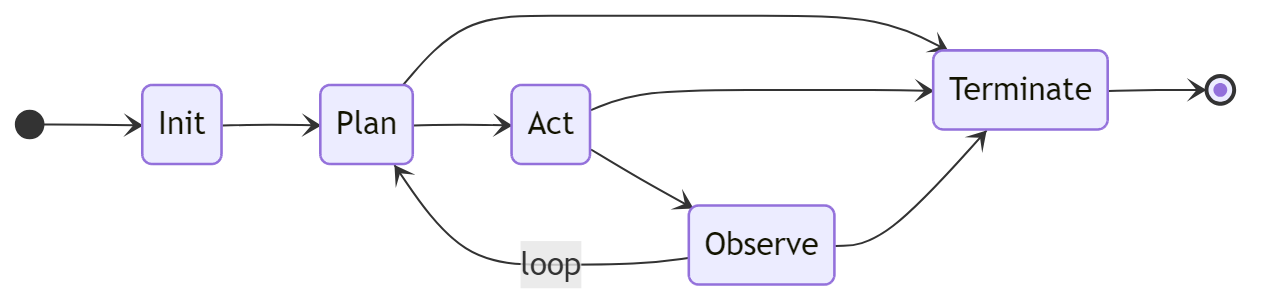
Terminate is reachable from any state except Init.
State Descriptions
| State | Description |
|---|---|
Init | Agent is being set up. Sandbox, cgroups, and capability profiles are applied. The agent binary has not yet received control. |
Plan | Agent is reasoning. Typically calls agent.plan() to declare steps, may read memory or query observations. |
Act | Agent is executing. Tool invocations are expected in this state. |
Observe | Agent is processing results. Typically calls agent.observe() to record what happened. |
Terminate | Agent is shutting down. Resources are released and the audit log entry is finalized. |
State Transitions
Agents transition by calling agent.transition(state) (via the SDK) or by receiving an IPC Transition request. Transitions are validated:
Init → Planis the first valid transition after spawnPlan ↔ Act ↔ Observeare the normal loop statesTerminatefrom any non-Initstate is always valid- Invalid transitions return an error without changing state
Operators can force a transition with ash transition <agent-id> <state>.
Agent Identity
When agentd spawns an agent, it injects:
SCARAB_AGENT_ID=<uuid>          # Agent's unique identifier
SCARAB_SOCKET=/run/agentd/agentd.sock  # Path to daemon socket
SCARAB_TASK=<text>              # From spec.task (if set)
SCARAB_MODEL=<model-id>         # From spec.model (if set)
The agent binary reads these with std::env::var or the Agent::from_env() SDK helper.
Agent Hierarchy
Agents form a tree. The agent that spawns another becomes its parent. Escalations (capability requests, anomaly alerts) travel up the tree. The root agent escalates to the human HITL gate.
Discover Agents
Agents can discover each other by capability pattern:
ash discover <agent-id> "bus.*"
This finds all running agents that have any bus.* capability.
Agent Manifests
Agent manifests are YAML files that fully declare an agent's identity, capabilities, resource limits, and lifecycle behavior. agentd reads a manifest at spawn time to set up sandboxing, derive AppArmor and seccomp profiles, and enforce capability checks.
Minimal Example
apiVersion: scarab/v1
kind: AgentManifest
metadata:
  name: hello-agent
  version: 1.0.0
spec:
  trust_level: untrusted
  capabilities:
    - tool.invoke:echo
Full Field Reference
apiVersion: scarab/v1          # Required. Always "scarab/v1".
kind: AgentManifest            # Required. Always "AgentManifest".

metadata:
  name: <string>               # Required. Unique agent name.
  version: <semver>            # Required. e.g. "1.0.0"
  description: <string>        # Optional. Human-readable description.

spec:
  trust_level: <level>         # Required. untrusted|sandboxed|trusted|privileged
  task: <string>               # Optional. Goal text. Injected as SCARAB_TASK.
  model: <model-id>            # Optional. LLM model. Injected as SCARAB_MODEL.

  resources:                   # Optional.
    memory_limit: <size>       # e.g. 512Mi, 2Gi
    cpu_shares: <int>          # cgroup cpu.shares value
    max_open_files: <int>      # file descriptor limit

  capabilities:                # Required. List of capability strings.
    - <capability>

  network:                     # Optional.
    policy: none|local|allowlist|full
    allowlist:                 # Required if policy is "allowlist"
      - <host:port>

  lifecycle:                   # Optional.
    restart_policy: never|on-failure|always
    max_restarts: <int>
    timeout_secs: <int>

  command: <path>              # Optional. Binary to spawn.
  args:                        # Optional. Arguments passed to the binary.
    - <arg>

  secret_policy:               # Optional. Pre-approval rules for credential access.
    - label: <string>
      secret_pattern: <glob>
      tool_pattern: <glob>
      host_pattern: <glob>     # Optional
      expires_at: <iso8601>    # Optional
      max_uses: <int>          # Optional
      agent_matcher:           # Optional
        type: any|by_id|by_name_glob|by_trust_level
        id: <uuid>
        pattern: <glob>
        level: <trust-level>

  # Agent Store / runtime fields (Phase 8.0)
  runtime: native|python|node  # Execution runtime
  entrypoint: <path>           # Script entrypoint (for python/node)
  packages:                    # Packages to install for the runtime
    - <package-name>

  # MCP auto-attach (Phase 8.1)
  mcp_servers:                 # MCP servers to auto-attach at spawn
    - <server-name>

  # Scheduler fields
  workspace:                   # Workspace configuration
    auto_snapshot: <bool>      # Enable automatic snapshots (default: true)
    snapshot_interval_secs: <int>
Examples
Minimal Sandboxed Agent
apiVersion: scarab/v1
kind: AgentManifest
metadata:
  name: file-organizer
  version: 1.0.0
spec:
  trust_level: sandboxed
  capabilities:
    - fs.read
    - fs.write:/home/agent/workspace/**
    - tool.invoke:fs.read
    - tool.invoke:fs.write
    - tool.invoke:fs.list
  network:
    policy: none
  lifecycle:
    restart_policy: on-failure
    max_restarts: 3
    timeout_secs: 3600
LLM Agent with Task and Model
apiVersion: scarab/v1
kind: AgentManifest
metadata:
  name: research-agent
  version: 1.0.0
  description: Researches topics using web search and LLM.
spec:
  task: "Summarize the latest news about renewable energy in 3 bullet points."
  model: "anthropic/claude-opus-4-6"
  trust_level: trusted
  capabilities:
    - tool.invoke:lm.complete
    - tool.invoke:web.search
    - tool.invoke:web.fetch
    - memory.read:*
    - memory.write:*
    - obs.append
  network:
    policy: full
  lifecycle:
    restart_policy: never
    timeout_secs: 300
  command: target/debug/example-agent
Agent Using Secrets
apiVersion: scarab/v1
kind: AgentManifest
metadata:
  name: api-caller
  version: 1.0.0
spec:
  trust_level: trusted
  capabilities:
    - tool.invoke:web.fetch
    - secret.use:my-api-key
  network:
    policy: allowlist
    allowlist:
      - "api.example.com:443"
  secret_policy:
    - label: "API access"
      secret_pattern: "my-api-key"
      tool_pattern: "web.fetch"
      host_pattern: "api.example.com"
Validation
ash validate path/to/manifest.yaml
Validation checks:
- Required fields are present
trust_levelis a valid value- Capabilities are parseable
- Network policy is consistent
apiVersionandkindare correct
Capability Tokens
Capability tokens are the primary access-control mechanism in Scarab-Runtime. An agent can only invoke tools, read/write memory, or access secrets that are listed in its manifest capabilities.
Token Format
<domain>.<action>
<domain>.<action>:<scope>
Examples:
fs.read
fs.write:/home/agent/workspace/**
tool.invoke:echo
tool.invoke:*
net.connect:api.example.com:443
secret.use:my-api-key
secret.use:db-*
memory.read:config
memory.write:*
obs.append
obs.query
sandbox.exec
Glob Matching on Scopes
The :<scope> portion supports glob matching:
| Pattern | Matches |
|---|---|
fs.read | Read any file (no scope restriction) |
fs.write:/home/agent/** | Write files anywhere under /home/agent/ |
tool.invoke:echo | Invoke only the echo tool |
tool.invoke:fs.* | Invoke any tool in the fs namespace |
tool.invoke:* | Invoke any tool |
secret.use:openai-* | Use any secret whose name starts with openai- |
net.connect:*.example.com:443 | Connect to any subdomain of example.com on port 443 |
Glob rules:
*matches any single path segment (no/)**matches zero or more path segments (including/)
Capability Domains
tool.invoke
tool.invoke:<tool-name>
Grants permission to invoke a named tool. Without this, the tool registry will reject the call.
fs
fs.read:<path-glob>
fs.write:<path-glob>
Used by filesystem tools to validate the requested path against the agent's allowed scopes. If an agent has tool.invoke:fs.read but not fs.read:/etc/**, it cannot read /etc/passwd.
Note: tool.invoke:fs.read and fs.read are complementary; the tool dispatch layer checks tool.invoke:fs.read, while the fs.read tool handler additionally checks fs.read:<path>.
memory
memory.read:<key-pattern>
memory.write:<key-pattern>
Scoped to key patterns. memory.read:* allows reading any key. memory.read:config allows only the config key.
secret.use
secret.use:<secret-name-glob>
Declares which secrets the agent may reference in tool arguments using the {{secret:<name>}} handle syntax.
obs
obs.append
obs.query
obs.append: write to this agent's observation log.
obs.query: read observation logs (own or other agents').
sandbox.exec
sandbox.exec
Allows use of the sandbox.exec tool to execute code in a throwaway namespace sandbox.
net.connect
net.connect:<host>:<port>
Low-level network connection permission (enforced by nftables). Higher-level network policy (spec.network) is the simpler interface for most use cases.
agent.discover
agent.discover
Allows querying the agent discovery service to find other agents by capability pattern.
Capability Enforcement
Every IPC request to agentd that involves a tool invocation goes through this check:
- Is the tool in the registry? (
ToolError::NotFound) - Does the agent have the required capability for this tool? (
ToolError::AccessDenied) - Does the tool require human approval? If so, queue it and return
RequiresApproval. - Call the tool handler. The handler may perform additional scope checks (e.g.,
fs.writevalidates the path againstfs.write:*capabilities).
Capability Sets in the Manifest
The spec.capabilities list is parsed into a CapabilitySet at spawn time. The set is stored in the agent's state and injected into every ToolContext when a tool is dispatched.
spec:
  capabilities:
    - tool.invoke:lm.complete
    - tool.invoke:web.fetch
    - tool.invoke:fs.read
    - fs.read:/home/agent/**
    - memory.read:*
    - memory.write:notes
    - obs.append
    - secret.use:openai-key
Trust Levels
Trust levels define the tier of privilege an agent operates at. They form a strict ordering:
untrusted < sandboxed < trusted < privileged
The trust level determines:
- Which capabilities can be declared in the manifest
- Which kernel enforcement profiles are applied
- What resources the agent can access by default
Levels
untrusted
Maximum isolation. Reserved for agents that should have no meaningful access to the system, such as untrusted third-party code, test agents, or proofs of concept.
Default capabilities: None (must be explicitly listed)
Typical use: tool.invoke:echo only
spec:
  trust_level: untrusted
  capabilities:
    - tool.invoke:echo
sandboxed
Standard level for most agents. Has access to a curated set of tools and can read/write within declared path scopes. Cannot access host-level resources.
Typical capabilities: fs.read, fs.write:<path>, tool.invoke:*, memory.read:*, obs.append
spec:
  trust_level: sandboxed
  capabilities:
    - tool.invoke:lm.complete
    - tool.invoke:fs.read
    - fs.read:/home/agent/**
    - memory.read:*
    - memory.write:*
    - obs.append
trusted
Broader access. Can write files to wider path scopes, access local network, use secrets, and spawn child agents.
Typical capabilities: All sandboxed capabilities plus fs.write:<wide-path>, net.local, secret.use:* (subject to policy)
spec:
  trust_level: trusted
  capabilities:
    - tool.invoke:lm.complete
    - tool.invoke:web.fetch
    - tool.invoke:web.search
    - tool.invoke:fs.read
    - tool.invoke:fs.write
    - fs.write:/home/agent/research/**
    - secret.use:openrouter-key
    - obs.append
privileged
Full access within the agent world. Reserved for system-level agents (e.g. the root orchestrator). privileged does not mean host root access; the runtime system directories (/usr, /lib, /bin) are always outside every agent's write scope.
Note: Use privileged sparingly. Most agent workloads should use sandboxed or trusted.
spec:
  trust_level: privileged
  capabilities:
    - "*.*"
Enforcement
Trust levels affect the kernel profiles derived at spawn time:
untrusted: strictest seccomp allowlist, most restrictive AppArmor profile, lowest cgroup cpu.sharessandboxed: standard seccomp allowlist, AppArmor profile for workspace access onlytrusted: expanded seccomp, AppArmor allows broader network and file accessprivileged: minimal restrictions, but still isolated from host system paths
Capability Escalation
An agent cannot declare capabilities that exceed its trust level. The daemon validates capability declarations at spawn time. If an agent at sandboxed trust level attempts to declare a capability reserved for trusted agents, the manifest is rejected.
Runtime capability grants (via ash grants or the escalation hierarchy) can temporarily extend an agent's capabilities within the bounds of its trust level.
Audit Trail
Every action taken by every agent is recorded in an append-only, tamper-evident audit log. The audit trail is the definitive record of what happened in the system.
Properties
- Append-only - entries are never deleted or modified
- Hash-chained - each entry includes the SHA-256 hash of the previous entry, making tampering detectable
- Ring buffer - the daemon stores the most recent N entries in memory; older entries are written to disk
- Queryable - filter by agent ID, time range, or action type
Entry Structure
Each audit entry contains:
{
  "id": "<uuid>",
  "timestamp": "2026-02-22T12:34:56.789Z",
  "agent_id": "<uuid>",
  "agent_name": "my-agent",
  "action": "tool_invoked",
  "detail": "echo({\"message\": \"hello\"})",
  "outcome": "success",
  "prev_hash": "<sha256-hex>",
  "hash": "<sha256-hex>"
}
The hash field is SHA-256(prev_hash + timestamp + agent_id + action + detail + outcome). Verifying the chain means checking that each entry's hash matches its declared inputs and that each prev_hash matches the previous entry's hash.
Querying the Audit Log
# Last 20 entries (all agents)
ash audit

# Filter by agent
ash audit --agent <uuid>

# Show more entries
ash audit --limit 100
What Gets Audited
Every IPC request handled by agentd that results in an action produces an audit entry. This includes:
| Action | Audit Entry |
|---|---|
| Agent spawned | agent_spawned |
| Lifecycle transition | state_transition |
| Tool invoked (success) | tool_invoked |
| Tool denied (capability) | access_denied |
| Tool queued for approval | approval_requested |
| Tool approved/denied | approval_resolved |
| Memory read/write | memory_access |
| Observation appended | observation_appended |
| Workspace snapshot | workspace_snapshot |
| Secret used | secret_used |
| Anomaly detected | anomaly_detected |
| Capability grant issued | capability_granted |
| Capability grant revoked | capability_revoked |
| Plan declared | plan_declared |
| Plan revised | plan_revised |
| Agent terminated | agent_terminated |
Anomaly Detection
The audit trail feeds the behavioral anomaly detector (agentd/src/anomaly.rs). The detector runs four rules:
- Volume spike: unusually high number of tool invocations in a short window
- Scope creep: repeated access denials suggesting capability probing
- Repeated kernel denials: seccomp/AppArmor denials indicating containment pressure
- Secret probe / canary leak: attempts to access undeclared secrets, or canary token appearing in a tool result
When an anomaly is detected, an anomaly_detected audit entry is written and an escalation message is sent up the agent hierarchy.
Tamper Detection
To verify the audit chain:
# (planned: ash audit verify)
# For now, query entries and verify hashes manually
ash audit --limit 1000
If any entry's hash does not match SHA-256(prev_hash + fields), the chain has been tampered with.
Managing Agents
This page covers the day-to-day operations of spawning, inspecting, and terminating agents.
Spawning an Agent
ash spawn path/to/manifest.yaml
# Output: Spawned agent 550e8400-e29b-41d4-a716-446655440000
agentd will:
- Parse and validate the manifest
- Create an overlayfs workspace for the agent
- Derive AppArmor and seccomp profiles from the manifest
- Set up cgroups for resource limits
- Apply nftables rules for network policy
- Spawn the agent binary with
SCARAB_AGENT_IDandSCARAB_SOCKETinjected - Transition the agent to
Initstate, thenPlan
Listing Agents
ash list
# or
ash ls
Output:
ID                                    NAME              STATE    TRUST       UPTIME
550e8400-e29b-41d4-a716-446655440000  my-agent          Plan     sandboxed   0:01:23
6ba7b810-9dad-11d1-80b4-00c04fd430c8  worker            Act      trusted     0:00:05
Inspecting an Agent
ash info <agent-id>
Shows:
- Agent ID, name, version, description
- Trust level and lifecycle state
- Capabilities list
- Resource limits
- Network policy
- Uptime and spawn timestamp
Terminating an Agent
ash kill <agent-id>
The daemon transitions the agent to Terminate, waits for it to exit gracefully, then cleans up its workspace and releases cgroup resources.
To force-terminate (SIGKILL after timeout):
# (if the agent hangs, the daemon's timeout_secs will force-kill it)
Forcing a State Transition
Administrators can override an agent's lifecycle state:
ash transition <agent-id> plan
ash transition <agent-id> act
ash transition <agent-id> observe
ash transition <agent-id> terminate
Use with care; forcing a transition without the agent's cooperation may leave the agent in an inconsistent state.
Validating a Manifest
Validation runs locally without connecting to the daemon:
ash validate manifest.yaml
# Manifest is valid
# or
# Error: missing required field 'spec.trust_level'
Monitoring Agent State
For production monitoring, watch the daemon's structured log output:
RUST_LOG=info agentd 2>&1 | grep agent_id=<uuid>
Or query the audit log periodically:
ash audit --agent <uuid> --limit 5
Daemon Status
ash status
Shows: daemon version, socket path, number of running agents, uptime, and resource usage summary.
Handling Agent Crashes
If an agent process exits unexpectedly:
restart_policy: on-failurewill restart it (up tomax_restartstimes)restart_policy: never(default) leaves it terminated- A
process_exitedaudit entry is written with the exit code - Anomaly detection may fire if the crash pattern is unusual
Human-in-the-Loop Approvals
Scarab-Runtime supports human-in-the-loop (HITL) gating for sensitive tool invocations. When an agent invokes a tool that requires approval, the request is queued and the agent blocks until the operator approves or denies it.
How it Works
- Agent calls a tool marked
requires_approval: true(e.g.sensitive-op) agentdqueues the request and returns aRequiresApprovalresponse to the agent- The agent waits (blocking on IPC)
- The operator sees the pending request with
ash pending - The operator approves or denies it
- The agent's blocked call returns with the result or a denial error
Viewing Pending Requests
ash pending
Output:
REQUEST-ID                            AGENT          TOOL          CREATED
a1b2c3d4-...                          my-agent       sensitive-op  2026-02-22T12:34:56Z
Approving a Request
ash approve <request-id>

# With an operator token (for audit trail)
ash approve <request-id> --operator "alice"
Denying a Request
ash deny <request-id>

# With an operator token
ash deny <request-id> --operator "alice"
When denied, the agent receives a ToolFailed("denied by operator") error from invoke_tool().
Configuring Approval Timeouts
Each tool can declare an approval_timeout_secs. If the operator does not respond within the timeout:
- The request is automatically denied
- The agent receives a timeout error
- An audit entry is written
The sensitive-op built-in tool has a 300-second (5 minute) timeout.
Custom Approval-Required Tools
When registering a dynamic tool (or in a future tool plugin), set requires_approval: true in the ToolInfo:
#![allow(unused)]
fn main() {
ToolInfo {
    name: "deploy-to-production".to_string(),
    requires_approval: true,
    approval_timeout_secs: Some(600),  // 10 minutes
    // ...
}
}
Escalation Hierarchy
HITL approvals that are not handled by an operator escalate up the agent hierarchy. A parent agent may be configured to auto-approve or auto-deny certain request types, filtering the interrupt load before it reaches the human.
See Hierarchy and Escalations for details.
Workspace Snapshots
Every agent runs in an overlayfs workspace, a copy-on-write filesystem view. All writes go to the agent's upper layer; the lower layer (base system) is never modified. Snapshots checkpoint the upper layer, enabling rollback if an agent makes unwanted changes.
How Overlayfs Works
Base filesystem (lower, read-only)
         +
Agent's upper layer (read-write)
         =
Agent's merged view (what the agent sees)
When the agent writes a file, the write goes to the upper layer only. The base filesystem is untouched.
Taking a Snapshot
ash workspace snapshot <agent-id>
# Output: Snapshot 3 taken for agent <uuid>
Snapshots can also be triggered automatically. Set in the manifest:
spec:
  workspace:
    auto_snapshot: true
    snapshot_interval_secs: 300  # every 5 minutes
Listing Snapshots
ash workspace history <agent-id>
Output:
INDEX  CREATED                   SIZE
0      2026-02-22T12:00:00Z      1.2 MB
1      2026-02-22T12:05:00Z      1.8 MB
2      2026-02-22T12:10:00Z      2.1 MB
Index 0 is the oldest, highest index is the most recent.
Viewing Changes
ash workspace diff <agent-id>
Shows files changed in the current overlay vs the last snapshot.
Rolling Back
ash workspace rollback <agent-id> <index>
# e.g.
ash workspace rollback abc-123 1
Rolls back the agent's upper layer to the state at snapshot index 1. The agent continues running with the rolled-back view.
Committing
ash workspace commit <agent-id>
Promotes the current overlay to a permanent snapshot and clears the upper layer. Use this when you want to "bake in" the agent's changes as a new baseline.
Replay Integration
The replay debugger uses workspace snapshots to reconstruct an agent's state at any point in time. See Replay Debugger.
Storage
Workspace data is stored under the agent's working directory, managed by agentd. On cleanup (agent terminate), the upper layer is optionally preserved or discarded based on configuration.
Persistent Memory
Agents have access to a per-agent persistent key-value memory store backed by SQLite. Memory survives agent restarts and daemon restarts. It is independent of the workspace filesystem.
Overview
- Scope: Per-agent. Each agent has its own isolated namespace.
- Backend: SQLite database managed by
agentd - Persistence: Survives agent and daemon restarts
- Versioning: Every key has a version number, enabling optimistic compare-and-swap
- TTL: Optional per-entry time-to-live
Reading a Value
Via SDK:
#![allow(unused)]
fn main() {
let value = agent.memory_get("config").await?;
}
Via ash:
ash memory read <agent-id> config
# Output: {"theme": "dark", "max_retries": 3}
Writing a Value
Via SDK:
#![allow(unused)]
fn main() {
agent.memory_set("config", json!({"theme": "dark"})).await?;
}
Via ash:
ash memory write <agent-id> config '{"theme": "dark"}'

# With TTL (expires after 3600 seconds)
ash memory write <agent-id> session-token '"abc123"' --ttl 3600
Compare-and-Swap
For safe concurrent updates, use CAS:
ash memory cas <agent-id> counter 2 '"new-value"'
# Expected version = 2; if current version != 2, the write is rejected
Via IPC request:
{
  "MemoryWriteCas": {
    "agent_id": "<uuid>",
    "key": "counter",
    "expected_version": 2,
    "value": 42,
    "ttl_secs": null
  }
}
Deleting a Key
ash memory delete <agent-id> session-token
Listing Keys
ash memory list <agent-id>

# With glob filter
ash memory list <agent-id> --pattern "cache.*"
Capabilities Required
spec:
  capabilities:
    - memory.read:*          # Read any key
    - memory.write:*         # Write any key
    - memory.read:config     # Read only the "config" key
    - memory.write:notes     # Write only the "notes" key
Difference from Blackboard
| Feature | Persistent Memory | Blackboard |
|---|---|---|
| Scope | Per-agent | Shared (all agents) |
| Persistence | SQLite, survives restarts | In-memory (lost on restart) |
| TTL support | Yes | Yes |
| CAS | Yes (version-based) | Yes (value-based) |
| Access control | memory.read/write capabilities | bb.read/write capabilities |
Observation Logs
The observation log is a per-agent, hash-chained, append-only NDJSON log that records the agent's reasoning trace: what it did and what it learned. Unlike the audit trail (which records security events at the daemon level), observations are agent-authored records of intent and outcome.
What is an Observation?
An observation is a structured record written by the agent to document a step in its reasoning:
{
  "id": "<uuid>",
  "timestamp": "2026-02-22T12:34:56Z",
  "agent_id": "<uuid>",
  "action": "searched_web",
  "result": "Found 5 results about renewable energy",
  "tags": ["research", "web-search"],
  "prev_hash": "<sha256>",
  "hash": "<sha256>"
}
Like the audit trail, observations are hash-chained for tamper detection.
Writing an Observation
Via SDK:
#![allow(unused)]
fn main() {
agent.observe(
    "searched_web",
    "Found 5 results about renewable energy",
    vec!["research".to_string(), "web-search".to_string()],
).await?;
}
Via IPC directly:
{
  "ObservationAppend": {
    "agent_id": "<uuid>",
    "action": "completed_task",
    "result": "Summary written to /workspace/report.md",
    "tags": ["output", "success"],
    "metadata": null
  }
}
Querying Observations
# All observations for an agent
ash obs query <agent-id>

# With filters
ash obs query <agent-id> --keyword "error" --limit 10
ash obs query <agent-id> --since "2026-02-22T12:00:00Z"
ash obs query <agent-id> --until "2026-02-22T13:00:00Z"

# Query another agent's log (requires obs.query capability)
ash obs query <my-agent-id> --target <other-agent-id>
Capabilities Required
spec:
  capabilities:
    - obs.append    # Write observations
    - obs.query     # Read observations (own and others)
Storage
Observations are stored as NDJSON (newline-delimited JSON) files on disk, one file per agent. The hash chain links entries, making any post-hoc modification detectable.
Use Cases
- Debugging - understand what the agent was doing before a failure
- Replay - combined with workspace snapshots, reconstruct the agent's full reasoning trace
- Audit - agent-authored record complementing the daemon-level audit trail
- Training data - high-quality reasoning traces for fine-tuning
Message Bus
The message bus provides typed pub/sub messaging between agents. Agents publish messages to topics; other agents subscribe to topic patterns and poll for messages.
Topics
Topics are dot-separated strings, e.g.:
tasks.newresults.agent-abcscarab.escalation.<agent-id>(reserved for escalations)
Publishing
Via ash:
ash bus publish <agent-id> tasks.new '{"task": "summarize /workspace/report.md"}'
Via SDK (using the underlying IPC client):
#![allow(unused)]
fn main() {
agent.client.bus_publish(agent.id, "tasks.new", json!({"task": "..."})).await?;
}
Subscribing
ash bus subscribe <agent-id> "tasks.*"
Subscriptions use glob patterns. tasks.* matches tasks.new, tasks.urgent, etc.
Polling
ash bus poll <agent-id>
# Drains and prints all pending messages
Via SDK:
#![allow(unused)]
fn main() {
// Poll for escalations specifically
let escalations = agent.pending_escalations().await?;

// Poll the bus directly
match client.bus_poll(agent.id).await? {
    Response::Messages { messages } => { /* process */ }
    _ => {}
}
}
Unsubscribing
ash bus unsubscribe <agent-id> "tasks.*"
Escalation Topic
The escalation system uses the bus with reserved topics:
scarab.escalation.<target-agent-id>
When the anomaly detector or hierarchy escalation fires, it publishes a message to the parent agent's escalation topic. The Agent::pending_escalations() SDK method filters bus messages for these topics.
Capabilities Required
spec:
  capabilities:
    - tool.invoke:bus.publish   # (future: explicit bus capability)
    - tool.invoke:bus.subscribe
    - tool.invoke:bus.poll
Currently bus operations are gated by trust level and the general IPC dispatch.
Blackboard
The blackboard is a shared, in-memory key-value store accessible by all agents. It is intended for coordination data that multiple agents need to read and write concurrently.
Unlike Persistent Memory, the blackboard is:
- Shared across all agents (not per-agent)
- In-memory (lost when
agentdrestarts) - Supports TTL for ephemeral coordination state
Reading
ash bb read <agent-id> my-key
The <agent-id> is the agent making the request (used for capability checks and audit).
Writing
ash bb write <agent-id> my-key '{"status": "ready"}'

# With TTL (expires after 60 seconds)
ash bb write <agent-id> lock '{"holder": "agent-abc"}' --ttl 60
Compare-and-Swap
For safe concurrent coordination:
ash bb cas <agent-id> lock '{"holder": "agent-abc"}' '{"holder": "agent-xyz"}'
CAS succeeds only if the current value equals expected. If the key doesn't exist, use null as the expected value:
ash bb cas <agent-id> lock null '{"holder": "agent-xyz"}'
Deleting
ash bb delete <agent-id> my-key
Listing Keys
ash bb list <agent-id>

# With glob filter
ash bb list <agent-id> --pattern "task.*"
Use Cases
- Work queue coordination - agents claim items from a shared task list using CAS
- Distributed locking - agents acquire a lock via CAS before entering a critical section
- Status broadcasting - one agent writes its status; others read it without direct messaging
- Configuration sharing - a root agent writes config; worker agents read it
Example: Distributed Lock
# Agent A tries to acquire a lock
ash bb cas agent-a lock null '"agent-a"'
# If success (lock was unclaimed), agent-a proceeds

# Agent B tries to acquire the same lock
ash bb cas agent-b lock null '"agent-b"'
# Fails if agent-a holds it (current value is not null)

# Agent A releases the lock
ash bb cas agent-a lock '"agent-a"' null
Scheduler
Scarab-Runtime includes a cost-aware and deadline-aware scheduler that manages agent priorities and enforces per-agent budgets.
Overview
The scheduler tracks:
- Token cost accumulated by each agent (from
lm.completeand other cost-bearing tools) - Deadlines set by operators or agents
- Priority (1–100, higher = higher priority)
- Budget (maximum allowed cost before the agent is paused or terminated)
Viewing Stats
# Global stats: tool cost totals + all agent summaries
ash scheduler stats

# Per-agent info
ash scheduler info <agent-id>
Output includes: current priority, cost accumulated, deadline (if set), and budget usage.
Setting a Deadline
ash scheduler set-deadline <agent-id> 2026-12-31T00:00:00Z
Deadlines must be in RFC3339 format. The scheduler boosts the priority of agents approaching their deadline automatically.
Clearing a Deadline
ash scheduler clear-deadline <agent-id>
Setting Priority
ash scheduler set-priority <agent-id> 80
Priority range: 1–100. Default: 50. Higher priority agents get preferential tool dispatch when the system is under load.
Budget Enforcement
Declare a cost budget in the manifest:
spec:
  resources:
    # (budget is declared via scheduler config, not manifest resources directly)
When an agent exceeds its budget, the scheduler emits an anomaly event and optionally pauses the agent pending operator review.
Deadline Priority Boost
The scheduler continuously monitors deadlines. As an agent's deadline approaches:
- >1h remaining: normal priority
- 30min–1h: priority boosted by 10
- <30min: priority boosted by 25
- Past deadline: anomaly event generated; agent priority set to maximum
User-declared deadlines take priority over agent-declared deadlines.
Tool Cost Tracking
Each built-in tool has an estimated_cost field (fractional units). The scheduler accumulates cost per agent and per tool type. Use ash scheduler stats to see cost breakdowns.
| Tool | Estimated Cost |
|---|---|
echo | 0.1 |
fs.read | 0.1 |
fs.write | 0.2 |
web.fetch | 0.1 |
web.search | 0.5 |
lm.complete | 1.0 (plus actual token cost) |
lm.embed | 0.1 |
sandbox.exec | 1.0 |
sensitive-op | 5.0 |
Hierarchy and Escalations
Agents form a parent-child hierarchy tree. Escalations travel up this tree before reaching the human HITL gate, keeping human interrupt rates low.
The Hierarchy Tree
When agent A spawns agent B, A becomes B's parent. The root agent has no parent and escalates directly to the human.

agentd tracks this tree. View it with:
ash hierarchy show
Escalation Flow
When an agent encounters a situation requiring escalation (capability request beyond its manifest, anomaly alert, plan deviation requiring human review):
- The escalation is sent to the agent's parent via the bus topic
scarab.escalation.<parent-id> - The parent agent receives the escalation via
agent.pending_escalations() - The parent can auto-resolve it (approve, deny, or reroute) or escalate further up
- Only the root agent escalates to the human HITL gate
Viewing Pending Escalations
ash hierarchy escalations
Lists agents with unresolved escalations in their mailbox.
Polling Escalations (SDK)
#![allow(unused)]
fn main() {
let escalations = agent.pending_escalations().await?;
for esc in escalations {
    println!("Escalation: {}", esc);
    // Decide: auto-resolve or escalate to parent
}
}
Types of Escalations
| Type | Trigger |
|---|---|
| Capability request | Agent attempts action outside its manifest |
| Anomaly alert | Anomaly detector fires (see Anomaly Detection) |
| Plan deviation | Agent deviates from declared plan (Strict mode) |
| HITL approval | A tool requires human approval and no parent handles it |
| Budget exceeded | Agent exceeds its cost budget |
Capability Grants via Escalation
When an agent needs a capability not in its manifest, it can request a runtime grant:
- Agent's tool call fails with
AccessDenied - Agent (or its SDK) sends a grant request
- Grant request escalates up the hierarchy
- Parent or human approves the grant
agentdissues a temporaryCapabilityGrantfor that agent
See Capability Grants for operator details.
Anomaly Detection
The anomaly detector is a background watchdog that continuously monitors the audit trail for behavioral patterns that indicate a compromised, malfunctioning, or misbehaving agent.
Detection Rules
Four rules are currently implemented:
1. Volume Spike
Detects an unusually high number of tool invocations within a short time window for a single agent.
Trigger: More than N tool invocations in M seconds (configurable thresholds)
Response: volume_spike anomaly event, escalation to parent
2. Scope Creep
Detects repeated access-denied errors for a single agent, which may indicate capability probing or a prompt-injection attack attempting to discover what the agent can access.
Trigger: More than N access_denied audit entries in a short window
Response: scope_creep anomaly event, escalation to parent
3. Repeated Kernel Denials
Detects seccomp-BPF or AppArmor denials appearing in the audit trail, indicating an agent is pushing against its kernel-level sandbox.
Trigger: More than N kernel denial events
Response: kernel_denial_spike anomaly event, may trigger agent pause
4. Secret Probe / Canary Leak
Two sub-rules:
- Secret probe: Agent attempts to use a secret it hasn't declared (
secret.use:<name>not in capabilities) - Canary leak: A canary token (a fake secret value embedded in the store) appears in a tool result output
Trigger: secret_probe (attempt to resolve undeclared secret); canary_leak (canary value in scrubbed output)
Response: Immediate escalation, potential agent termination
Viewing Anomaly Events
# Recent events (all agents)
ash anomaly list

# Filter by agent
ash anomaly list --agent <uuid>

# Show more
ash anomaly list --limit 50
Output:
TIMESTAMP              AGENT         RULE           DETAIL
2026-02-22T12:34:56Z   my-agent      scope_creep    5 denied calls in 30s
2026-02-22T12:35:01Z   my-agent      secret_probe   attempted secret: db-password
Anomaly Escalation
When an anomaly fires:
- An
anomaly_detectedentry is written to the audit trail - An escalation message is published to
scarab.escalation.<parent-agent-id> - The parent agent receives it via
pending_escalations() - If unhandled, it bubbles to the root agent and then to the human
Canary Tokens
agentd embeds canary tokens in the secret store. These are fake secret values that are never legitimately used. If a canary value appears in a tool result (e.g., it leaked via a tool output), it indicates the secret scrubber may have been bypassed, or a tool is exfiltrating data.
Canary tokens are rotated periodically. Their values are never logged or shown to operators.
Replay Debugger
The replay debugger lets you reconstruct an agent's execution timeline from its audit log entries and workspace snapshots. It is useful for post-incident analysis and debugging complex multi-step agent failures.
Viewing the Timeline
ash replay timeline <agent-id>
Outputs a merged chronological timeline of:
- Lifecycle state transitions
- Tool invocations (with inputs and outputs)
- Observation log entries
- Workspace snapshot events
- Anomaly events
- Audit entries
2026-02-22T12:00:00Z  [Init]    agent spawned
2026-02-22T12:00:01Z  [Plan]    plan declared: ["search web", "summarize", "write report"]
2026-02-22T12:00:02Z  [Act]     web.search({"query": "renewable energy 2026"}) → 5 results
2026-02-22T12:00:03Z  [Act]     lm.complete({"prompt": "Summarize..."}) → 300 tokens
2026-02-22T12:00:05Z  [Obs]     observed: "summary generated"
2026-02-22T12:00:06Z  [Act]     fs.write({"path": "/workspace/report.md"}) → 1.2KB written
2026-02-22T12:00:07Z  [Snapshot] workspace snapshot 1 taken
2026-02-22T12:00:08Z  [Terminate] agent exited cleanly
Filtering by Time Range
ash replay timeline <agent-id> --since 2026-02-22T12:00:00Z
ash replay timeline <agent-id> --until 2026-02-22T12:00:05Z
ash replay timeline <agent-id> --since 2026-02-22T12:00:00Z --until 2026-02-22T12:00:05Z
Rolling Back Workspace
To restore the agent's workspace to a previous snapshot for inspection:
ash replay rollback <agent-id> <snapshot-index>
This is identical to ash workspace rollback but surfaced in the replay subcommand for convenience.
Combining with Observation Logs
For the full picture, combine the replay timeline with the observation log:
# Timeline
ash replay timeline <agent-id>

# Detailed observations
ash obs query <agent-id> --limit 100
Use Cases
- Post-incident analysis - understand exactly what an agent did before it failed or was terminated
- Debugging prompt injection - trace the tool calls that resulted from an unexpected prompt
- Regression testing - compare timelines between runs to identify behavioral changes
- Training data generation - export successful agent traces for fine-tuning
Capability Grants
Runtime capability grants allow operators (or parent agents) to temporarily extend an agent's capabilities beyond what is declared in its manifest, without requiring a restart.
Overview
Grants are temporary: they expire at a configurable time or when explicitly revoked. Every grant is logged in the audit trail.
Listing Grants
ash grants list <agent-id>
Output:
GRANT-ID                              CAPABILITY           GRANTED-BY  EXPIRES
f1e2d3c4-...                          fs.write:/tmp/**     operator    2026-02-22T13:00:00Z
Revoking a Grant
ash grants revoke <agent-id> <grant-id>
The grant is immediately removed and the agent loses the capability.
How Grants Are Issued
Grants are typically issued through the escalation hierarchy:
- Agent calls a tool and receives
AccessDenied - Agent (or parent) initiates a grant request via IPC
- Parent agent or operator approves the request
agentdcreates aCapabilityGrantfor the agent with the requested capability and expiry- Subsequent tool calls succeed until the grant expires or is revoked
Operators can also issue grants directly via the ash CLI or IPC.
Capabilities That Can Be Granted
Any valid capability string can be granted at runtime:
fs.read:/tmp/report.pdf
fs.write:/tmp/**
tool.invoke:web.search
secret.use:temp-key
Grants are additive; they extend the manifest's capability set for the duration of the grant.
Audit Trail
Every grant issuance and revocation appears in the audit log:
{"action": "capability_granted", "capability": "fs.write:/tmp/**", "agent_id": "...", "granted_by": "operator"}
{"action": "capability_revoked", "capability": "fs.write:/tmp/**", "agent_id": "...", "revoked_by": "operator"}
Security Considerations
- Grants cannot exceed the agent's trust level ceiling
- Expired grants are automatically cleaned up by the daemon
- A
privilegedtrust-level agent cannot be granted capabilities outside whatprivilegedallows - Grants to
untrustedagents are limited to theuntrustedcapability set
Secrets Overview
The Sealed Credential Store manages sensitive values (API keys, passwords, tokens) across the full lifecycle: encrypted on disk, decrypted on demand, and scrubbed before they re-enter agent context.
Architecture
The store is composed of four layers:
| Component | Role |
|---|---|
SecretStore | Heap-only runtime store. Values held as Zeroizing<String>. All resolve/substitute calls return StoreLocked while locked. |
EncryptedSecretStore | SQLite-backed persistence. Secret values encrypted with AES-256-GCM; master key derived from a passphrase via Argon2id. KDF salt stored in a kdf_params table. |
SecretPolicyStore | SQLite-backed pre-approval policy store. Policies survive daemon restarts. |
SecretGrantStore | Ephemeral in-memory per-agent delegation grants. Grants expire on daemon restart by design. |
Design Goals
- Encrypted at rest: Secret values are encrypted with AES-256-GCM before being written to SQLite. The master key is derived from a passphrase (Argon2id, 64 MiB memory cost) and held in
Zeroizing<[u8; 32]>- zeroed on drop. - Opaque handles: Agents reference secrets as
{{secret:<name>}}in tool arguments; the daemon substitutes the plaintext only inside the tool dispatch layer. - Output scrubbing: Tool results are scanned for secret values before they are returned to the agent; matches are replaced with
[REDACTED:<name>]. - Pre-approval policies: Secret resolution requires an active policy matching the (secret, tool, host) triple - no open-ended blanket access.
- Audit trail: Every secret use is recorded with the matching policy ID.
- Canary tokens: Fake secrets embedded in the store detect exfiltration attempts.
Security Properties
| Property | Guarantee |
|---|---|
| Disk persistence | Values encrypted with AES-256-GCM; master key never written to disk |
| In-memory | Values held as Zeroizing<String>; zeroed by the allocator on drop |
| IPC responses | Values never appear in ash output or IPC responses |
| LLM context | Values scrubbed before re-entering LLM context |
| Agent memory | Agents never see plaintext; only {{secret:<name>}} handles are visible |
| Kernel | Secrets are not in environment variables (not in /proc/<pid>/environ) |
| Locked state | All resolve/substitute calls return StoreLocked until ash secrets unlock succeeds |
Lock / Unlock Lifecycle
First run:
  ash secrets unlock          # prompts for passphrase → init_passphrase() → store ready

Daemon restart:
  ash secrets unlock          # prompts for passphrase → derive_key() + load_all() → store ready

While running:
  ash secrets lock            # zeroize all in-memory plaintext; subsequent uses return StoreLocked
  ash secrets unlock          # re-derive key and reload from encrypted store

Key rotation:
  ash secrets rekey           # prompts for old + new passphrase; re-encrypts all blobs atomically
On first run (no KDF params in the database yet), ash secrets unlock automatically calls init_passphrase() to create a fresh encrypted store with the supplied passphrase. On subsequent starts it calls derive_key() against the stored salt.
Workflow
1. Operator unlocks / initialises the store:
   ash secrets unlock
   (prompted for passphrase; initialises on first run, reloads on restart)

2. Operator registers a secret:
   ash secrets add my-api-key
   (value read via echo-off prompt; persisted encrypted to SQLite if store is unlocked)

3. Operator creates a pre-approval policy:
   ash secrets policy add \
     --label "API access" \
     --secret "my-api-key" \
     --tool "web.fetch" \
     --host "api.example.com"

4. Agent uses secret in a tool call:
   {"url": "https://api.example.com/v1", "headers": {"Authorization": "Bearer {{secret:my-api-key}}"}}

5. agentd:
   a. Finds active policy matching (my-api-key, web.fetch, api.example.com)
   b. Substitutes plaintext in the tool input (never logged)
   c. Calls the tool handler
   d. Scrubs the tool output before returning to agent
   e. Writes audit entry: "secret_used: my-api-key via web.fetch (policy: <uuid>)"
Declaring Secret Access in a Manifest
spec:
  capabilities:
    - secret.use:my-api-key
    - secret.use:db-*           # glob: all secrets starting with "db-"
  secret_policy:
    - label: "API access"
      secret_pattern: "my-api-key"
      tool_pattern: "web.fetch"
      host_pattern: "api.example.com"
The secret_policy section in the manifest creates pre-approval policies automatically at spawn time. This enables unattended operation without requiring a separate ash secrets policy add step.
Registering Secrets
Secrets are registered with agentd via ash. The value is read via an echo-disabled prompt; it is never shown on screen or written to shell history.
Initialising the Store
Before registering secrets, the encrypted store must be unlocked. On first run this also initialises the store with your chosen master passphrase:
ash secrets unlock
# Enter master passphrase: (input hidden)
# Secret store initialised and unlocked.
On subsequent daemon restarts, the same command reloads all previously persisted secrets:
ash secrets unlock
# Enter master passphrase: (input hidden)
# Secret store unlocked. 3 secret(s) loaded.
Adding a Secret
ash secrets add my-api-key
# Enter value for 'my-api-key': (input hidden)
# Secret 'my-api-key' registered.
With an optional description:
ash secrets add openrouter-key --description "OpenRouter API key for LLM access"
The name you choose here is the identifier used in:
- Capability declarations:
secret.use:openrouter-key - Handle syntax in tool arguments:
{{secret:openrouter-key}} - Pre-approval policies:
--secret "openrouter-key"
If the store is unlocked (i.e. an encryption key is active), the value is also encrypted and persisted to the SQLite store immediately.
Listing Secrets
ash secrets list
# my-api-key
# openrouter-key
# db-password
Only names are shown; values are never displayed.
Removing a Secret
ash secrets remove my-api-key
# Secret 'my-api-key' removed.
Removing a secret wipes the plaintext from heap memory and deletes the encrypted blob from the SQLite store. Any pending tool calls using that handle will fail with secret not found.
Locking and Unlocking
# Lock: immediately zeroize all in-memory plaintext.
ash secrets lock

# Unlock: re-derive key from passphrase and reload from encrypted store.
ash secrets unlock
While the store is locked, all {{secret:<name>}} handle substitutions return StoreLocked. Use ash secrets lock before handing off a session or stepping away from a running daemon.
Rotating the Master Key
ash secrets rekey
# Enter current passphrase: (input hidden)
# Enter new passphrase:     (input hidden)
# Confirm new passphrase:   (input hidden)
# Master key rotated. All secrets re-encrypted.
rekey re-encrypts every secret blob in a single atomic SQLite transaction. The daemon remains fully operational throughout; no secrets need to be re-registered.
Naming Conventions
Choose names that are:
- Lowercase, kebab-case:
openrouter-key,db-password,analytics-api-key - Descriptive of the service, not the value:
stripe-keynotsk_live_abc123 - Consistent with the glob patterns you will use in policies:
db-*matchesdb-password,db-read-key, etc.
Secret Lifetime and Persistence
Secrets are encrypted and persisted to SQLite whenever the store is unlocked. On daemon restart, run ash secrets unlock with the master passphrase to restore all registered secrets automatically, with no re-registration required.
The SQLite database path is controlled by the AGENTD_ENCRYPTED_SECRETS_DB environment variable (default: /tmp/agentd_secrets.db). For production deployments, point this at a path on an encrypted filesystem.
Note: Per-agent delegation grants (
ash secrets grant) are intentionally ephemeral; they live only in the daemon's memory and must be re-granted after a restart.
Pre-Approval Policies
Every secret use requires an active pre-approval policy that matches the (secret, tool, host) triple. Without a matching policy, the request is denied, even if the agent has the secret.use:<name> capability.
Policies answer the question: "Is this agent allowed to use secret X with tool Y to reach host Z?"
Policies are persisted to SQLite and survive daemon restarts. No re-registration is required after restarting agentd.
Creating a Policy
ash secrets policy add \
  --label "OpenRouter API access" \
  --secret "openrouter-key" \
  --tool "web.fetch" \
  --host "openrouter.ai"
All fields:
ash secrets policy add \
  --label "Nightly analytics batch" \
  --secret "analytics-api-key" \    # glob: which secrets
  --tool "web.fetch" \              # glob: which tools
  --host "api.analytics.example.com" \   # optional: which host
  --expires "2026-12-31T00:00:00Z" \     # optional: expiry
  --max-uses 100 \                       # optional: use limit
  --trust-level "trusted"                # optional: agent trust level floor
Policy Fields
| Field | Type | Description |
|---|---|---|
--label | string | Human-readable name for audit entries |
--secret | glob | Matches secret names (openai-*, db-password, *) |
--tool | glob | Matches tool names (web.fetch, sandbox.exec, *) |
--host | glob | Optional. Matches destination host for network tools |
--expires | RFC3339 | Optional. Policy stops applying after this time |
--max-uses | integer | Optional. Policy disabled after N auto-approvals |
--trust-level | level | Optional. Only applies to agents at this trust level or above |
Listing Policies
ash secrets policy list
# ID                                    LABEL                     SECRET        TOOL       EXPIRES
# a1b2c3d4-...                          OpenRouter API access      openrouter-*  web.fetch  never
# e5f6a7b8-...                          Nightly analytics batch    analytics-*   web.fetch  2026-12-31
Inspecting a Single Policy
ash secrets policy show a1b2c3d4-e5f6-...
# ID:          a1b2c3d4-e5f6-...
# Label:       OpenRouter API access
# Secret:      openrouter-*
# Tool:        web.fetch
# Host:        openrouter.ai
# Expires:     never
# Max uses:    unlimited
# Use count:   42
# Created by:  operator
# Created at:  2026-01-15T10:00:00Z
Removing a Policy
ash secrets policy remove <policy-id>
Immediately revokes the policy. Subsequent secret resolutions that would have matched this policy are denied.
Manifest-Declared Policies
Policies can be declared in the manifest so they are applied automatically at spawn time:
spec:
  capabilities:
    - secret.use:openrouter-key
  secret_policy:
    - label: "LLM completions"
      secret_pattern: "openrouter-key"
      tool_pattern: "web.fetch"
      host_pattern: "openrouter.ai"
      max_uses: 1000
Manifest-level policies are scoped to the specific agent spawned from that manifest. Runtime policies created via ash secrets policy add can optionally be scoped by agent_matcher.
Policy Matching
When an agent uses a secret handle in a tool call, agentd checks all active policies for a match:
- Does
secret_patternmatch the secret name? - Does
tool_patternmatch the tool being invoked? - If
host_patternis set, does it match the destination host in the request? - Is the policy not expired?
- Is the policy under its
max_useslimit? - If
agent_matcheris set, does the calling agent match?
If all matching conditions pass, the policy approves the use, increments its use_count, and records the policy ID in the audit trail.
If no policy matches, the request is denied with NoPolicyMatch and the event is logged as a warning. Full HITL queue routing for unmatched requests is planned for a future phase.
Using Secrets in Agents
Agents never see secret values. They reference secrets by name using the handle syntax, and the daemon substitutes the plaintext at dispatch time.
Handle Syntax
{{secret:<name>}}
Use handles anywhere in tool call JSON arguments:
{
  "url": "https://api.openai.com/v1/chat/completions",
  "headers": {
    "Authorization": "Bearer {{secret:openai-key}}"
  }
}
{
  "url": "https://api.example.com/data?key={{secret:api-key}}"
}
The daemon:
- Parses the tool input JSON
- Finds all
{{secret:<name>}}occurrences - Checks the agent has
secret.use:<name>capability - Finds an active pre-approval policy matching (name, tool, host)
- Substitutes the plaintext inline in the tool input (only for the handler, never logged)
- Calls the tool handler with the substituted input
- Scrubs the tool output for any secret values before returning to the agent
Manifest Declaration
Declare which secrets an agent may use:
spec:
  capabilities:
    - secret.use:openai-key
    - secret.use:db-*            # glob: any secret starting with "db-"
SDK Usage
The Agent SDK does not need special handling for secrets; just pass the handle as a string in your tool input:
#![allow(unused)]
fn main() {
let result = agent.invoke_tool("web.fetch", json!({
    "url": "https://api.openai.com/v1/models",
    "headers": {
        "Authorization": "Bearer {{secret:openai-key}}"
    }
})).await?;
}
If the secret is not registered, the capability is missing, or no policy matches, the call returns a ToolFailed error describing why.
Output Scrubbing
After the tool handler returns, agentd scans the result for any registered secret values. If found, they are replaced with [REDACTED:<name>]:
{"body": "Error: invalid token [REDACTED:openai-key]"}
This prevents accidental leakage into the agent's LLM context.
sandbox.exec and Secrets
The sandbox.exec tool supports injecting secrets as environment variables in the sandboxed process:
{
  "runtime": "sh",
  "code": "curl -H \"Authorization: Bearer $OPENAI_KEY\" https://api.openai.com/v1/models",
  "secrets": {
    "OPENAI_KEY": "{{secret:openai-key}}"
  }
}
The environment variable is set for the child process only. It does not appear in tool logs.
Handle Syntax
Secret handles use a simple template syntax embedded in JSON strings.
Format
{{secret:<name>}}
{{and}}are the delimiterssecret:is the literal prefix<name>is the exact name used when registering the secret withash secrets add
Valid Examples
{{secret:openai-key}}
{{secret:db-password}}
{{secret:analytics-api-key-prod}}
Placement in Tool Input
Handles can appear:
- As the entire value of a JSON string field
- As a substring within a JSON string field (embedded in a URL, header value, etc.)
{
  "api_key": "{{secret:stripe-key}}",
  "url": "https://api.example.com?key={{secret:api-key}}&format=json",
  "headers": {
    "Authorization": "Bearer {{secret:openai-key}}",
    "X-Custom": "prefix-{{secret:token}}-suffix"
  }
}
Multiple Handles
A single tool call can reference multiple secrets:
{
  "username": "{{secret:db-user}}",
  "password": "{{secret:db-password}}"
}
Each handle is resolved independently. All referenced secrets must have matching pre-approval policies.
Handle Resolution Errors
If resolution fails, the tool call returns a ToolFailed error:
| Cause | Error Message |
|---|---|
| Secret not registered | secret 'name' not found |
| Capability missing | agent lacks secret.use:name capability |
| No matching policy | no pre-approval policy matches (name, tool, host) |
| Policy expired | pre-approval policy expired |
| Policy max_uses reached | pre-approval policy exhausted |
Security Notes
- Handles are never logged by
agentd- only the secret name appears in audit entries - The plaintext substitution happens in memory, immediately before calling the tool handler
- The substituted input is discarded after the handler returns
[REDACTED:<name>]in output indicates a secret value was found and scrubbed
Sandboxing Overview
Scarab-Runtime uses five independent, kernel-enforced isolation mechanisms to sandbox every agent. The combination provides defense in depth: a bypass of one layer does not compromise the others.
Five Enforcement Layers
| Layer | Mechanism | What It Enforces |
|---|---|---|
| 1 | Tool dispatch (userspace) | Capability tokens before every tool call |
| 2 | seccomp-BPF | Per-agent syscall allowlist |
| 3 | AppArmor | Per-agent MAC profile (files, network) |
| 4 | cgroups v2 | Per-agent resource limits (memory, CPU, open files) |
| 5 | nftables | Per-agent network policy |
| + | Linux namespaces | Process, network, and mount isolation |
Profile Generation
All kernel profiles are derived automatically from the agent's manifest at spawn time. The profile_gen.rs module reads the manifest and produces:
- A seccomp-BPF filter: syscalls are allowed based on the agent's trust level and declared capabilities
- An AppArmor profile: file path rules derived from
fs.read,fs.writecapabilities; network rules fromspec.network - cgroup limits: memory and cpu.shares from
spec.resources - nftables rules: derived from
spec.network.policyandspec.network.allowlist
An agent cannot modify its own profiles. Profile modification requires daemon-level access.
PlatformEnforcer
The PlatformEnforcer trait is the abstraction over Linux enforcement. The default implementation:
- Uses
seccompcrate for BPF filter application - Uses AppArmor via the kernel's
AA_SETPROFinterface - Uses cgroups v2 via
/sys/fs/cgroup/ - Uses nftables via the
nftcommand or netlink - Uses
clone()withCLONE_NEWPID,CLONE_NEWNET,CLONE_NEWNSfor namespaces
A MockPlatformEnforcer is used in tests to avoid requiring root.
Universal Sandbox Guarantee
Every agent runs in a sandbox, regardless of trust level. A privileged agent is privileged within the agent world (it can access a wider set of capabilities), but:
- It cannot write to
/usr,/lib,/bin,/boot - It cannot modify kernel parameters
- It cannot access other agents' workspaces
- It cannot read secrets it hasn't declared
The agentd process itself is the trusted root. It applies profiles to all agents and is not subject to agent-level enforcement.
Coverage Diagram
Each layer covers attack surfaces the others cannot reach. The diagram below maps every layer to the threats it uniquely addresses.
| Threat | Tool dispatch | seccomp-BPF | AppArmor | cgroups v2 | nftables | Namespaces |
|---|---|---|---|---|---|---|
Capability not declared (fs.write, net.*) | ✓ | |||||
Dangerous syscall (ptrace, kexec, pivot_root) | ✓ | |||||
Memory exfiltration (process_vm_readv/writev) | ✓ | |||||
| Kernel escape via new user namespace | ✓ | |||||
| Filesystem path access outside capability scope | ✓ | |||||
Host system path writes (/bin, /lib, /boot) | ✓ | |||||
| Exec of arbitrary binary | ✓ | |||||
| Memory exhaustion / CPU starvation | ✓ | |||||
| Fork bomb / PID exhaustion | ✓ | |||||
| Unauthorized network destination (IP/port) | ✓ | |||||
| Data exfiltration to non-allowlisted host | ✓ | |||||
| Seeing other agents' PIDs / sending signals | ✓ | |||||
/proc enumeration of other agents | ✓ | |||||
| Agent seeing host mounts or other workspaces | ✓ |
✓ = the sole layer enforcing this restriction
Why each layer is necessary
Tool dispatch (userspace) is the only layer that understands Scarab capability tokens. It rejects calls like fs.write before any kernel involvement, and is the enforcement point for HITL approvals, anomaly detection, and audit logging. The kernel layers below it have no concept of capability tokens.
seccomp-BPF is the only layer that can block specific syscalls and their arguments at kernel entry. AppArmor cannot deny ptrace(2), process_vm_readv(2), kexec_load(2), or clone(CLONE_NEWUSER), as these primitives operate below the VFS and network layers that AppArmor models. seccomp stops them before they reach the kernel proper.
AppArmor (MAC) is the only layer that enforces access control at the filesystem inode level, independent of the process's own capabilities or file descriptors. An agent that obtains a raw file descriptor through a syscall that seccomp allows will still be denied by AppArmor if the path is outside its profile. AppArmor also controls which binaries the agent may exec, which seccomp cannot express at the path level.
cgroups v2 is the only layer that limits resource consumption. No other layer can prevent a process from allocating all available memory, spinning all CPUs, or exhausting file descriptors. Without cgroups, a single agent could degrade or crash all other agents on the host.
nftables is the only layer that enforces network policy at the packet level inside the agent's network namespace. AppArmor's network inet rules control whether a socket can be created, but cannot restrict destination IP addresses or ports. nftables enforces the allowlist at the packet level, independent of the agent binary.
Namespaces are the only layer that provides isolation by partition rather than by denial. They ensure each agent has a private PID space, private network stack, and private mount tree. Without namespaces, a process confined by AppArmor and seccomp could still read /proc/<other-agent-pid>/fd or observe host mount points, as these are legal syscalls and legal paths in a flat process model.
Validation Tests
Enforcement tests run under sudo cargo test and validate that the enforcement actually works on real hardware. These tests:
- Verify that cgroup memory limits are applied and enforced
- Verify that seccomp-BPF denies disallowed syscalls
- Verify that AppArmor profiles block unauthorized file access
- Verify that nftables rules block unauthorized network connections
seccomp-BPF
seccomp-BPF (Secure Computing Mode with Berkeley Packet Filter) is applied per-agent to enforce a syscall allowlist. If an agent's process makes a syscall not in its allowlist, the kernel kills the process with SIGSYS.
How It Works
At spawn time, agentd generates a BPF filter for the agent based on its trust level and declared capabilities. The filter is applied to the agent process using seccomp(SECCOMP_SET_MODE_FILTER, ...) before the agent binary starts executing.
The filter is a compiled list of rules evaluated at kernel level, with no agentd involvement per syscall.
Syscall Allowlists by Trust Level
| Trust Level | Allowed Syscalls |
|---|---|
untrusted | Minimal: read, write, exit, exit_group, sigreturn, brk, mmap (no exec, no network) |
sandboxed | Standard: adds open, close, stat, fstat, lstat, poll, lseek, mprotect, etc. Network syscalls blocked unless network.policy != none |
trusted | Expanded: adds socket, connect, sendto, recvfrom, etc. for network access |
privileged | Near-full: most syscalls allowed except dangerous kernel-modification calls |
The exact allowlist is derived by profile_gen.rs and varies based on capabilities. For example, an agent with sandbox.exec capability gets clone, execve, and waitpid added to allow spawning sandboxed children.
Validation
# Run seccomp enforcement tests (requires root)
sudo cargo test seccomp
The tests verify that a sandboxed process cannot make disallowed syscalls by attempting them and expecting SIGSYS.
Profile Location
Generated seccomp profiles can be inspected in the daemon's debug output:
RUST_LOG=debug agentd 2>&1 | grep seccomp
Interaction with Namespaces
The seccomp filter is applied inside the new namespaces (PID, NET, MNT). The unshare syscall is allowed only for agents with capabilities that require it (e.g., sandbox.exec).
AppArmor
AppArmor provides Mandatory Access Control (MAC) for agent processes. Each agent gets a unique AppArmor profile derived from its manifest. The kernel enforces the profile independently of agentd.
Profile Generation
At spawn time, profile_gen.rs generates an AppArmor profile for the agent:
profile scarab-agent-<uuid> {
  # Base abstractions
  #include <abstractions/base>

  # Workspace access (derived from fs.read/fs.write capabilities)
  /home/agent/workspace/** rw,
  /home/agent/workspace r,

  # No network (if policy: none)
  deny network,

  # Deny everything else
  deny /** rwxmlink,
}
The profile name includes the agent UUID, ensuring each agent gets isolated enforcement.
File Access Rules
File rules are derived from the agent's fs.read and fs.write capabilities:
| Capability | AppArmor rule |
|---|---|
fs.read | /** r, (any file, read-only) |
fs.read:/home/agent/** | /home/agent/** r, |
fs.write:/home/agent/workspace/** | /home/agent/workspace/** rw, |
Network Rules
Network rules are derived from spec.network.policy:
| Policy | AppArmor Rule |
|---|---|
none | deny network, |
local | network inet stream, network inet dgram, (no external) |
allowlist | network inet stream, with per-IP rules |
full | network, |
Profile Loading
Generated profiles are loaded into the kernel's AppArmor subsystem before the agent binary is exec'd. The agentd process must have permission to load AppArmor profiles (typically requires root or CAP_MAC_ADMIN).
Validation
# Run AppArmor enforcement tests (requires root + AppArmor enabled)
sudo cargo test apparmor
Tests verify that file access outside declared scopes is denied by AppArmor.
Debugging
If an agent's operations are unexpectedly denied, check the kernel audit log:
dmesg | grep apparmor | grep DENIED
Or:
journalctl -k | grep apparmor
AppArmor denials also feed back into the anomaly detector as kernel_denial events.
cgroups
cgroups v2 enforce per-agent resource limits declared in spec.resources. Limits are applied at spawn time by the PlatformEnforcer.
Supported Limits
| Manifest Field | cgroup Controller | Description |
|---|---|---|
memory_limit | memory.max | Maximum resident memory (e.g. 512Mi, 2Gi) |
cpu_shares | cpu.weight | Relative CPU weight (maps to cgroups v2 cpu.weight) |
max_open_files | pids.max + rlimit | File descriptor limit (also applied via setrlimit) |
Manifest Declaration
spec:
  resources:
    memory_limit: 512Mi
    cpu_shares: 100
    max_open_files: 64
cgroup Hierarchy
Each agent gets its own cgroup under agentd's cgroup subtree:
/sys/fs/cgroup/
  scarab-runtime/
    agentd/
      agent-<uuid>/
        memory.max
        cpu.weight
        pids.max
Memory Enforcement
When an agent's resident memory exceeds memory_limit, the kernel OOM killer terminates the agent process. This generates an audit entry and may trigger the anomaly detector.
CPU Fairness
cpu_shares (mapped to cpu.weight) is a relative weight. An agent with cpu_shares: 200 gets twice as much CPU time as one with cpu_shares: 100 when both are runnable.
Default cpu.weight is 100 (the cgroup v2 default).
Validation
# Run cgroup enforcement tests (requires root + cgroups v2 enabled)
sudo cargo test cgroups
Tests verify that cgroup limits are created correctly and enforce at the kernel level.
Checking Limits
To inspect a running agent's cgroup:
# Find the cgroup path
cat /proc/$(pgrep -f "agent-binary")/cgroup

# Check limits
cat /sys/fs/cgroup/scarab-runtime/agentd/agent-<uuid>/memory.max
cat /sys/fs/cgroup/scarab-runtime/agentd/agent-<uuid>/cpu.weight
nftables
nftables provides per-agent network isolation by installing packet filter rules at spawn time. The rules enforce the agent's spec.network policy.
Network Policies
| Policy | Behavior |
|---|---|
none | All network access denied. The agent cannot make or receive network connections. |
local | Only loopback (127.0.0.1/::1) and local network connections allowed. |
allowlist | Only connections to hosts in spec.network.allowlist are allowed. |
full | Unrestricted network access. |
Manifest Configuration
spec:
  network:
    policy: allowlist
    allowlist:
      - "api.openai.com:443"
      - "api.example.com:443"
      - "*.internal.company.com:8080"
How Rules Are Applied
At spawn time, agentd creates nftables rules in a per-agent table. The rules are applied to the agent's network namespace (created during spawn).
For allowlist policy, rules permit TCP connections to listed hosts only. All other outbound connections are dropped.
table inet scarab-agent-<uuid> {
    chain output {
        type filter hook output priority 0; policy drop;
        ip daddr 1.2.3.4 tcp dport 443 accept;
        ip6 daddr ::1 accept;
        # deny all else
    }
}
Allowlist Format
Each allowlist entry is <host>:<port>:
api.openai.com:443- specific host and port*.example.com:443- glob matching subdomains (resolved to IPs at spawn time)192.168.1.0/24:80- CIDR range
DNS Resolution
Hostnames in the allowlist are resolved to IP addresses at spawn time. If the IP changes after spawn, the agent will be blocked. For dynamic IPs, use CIDR ranges or the full policy with application-level filtering.
Interaction with seccomp
For none network policy, seccomp also blocks the socket() syscall to provide defense in depth. Both layers enforce the restriction independently.
Validation
sudo cargo test nftables
Tests create an agent with none network policy and verify it cannot reach external addresses.
Namespaces
Linux namespaces provide process-level isolation for each agent. Every agent runs in its own set of namespaces, created at spawn time.
Namespaces Used
| Namespace | Flag | What It Isolates |
|---|---|---|
| PID | CLONE_NEWPID | Process ID space; agents cannot see other agents' PIDs |
| Network | CLONE_NEWNET | Network interfaces and routing; nftables rules are applied here |
| Mount | CLONE_NEWNS | Filesystem mount points; the overlayfs workspace is mounted here |
PID Namespace
Each agent sees only its own process tree. It cannot enumerate or signal other agents' processes. The agent's init process (PID 1 in its namespace) is the spawned binary.
Benefits:
- Prevents agent from killing or ptrace-ing other agents
- Prevents
/procenumeration of other agents - Simplifies cleanup (killing PID 1 in the namespace kills the whole tree)
Network Namespace
A new network namespace is created for the agent:
- nftables rules are installed in this namespace only, not affecting the host
- The agent gets a virtual network interface (veth pair) connected to the host
nonepolicy: no interfaces other than loopback- Other policies: veth interface with appropriate nftables filtering
Mount Namespace
A new mount namespace is created for the agent:
- The overlayfs workspace is mounted here
- The base filesystem is read-only in this namespace
- Only the agent's upper layer (workspace) is writable
agentd's mounts are not visible from inside the namespace
Interaction with Other Layers
Namespaces work alongside the other enforcement layers:
| Layer | Namespace Interaction |
|---|---|
| seccomp | Applied inside the PID namespace |
| AppArmor | Applied to the binary exec'd inside the mount namespace |
| cgroups | Applied to the cgroup containing the PID namespace init |
| nftables | Applied inside the network namespace |
User Namespace (Future)
User namespaces (CLONE_NEWUSER) are not currently used. Adding them would allow agents to run as "root" inside their namespace without any host privileges. This is planned for a future phase.
Agent SDK
The libagent crate provides a high-level Rust SDK for agent binaries. The entry point is Agent::from_env(), which reads environment variables injected by agentd at spawn time.
Adding the Dependency
In your agent's Cargo.toml:
[dependencies]
libagent = { path = "../libagent" }  # or published crate path
tokio = { version = "1", features = ["full"] }
serde_json = "1"
Quickstart
use libagent::agent::Agent;
use libagent::types::LifecycleState;
use serde_json::json;

#[tokio::main]
async fn main() -> Result<(), Box<dyn std::error::Error>> {
    // Connect to agentd using environment variables
    let mut agent = Agent::from_env().await?;

    // Declare the Plan phase
    agent.transition(LifecycleState::Plan).await?;

    // Transition to Act
    agent.transition(LifecycleState::Act).await?;

    // Invoke a tool
    let result = agent.invoke_tool("lm.complete", json!({
        "prompt": "Summarize the key benefits of renewable energy in 3 bullet points.",
        "system": "You are a helpful research assistant."
    })).await?;

    println!("{}", result["text"]);

    // Record an observation
    agent.observe(
        "completed_task",
        "Summary generated successfully",
        vec!["llm".to_string(), "success".to_string()],
    ).await?;

    // Transition to Terminate
    agent.transition(LifecycleState::Terminate).await?;

    Ok(())
}
API Reference
Agent::from_env() -> Result<Agent, AgentError>
Connects to agentd using:
SCARAB_AGENT_ID- UUID assigned at spawnSCARAB_SOCKET- path to agentd socket (defaults to/run/agentd/agentd.sock)
Fails with AgentError::EnvMissing if SCARAB_AGENT_ID is not set.
agent.transition(state) -> Result<(), AgentError>
Transitions the agent to the given lifecycle state.
#![allow(unused)]
fn main() {
agent.transition(LifecycleState::Plan).await?;
agent.transition(LifecycleState::Act).await?;
agent.transition(LifecycleState::Observe).await?;
agent.transition(LifecycleState::Terminate).await?;
}
agent.invoke_tool(name, input) -> Result<Value, AgentError>
Invokes a tool by name with a JSON input. Returns the tool's JSON output on success.
#![allow(unused)]
fn main() {
let out = agent.invoke_tool("echo", json!({"message": "hello"})).await?;
}
agent.observe(action, result, tags) -> Result<(), AgentError>
Appends a structured observation to the agent's observation log.
#![allow(unused)]
fn main() {
agent.observe("fetched_url", "200 OK, 1.2KB", vec!["web".into()]).await?;
}
agent.memory_get(key) -> Result<Option<Value>, AgentError>
Reads a value from persistent memory.
#![allow(unused)]
fn main() {
let config = agent.memory_get("config").await?;
}
agent.memory_set(key, value) -> Result<(), AgentError>
Writes a value to persistent memory.
#![allow(unused)]
fn main() {
agent.memory_set("last_run", json!({"timestamp": "2026-02-22T12:00:00Z"})).await?;
}
agent.plan(steps) -> Result<(), AgentError>
Declares a structured plan for the upcoming Act phase.
#![allow(unused)]
fn main() {
use libagent::types::PlanStep;
agent.plan(vec![
    PlanStep { description: "Search for news".to_string(), tool: Some("web.search".to_string()) },
    PlanStep { description: "Summarize findings".to_string(), tool: Some("lm.complete".to_string()) },
]).await?;
}
agent.revise_plan(steps, reason) -> Result<(), AgentError>
Revises the current plan with an explicit reason (creates an audit entry).
#![allow(unused)]
fn main() {
agent.revise_plan(new_steps, "Found more relevant sources".to_string()).await?;
}
agent.pending_escalations() -> Result<Vec<Value>, AgentError>
Polls for escalation messages addressed to this agent on the bus.
#![allow(unused)]
fn main() {
let escalations = agent.pending_escalations().await?;
for esc in escalations {
    eprintln!("Escalation received: {}", esc);
}
}
Error Handling
#![allow(unused)]
fn main() {
use libagent::agent::AgentError;

match agent.invoke_tool("web.fetch", input).await {
    Ok(output) => { /* success */ }
    Err(AgentError::ToolFailed(msg)) => {
        eprintln!("Tool failed: {}", msg);
    }
    Err(AgentError::Ipc(e)) => {
        eprintln!("IPC error: {}", e);
    }
    Err(e) => eprintln!("Error: {}", e),
}
}
Writing an Agent
This guide walks through writing a complete agent binary in Rust using the libagent SDK.
Project Setup
cargo new --bin my-agent
cd my-agent
Add to Cargo.toml:
[dependencies]
libagent = { path = "../../crates/libagent" }
tokio = { version = "1", features = ["full"] }
serde_json = "1"
tracing = "0.1"
tracing-subscriber = "0.3"
Minimal Agent
// src/main.rs
use libagent::agent::Agent;
use libagent::types::LifecycleState;
use serde_json::json;

#[tokio::main]
async fn main() -> Result<(), Box<dyn std::error::Error>> {
    tracing_subscriber::fmt::init();

    let mut agent = Agent::from_env().await?;
    tracing::info!(agent_id = %agent.id, "Agent started");

    agent.transition(LifecycleState::Plan).await?;
    agent.transition(LifecycleState::Act).await?;

    let result = agent.invoke_tool("echo", json!({"message": "hello world"})).await?;
    tracing::info!("Tool result: {}", result);

    agent.transition(LifecycleState::Observe).await?;
    agent.observe("echoed", "hello world echoed successfully", vec![]).await?;

    agent.transition(LifecycleState::Terminate).await?;
    Ok(())
}
The Manifest
Create manifest.yaml alongside your binary:
apiVersion: scarab/v1
kind: AgentManifest
metadata:
  name: my-agent
  version: 1.0.0
spec:
  trust_level: sandboxed
  capabilities:
    - tool.invoke:echo
    - obs.append
  lifecycle:
    restart_policy: never
    timeout_secs: 60
  command: target/debug/my-agent
Spawning
cargo build
ash spawn manifest.yaml
Reading Task and Model
If the manifest declares spec.task and spec.model, read them from environment:
#![allow(unused)]
fn main() {
let task = std::env::var("SCARAB_TASK").unwrap_or_default();
let model = std::env::var("SCARAB_MODEL")
    .unwrap_or_else(|_| "anthropic/claude-opus-4-6".to_string());

tracing::info!("Task: {}", task);
tracing::info!("Model: {}", model);
}
Error Recovery Pattern
#![allow(unused)]
fn main() {
loop {
    agent.transition(LifecycleState::Act).await?;

    match agent.invoke_tool("web.search", json!({"query": task})).await {
        Ok(results) => {
            agent.transition(LifecycleState::Observe).await?;
            agent.observe("searched", &format!("{} results", results["results"].as_array().map(|a| a.len()).unwrap_or(0)), vec![]).await?;
            break;
        }
        Err(e) => {
            tracing::warn!("Search failed: {}, retrying", e);
            agent.transition(LifecycleState::Plan).await?;
            tokio::time::sleep(std::time::Duration::from_secs(2)).await;
        }
    }
}
}
Graceful Shutdown
Always call transition(Terminate) before exiting. If the binary exits without transitioning, agentd will detect the process exit and mark the agent as terminated with an error.
#![allow(unused)]
fn main() {
// At the end of main, or in a signal handler
agent.transition(LifecycleState::Terminate).await?;
}
Testing Agents Locally
For unit tests that don't need a live agentd, mock the socket:
#![allow(unused)]
fn main() {
#[tokio::test]
async fn test_agent_from_env_missing() {
    std::env::remove_var("SCARAB_AGENT_ID");
    assert!(Agent::from_env().await.is_err());
}
}
For integration tests, spin up agentd in a test fixture and use a temp socket path.
Plan–Act–Observe Loop
The Plan→Act→Observe loop is the fundamental reasoning pattern for agents in Scarab-Runtime.
State Sequence
Init
 ↓
Plan  ← Reason, declare steps, read memory
 ↓
Act   ← Invoke tools, make changes
 ↓
Observe ← Record what happened, update memory
 ↓
Plan (repeat, or)
 ↓
Terminate
Plan Phase
In the Plan phase, the agent reasons about what to do next:
#![allow(unused)]
fn main() {
agent.transition(LifecycleState::Plan).await?;

// Read prior context from memory
let prior_results = agent.memory_get("prior_results").await?;

// Declare the plan (advisory - helps deviation detection)
agent.plan(vec![
    PlanStep {
        description: "Search for relevant papers".to_string(),
        tool: Some("web.search".to_string()),
    },
    PlanStep {
        description: "Summarize top 3 results".to_string(),
        tool: Some("lm.complete".to_string()),
    },
    PlanStep {
        description: "Write summary to workspace".to_string(),
        tool: Some("fs.write".to_string()),
    },
]).await?;
}
The plan is advisory; the daemon uses it for deviation detection in Strict mode but does not enforce sequential execution.
Act Phase
In the Act phase, the agent executes its plan:
#![allow(unused)]
fn main() {
agent.transition(LifecycleState::Act).await?;

// Step 1: Search
let search_result = agent.invoke_tool("web.search", json!({
    "query": "renewable energy breakthroughs 2026"
})).await?;

// Step 2: Summarize
let summary = agent.invoke_tool("lm.complete", json!({
    "prompt": format!("Summarize these search results: {}", search_result["results"]),
    "model": model
})).await?;

// Step 3: Write
agent.invoke_tool("fs.write", json!({
    "path": "/workspace/summary.md",
    "content": summary["text"]
})).await?;
}
Observe Phase
In the Observe phase, the agent records what happened and updates memory:
#![allow(unused)]
fn main() {
agent.transition(LifecycleState::Observe).await?;

// Record observation
agent.observe(
    "completed_summary",
    &format!("Summary written: {} tokens used", summary["output_tokens"]),
    vec!["success".to_string(), "summary".to_string()],
).await?;

// Update persistent memory
agent.memory_set("last_summary_path", json!("/workspace/summary.md")).await?;
agent.memory_set("run_count", json!(run_count + 1)).await?;
}
Full Example Loop
#![allow(unused)]
fn main() {
let task = std::env::var("SCARAB_TASK").unwrap_or_default();
let model = std::env::var("SCARAB_MODEL").unwrap_or_else(|_| "anthropic/claude-opus-4-6".to_string());

agent.transition(LifecycleState::Plan).await?;
agent.plan(vec![/* ... */]).await?;

agent.transition(LifecycleState::Act).await?;
let result = agent.invoke_tool("lm.complete", json!({
    "prompt": task,
    "model": model
})).await?;

agent.transition(LifecycleState::Observe).await?;
agent.observe("completed", &format!("Done: {}", result["text"]), vec![]).await?;

agent.transition(LifecycleState::Terminate).await?;
}
Plan Revision
If the agent discovers mid-execution that the original plan needs changing:
#![allow(unused)]
fn main() {
// Still in Act phase, but plan needs updating
agent.revise_plan(
    new_steps,
    "Found additional data source that requires an extra step".to_string(),
).await?;
}
Revisions create an audit entry with the reason, enabling full traceability of reasoning changes.
Multi-Iteration Loop
For long-running agents that iterate:
#![allow(unused)]
fn main() {
loop {
    // Check for escalations before each iteration
    let escalations = agent.pending_escalations().await?;
    if !escalations.is_empty() {
        handle_escalations(&mut agent, escalations).await?;
    }

    agent.transition(LifecycleState::Plan).await?;
    // ... plan ...

    agent.transition(LifecycleState::Act).await?;
    // ... act ...

    agent.transition(LifecycleState::Observe).await?;
    // ... observe ...

    if task_complete {
        break;
    }
}

agent.transition(LifecycleState::Terminate).await?;
}
Invoking Tools
Tools are invoked via agent.invoke_tool(name, input). The input and output are JSON Value objects.
Basic Invocation
#![allow(unused)]
fn main() {
let output = agent.invoke_tool("echo", json!({"message": "hello"})).await?;
println!("{}", output["message"]);  // "hello"
}
Error Handling
#![allow(unused)]
fn main() {
use libagent::agent::AgentError;

match agent.invoke_tool("web.fetch", json!({"url": "https://example.com"})).await {
    Ok(output) => {
        let status = output["status"].as_i64().unwrap_or(0);
        let body = output["body"].as_str().unwrap_or("");
        println!("HTTP {}: {} bytes", status, body.len());
    }
    Err(AgentError::ToolFailed(msg)) if msg.contains("access denied") => {
        eprintln!("Missing capability for web.fetch");
    }
    Err(AgentError::ToolFailed(msg)) if msg.contains("requires approval") => {
        eprintln!("Waiting for human approval...");
        // The call blocks until approved - no special handling needed
    }
    Err(e) => eprintln!("Tool error: {}", e),
}
}
Tool Input/Output Schemas
Each tool declares input and output JSON schemas. View them with:
ash tools schema lm.complete
ash tools schema fs.write
Using Secrets in Tool Calls
Reference secrets with handle syntax in JSON strings:
#![allow(unused)]
fn main() {
let output = agent.invoke_tool("web.fetch", json!({
    "url": "https://api.openai.com/v1/models",
    "headers": {
        "Authorization": "Bearer {{secret:openai-key}}"
    }
})).await?;
}
The daemon substitutes the secret value before calling the tool handler.
Tool Invocation in the Act Phase
Tool calls should be made in the Act lifecycle state. While the daemon does not strictly enforce this in all cases, Act is the intended state for tool execution:
#![allow(unused)]
fn main() {
agent.transition(LifecycleState::Act).await?;
let result = agent.invoke_tool("lm.complete", json!({/* ... */})).await?;
agent.transition(LifecycleState::Observe).await?;
}
Available Built-in Tools
| Tool | Capability Required | Description |
|---|---|---|
echo | tool.invoke:echo | Returns input as-is |
lm.complete | tool.invoke:lm.complete | LLM completion via OpenRouter |
lm.embed | tool.invoke:lm.embed | Dense vector embedding |
fs.read | tool.invoke:fs.read | Read a file |
fs.write | tool.invoke:fs.write | Write or append to a file |
fs.list | tool.invoke:fs.list | List directory contents |
fs.delete | tool.invoke:fs.delete | Delete a file |
web.fetch | tool.invoke:web.fetch | Fetch a URL |
web.search | tool.invoke:web.search | Web search via DuckDuckGo |
sandbox.exec | sandbox.exec | Execute code in a sandbox |
agent.info | tool.invoke:agent.info | Get agent metadata |
sensitive-op | tool.invoke:sensitive-op | Human-approval-required operation |
Direct IPC (Advanced)
The Agent SDK wraps AgentdClient. For advanced use cases (custom IPC requests), access the client directly:
#![allow(unused)]
fn main() {
use libagent::ipc::Request;

let response = agent.client.send(Request::ListAgents).await?;
}
Memory
Agents have two memory mechanisms: persistent memory (per-agent SQLite KV store, survives restarts) and blackboard (shared, in-memory KV store).
Persistent Memory
Reading
#![allow(unused)]
fn main() {
let value: Option<serde_json::Value> = agent.memory_get("config").await?;
match value {
    Some(v) => println!("config = {}", v),
    None => println!("config not set"),
}
}
Writing
#![allow(unused)]
fn main() {
agent.memory_set("config", json!({"theme": "dark", "retries": 3})).await?;
}
TTL (Time-to-Live)
The SDK's memory_set does not support TTL directly. Use the underlying IPC client for TTL writes:
#![allow(unused)]
fn main() {
use libagent::ipc::Request;
agent.client.send(Request::MemoryWrite {
    agent_id: agent.id,
    key: "session".to_string(),
    value: json!("abc123"),
    ttl_secs: Some(3600),
}).await?;
}
Capabilities Required
spec:
  capabilities:
    - memory.read:*     # read any key
    - memory.write:*    # write any key
Scope to specific keys:
    - memory.read:config
    - memory.write:notes
Blackboard (Shared State)
The blackboard is shared across all agents. Use it for coordination.
#![allow(unused)]
fn main() {
use libagent::ipc::Request;

// Read from blackboard
let response = agent.client.send(Request::BlackboardRead {
    agent_id: agent.id,
    key: "task-queue-head".to_string(),
}).await?;

// Write to blackboard
agent.client.send(Request::BlackboardWrite {
    agent_id: agent.id,
    key: "task-queue-head".to_string(),
    value: json!(42),
    ttl_secs: None,
}).await?;

// Compare-and-swap
agent.client.send(Request::BlackboardCas {
    agent_id: agent.id,
    key: "lock".to_string(),
    expected: json!(null),  // only write if key is absent
    new_value: json!(agent.id.to_string()),
    ttl_secs: Some(30),
}).await?;
}
Memory vs Blackboard: When to Use Which
| Use Case | Use |
|---|---|
| Agent configuration that persists across restarts | Persistent memory |
| Agent state between iterations | Persistent memory |
| Cached results | Persistent memory with TTL |
| Coordinating work between agents | Blackboard |
| Distributed locking | Blackboard with CAS + TTL |
| Broadcasting agent status | Blackboard |
| Sharing results between agents | Either (blackboard for real-time, memory for durable) |
Observations
The observation log is the agent's authored record of its reasoning trace. Write observations liberally; they are cheap and provide invaluable debugging and replay capability.
Writing Observations
#![allow(unused)]
fn main() {
// Basic observation
agent.observe(
    "searched_web",                           // action name
    "Found 5 results for 'renewable energy'", // result description
    vec!["web-search".to_string()],           // tags
).await?;
}
#![allow(unused)]
fn main() {
// After a tool call
let result = agent.invoke_tool("lm.complete", input).await?;
agent.observe(
    "generated_summary",
    &format!("Summary: {} (tokens: {})", result["text"], result["output_tokens"]),
    vec!["llm".to_string(), "success".to_string()],
).await?;
}
#![allow(unused)]
fn main() {
// On error
match agent.invoke_tool("web.fetch", input).await {
    Ok(output) => {
        agent.observe("fetched_url", "HTTP 200", vec!["success".to_string()]).await?;
    }
    Err(e) => {
        agent.observe("fetch_failed", &e.to_string(), vec!["error".to_string()]).await?;
    }
}
}
Observation Fields
| Field | Description |
|---|---|
action | Short name identifying what happened (e.g., searched_web, wrote_file) |
result | Human-readable description of the outcome |
tags | List of string labels for filtering |
metadata | Optional JSON blob for structured data (via raw IPC) |
Querying Observations
Via ash:
# All observations
ash obs query <agent-id>

# Filter by keyword
ash obs query <agent-id> --keyword "error"

# Filter by time range
ash obs query <agent-id> --since 2026-02-22T12:00:00Z --limit 20
Capability Required
spec:
  capabilities:
    - obs.append   # Write observations
    - obs.query    # Read observations
Hash Chain
Each observation includes prev_hash and hash fields linking it to the previous entry. This makes the observation log tamper-evident; any modification of a historical entry breaks the chain.
Recommended Observation Points
Observe at these points for maximum replay value:
- Before each major tool call: what you intend to do
- After each major tool call: what happened (result summary)
- On errors: what failed and why
- At plan revision points: why the plan changed
- At start and end of each iteration: overall progress
#![allow(unused)]
fn main() {
// Pattern: intent → action → observation
agent.observe("starting_search", "About to search for news", vec!["intent".into()]).await?;
let result = agent.invoke_tool("web.search", json!({"query": task})).await?;
agent.observe("search_complete", &format!("{} results", result["results"].as_array().map(|a| a.len()).unwrap_or(0)), vec!["done".into()]).await?;
}
Capability Grants (Developer Guide)
From an agent's perspective, capability grants are temporary extensions to the agent's capability set granted by a parent agent or operator.
When You Need a Grant
If invoke_tool returns a ToolFailed error containing "access denied" or "lacks capability", the agent needs either:
- A capability added to its manifest (permanent, requiring redeployment)
- A runtime capability grant (temporary, requiring no restart)
Requesting a Grant
Currently, grant requests are issued by operators via ash or by parent agents via IPC. Agent-initiated grant requests are planned.
The typical flow from the agent's side:
#![allow(unused)]
fn main() {
match agent.invoke_tool("web.search", json!({"query": "..."})).await {
    Err(AgentError::ToolFailed(ref msg)) if msg.contains("access denied") => {
        // Observe the denial
        agent.observe(
            "capability_denied",
            msg,
            vec!["error".to_string(), "capability".to_string()],
        ).await?;

        // Check for an escalation response (parent may grant)
        tokio::time::sleep(std::time::Duration::from_secs(5)).await;
        let escalations = agent.pending_escalations().await?;
        // ... process escalations ...
    }
    Ok(result) => { /* proceed */ }
    Err(e) => return Err(e.into()),
}
}
Handling Escalations from Children
If you are writing a parent agent that manages child agents:
#![allow(unused)]
fn main() {
let escalations = agent.pending_escalations().await?;
for esc in &escalations {
    // Inspect the escalation type
    if esc["type"] == "capability_request" {
        let requested_cap = esc["capability"].as_str().unwrap_or("");
        let child_id = esc["agent_id"].as_str().unwrap_or("");

        // Decide: approve or deny
        // (parent agents issue grants via IPC - direct API planned)
        tracing::info!("Child {} requests capability: {}", child_id, requested_cap);
    }
}
}
Grant Expiry
Grants are temporary. Design agents to handle grant expiry gracefully:
#![allow(unused)]
fn main() {
loop {
    match agent.invoke_tool("web.search", input.clone()).await {
        Ok(result) => { /* success */ break; }
        Err(AgentError::ToolFailed(ref msg)) if msg.contains("access denied") => {
            // Grant may have expired - wait or escalate
            tracing::warn!("Access denied - grant may have expired");
            break;
        }
        Err(e) => return Err(e.into()),
    }
}
}
Best Practice: Manifest Over Grants
Prefer declaring capabilities in the manifest over relying on runtime grants. Grants are intended for:
- One-off operations the agent didn't anticipate needing
- Temporary escalation during an unusual workflow
- Operator-approved access to sensitive resources
Regular, predictable tool usage should be in the manifest.
Spawning Child Agents
Agents can spawn child agents to parallelize work or delegate subtasks. The spawning agent becomes the parent in the escalation hierarchy.
Spawning via IPC
Use the AgentdClient directly to spawn a child:
#![allow(unused)]
fn main() {
use libagent::ipc::{Request, Response};
use libagent::manifest::AgentManifest;

// Load or construct a manifest for the child
let manifest_yaml = std::fs::read_to_string("worker-agent.yaml")?;
let manifest: AgentManifest = serde_yaml::from_str(&manifest_yaml)?;

// Spawn the child
let response = agent.client.send(Request::SpawnAgent {
    manifest,
    parent_id: Some(agent.id),  // sets this agent as parent in hierarchy
}).await?;

let child_id = match response {
    Response::AgentSpawned { agent_id, .. } => agent_id,
    Response::Error { message } => return Err(message.into()),
    _ => return Err("unexpected response".into()),
};

tracing::info!("Spawned child agent {}", child_id);
}
Monitoring Child Agents
Check child agent status by querying the daemon:
#![allow(unused)]
fn main() {
let response = agent.client.send(Request::GetAgentInfo {
    agent_id: child_id,
}).await?;
}
Or watch for escalations from the child:
#![allow(unused)]
fn main() {
let escalations = agent.pending_escalations().await?;
for esc in escalations {
    if esc["agent_id"] == child_id.to_string() {
        // Child sent an escalation
    }
}
}
Coordinating with Children via Bus
Publish tasks to children and receive results:
#![allow(unused)]
fn main() {
// Parent publishes a task
agent.client.bus_publish(agent.id, "tasks.new", json!({
    "task": "analyze dataset chunk 3",
    "output_key": "results.chunk-3"
})).await?;

// Child (in child's code) subscribes and polls:
// agent.client.bus_subscribe(agent.id, "tasks.*").await?;
// let messages = agent.client.bus_poll(agent.id).await?;
}
Coordinating via Blackboard
#![allow(unused)]
fn main() {
// Parent writes task specification
agent.client.send(Request::BlackboardWrite {
    agent_id: agent.id,
    key: format!("task.{}.spec", child_id),
    value: json!({"query": "renewable energy"}),
    ttl_secs: Some(300),
}).await?;

// Child reads it (in child's code):
// agent.client.send(Request::BlackboardRead { ... })

// Parent polls for results
loop {
    let response = agent.client.send(Request::BlackboardRead {
        agent_id: agent.id,
        key: format!("task.{}.result", child_id),
    }).await?;
    if let Response::BlackboardValue { value: Some(result), .. } = response {
        println!("Child result: {}", result);
        break;
    }
    tokio::time::sleep(std::time::Duration::from_secs(1)).await;
}
}
Hierarchy Constraints
- A child agent's trust level cannot exceed its parent's trust level
- Escalations from the child route to the parent automatically (no code needed)
- The parent can terminate the child with
Request::TerminateAgent { agent_id: child_id }
echo
The echo tool returns its input unchanged. It is useful for testing capability enforcement and tool dispatch without side effects.
Capability Required
tool.invoke:echo
Input Schema
{
  "type": "object"
}
Any JSON object is accepted. No required fields.
Output Schema
The output is the same JSON object as the input.
Example
ash tools invoke <agent-id> echo '{"message": "hello", "count": 42}'
# Output: {"message": "hello", "count": 42}
#![allow(unused)]
fn main() {
let result = agent.invoke_tool("echo", json!({"message": "hello"})).await?;
assert_eq!(result["message"], "hello");
}
Cost
Estimated cost: 0.1 (minimal)
Category
Internal
Use Cases
- Testing that an agent can invoke tools at all
- Verifying capability token enforcement is working
- Smoke tests for the IPC pipeline
- Round-trip latency measurement
lm.complete
The lm.complete tool sends a prompt to a language model via OpenRouter and returns the completion text along with token usage and cost.
Capability Required
tool.invoke:lm.complete
Input Schema
{
  "type": "object",
  "required": ["prompt"],
  "properties": {
    "prompt": {
      "type": "string",
      "description": "The user message / prompt text."
    },
    "system": {
      "type": "string",
      "description": "Optional system message."
    },
    "model": {
      "type": "string",
      "description": "OpenRouter model ID. Overrides SCARAB_MODEL if set."
    }
  }
}
Output Schema
{
  "type": "object",
  "properties": {
    "text":          { "type": "string",  "description": "The completion text." },
    "input_tokens":  { "type": "integer", "description": "Tokens in the prompt." },
    "output_tokens": { "type": "integer", "description": "Tokens in the completion." },
    "cost":          { "type": "number",  "description": "Approximate USD cost." }
  }
}
Examples
#![allow(unused)]
fn main() {
// Basic completion
let result = agent.invoke_tool("lm.complete", json!({
    "prompt": "What is the capital of France?",
    "system": "Answer in one sentence.",
    "model": "anthropic/claude-opus-4-6"
})).await?;

println!("{}", result["text"]);        // "The capital of France is Paris."
println!("{}", result["output_tokens"]); // e.g. 8
println!("{}", result["cost"]);        // e.g. 0.00024
}
ash tools invoke <agent-id> lm.complete '{"prompt": "Hello!", "model": "openai/gpt-4o-mini"}'
Model Selection
The model is selected in this priority order:
modelfield in the tool input (always respected regardless of policy)spec.model_policyrouting: if the policy ischeapest,fastest, ormost_capable, agentd'sModelRouterselects a model from the built-in registry within the agent's remaining cost budgetSCARAB_DEFAULT_MODELenvironment variable (when policy isexplicitand no model is provided)- Hardcoded fallback:
anthropic/claude-haiku-4-5
Configure routing via spec.model_policy in the manifest. See the Manifest Reference for details.
Prompt Injection Defence
When the calling agent is tainted (it has called an Input-category tool such as web.fetch or fs.read), lm.complete applies the injection_policy from the manifest:
| Policy | Effect |
|---|---|
none | No protection |
delimiter_only (default for trusted) | Prompt is wrapped in <external_content>…</external_content> and a taint notice is prepended to the system message |
dual_validate (default for untrusted/sandboxed) | Same as above, plus a secondary classifier LLM call checks the prompt for injection patterns before the primary call proceeds |
See lm.chat and Manifest Reference for configuration details.
API Key
The lm.complete tool requires OPENROUTER_API_KEY to be set in agentd's environment, or registered as a secret:
export OPENROUTER_API_KEY=sk-or-...
Cost
Estimated base cost: 1.0 (actual cost varies by model and token count). The cost field in the output reflects the actual charged cost from OpenRouter.
Network Policy
Requires spec.network.policy: full or allowlist with openrouter.ai:443.
lm.chat
The lm.chat tool sends a full OpenAI-compatible chat-completions request to a language model via OpenRouter and returns the model's response. It supports native function-calling (tool use), making it the right choice for ReACT-style agents that need the model to select and invoke Scarab tools directly.
Capability Required
tool.invoke:lm.chat
Input Schema
{
  "type": "object",
  "required": ["messages"],
  "properties": {
    "messages": {
      "type": "array",
      "description": "Conversation history in OpenAI message format (role + content)."
    },
    "model": {
      "type": "string",
      "description": "OpenRouter model ID. Routed via ModelRouter if spec.model_policy is set."
    },
    "tools": {
      "type": "array",
      "description": "OpenAI function-calling tool definitions."
    },
    "tool_choice": {
      "type": "string",
      "description": "OpenAI tool_choice value: \"auto\", \"none\", or a specific function."
    }
  }
}
Output Schema
When finish_reason is "stop"
{
  "finish_reason":  "stop",
  "text":           "<model's final text response>",
  "input_tokens":   1234,
  "output_tokens":  56,
  "cost":           0.00042
}
When finish_reason is "tool_calls"
{
  "finish_reason": "tool_calls",
  "tool_calls": [
    {
      "id":        "<call-id>",
      "name":      "<tool-name>",
      "arguments": { ... }
    }
  ],
  "input_tokens":  1234,
  "output_tokens": 56,
  "cost":          0.00042
}
Examples
Basic chat
#![allow(unused)]
fn main() {
let response = agent.invoke_tool("lm.chat", json!({
    "model": "anthropic/claude-sonnet-4-6",
    "messages": [
        { "role": "system",  "content": "You are a helpful assistant." },
        { "role": "user",    "content": "What is 2 + 2?" }
    ]
})).await?;

println!("{}", response["text"]); // "4"
}
With function calling (ReACT loop)
#![allow(unused)]
fn main() {
// Build the function-calling manifest from the agent's live tool list.
let available_tools = agent.list_tools().await?;
let tools = agents::tools_to_openai_json(&available_tools);

let response = agent.invoke_tool("lm.chat", json!({
    "model":       "anthropic/claude-sonnet-4-6",
    "messages":    messages,
    "tools":       tools,
    "tool_choice": "auto"
})).await?;

if response["finish_reason"] == "tool_calls" {
    for tc in response["tool_calls"].as_array().unwrap() {
        let tool_name = tc["name"].as_str().unwrap();
        let args      = tc["arguments"].clone();
        let result    = agent.invoke_tool(tool_name, args).await?;
        // append result to messages …
    }
}
}
Tool Name Sanitisation
Some LLM providers (e.g. Amazon Bedrock via OpenRouter) reject tool names containing dots. The agents crate provides helpers to sanitise names for the LLM and map them back to canonical Scarab tool names:
#![allow(unused)]
fn main() {
use agents::{tools_to_openai_json, build_llm_name_map};

let available_tools = agent.list_tools().await?;
let tools           = tools_to_openai_json(&available_tools); // dots → underscores
let llm_name_map    = build_llm_name_map(&available_tools);   // reverse lookup

// When dispatching: map LLM name back before calling agentd.
let canonical = llm_name_map.get("web_search").cloned().unwrap_or_else(|| "web_search".into());
agent.invoke_tool(&canonical, args).await?;
}
Model Selection
Model selection follows the same priority order as lm.complete:
modelfield in the tool inputspec.model_policyrouting (ifspec.model_policy≠explicit): selects cheapest, fastest, or most capable model within the remaining cost budgetSCARAB_MODELenvironment variable- Fallback:
anthropic/claude-haiku-4-5
See Model Routing for details on spec.model_policy.
Prompt Injection Defence
When the calling agent is marked as tainted (it has invoked an Input-category tool), lm.chat automatically applies the injection_policy declared in the agent's manifest:
| Policy | Effect |
|---|---|
none | No protection. Suitable for fully-trusted agents on internal data. |
delimiter_only (default) | The last user message is wrapped in <external_content>…</external_content> tags and a taint notice is injected into the system message. |
dual_validate | Same as delimiter_only, plus a secondary classifier LLM call (configurable via SCARAB_CLASSIFIER_MODEL) rejects content classified as UNSAFE before the primary call is made. Recommended for untrusted/sandboxed agents consuming external data. |
Policy defaults by trust level when spec.injection_policy is not explicitly set:
| Trust level | Default policy |
|---|---|
untrusted, sandboxed | dual_validate |
trusted | delimiter_only |
privileged | none |
API Key
Requires OPENROUTER_API_KEY in agentd's environment:
export OPENROUTER_API_KEY=sk-or-...
Network Policy
Requires spec.network.policy: full or allowlist with openrouter.ai:443.
Reference Agent
See crates/agents/src/bin/react_agent.rs for a complete ReACT-loop implementation using lm.chat, including dynamic tool discovery, history trimming, and large-result condensation.
lm.embed
The lm.embed tool generates a dense vector embedding for a text string via OpenRouter. Embeddings can be used for semantic search, similarity comparison, or as input to downstream ML models.
Capability Required
tool.invoke:lm.embed
Input Schema
{
  "type": "object",
  "required": ["text"],
  "properties": {
    "text": {
      "type": "string",
      "description": "The text to embed."
    },
    "model": {
      "type": "string",
      "description": "Embedding model ID (optional)."
    }
  }
}
Output Schema
{
  "type": "object",
  "properties": {
    "embedding": {
      "type": "array",
      "items": { "type": "number" },
      "description": "The dense vector embedding."
    },
    "dimensions": {
      "type": "integer",
      "description": "Number of dimensions in the embedding."
    },
    "cost": {
      "type": "number",
      "description": "Approximate USD cost."
    }
  }
}
Examples
#![allow(unused)]
fn main() {
let result = agent.invoke_tool("lm.embed", json!({
    "text": "Renewable energy sources include solar and wind power.",
    "model": "openai/text-embedding-3-small"
})).await?;

let embedding: Vec<f64> = serde_json::from_value(result["embedding"].clone())?;
println!("Dimensions: {}", result["dimensions"]); // e.g. 1536
}
Use Cases
- Semantic search: Embed documents and queries, compute cosine similarity
- Clustering: Group similar observations or memory entries
- RAG (Retrieval-Augmented Generation): Embed documents at ingestion, retrieve at query time
- Deduplication: Find near-duplicate content by embedding distance
Cost
Estimated cost: 0.1 (actual cost varies by model and text length).
Network Policy
Requires spec.network.policy: full or allowlist with openrouter.ai:443.
fs.read
The fs.read tool reads the contents of a file within the agent's capability-scoped paths.
Capabilities Required
tool.invoke:fs.read
fs.read:<path-glob>
Both capabilities are required. tool.invoke:fs.read grants access to the tool; fs.read:<path> grants access to specific paths.
Input Schema
{
  "type": "object",
  "required": ["path"],
  "properties": {
    "path": {
      "type": "string",
      "description": "Absolute path to the file to read."
    }
  }
}
Output Schema
{
  "type": "object",
  "properties": {
    "content": { "type": "string",  "description": "File contents (UTF-8)." },
    "size":    { "type": "integer", "description": "File size in bytes." },
    "mime":    { "type": "string",  "description": "Detected MIME type." }
  }
}
Examples
#![allow(unused)]
fn main() {
let result = agent.invoke_tool("fs.read", json!({
    "path": "/workspace/report.md"
})).await?;

println!("{}", result["content"]);
println!("Size: {} bytes", result["size"]);
}
ash tools invoke <agent-id> fs.read '{"path": "/workspace/report.md"}'
Path Scoping
The path is validated against the agent's fs.read:<glob> capabilities. If the path does not match any declared scope, the call fails with access denied.
Examples:
spec:
  capabilities:
    - tool.invoke:fs.read
    - fs.read:/workspace/**           # read anything in /workspace/
    - fs.read:/etc/config.json        # read exactly this file
Workspace Isolation
Within the agent's workspace (overlay filesystem), reads see the agent's merged view (upper layer + base layer). The agent cannot read outside its workspace unless explicitly granted.
Cost
Estimated cost: 0.1
Error Cases
| Error | Cause |
|---|---|
access denied: fs.read:/path | Path not in declared scopes |
file not found | Path does not exist |
is a directory | Path points to a directory, not a file |
fs.write
The fs.write tool writes or appends content to a file within the agent's capability-scoped paths.
Capabilities Required
tool.invoke:fs.write
fs.write:<path-glob>
Input Schema
{
"type": "object",
"required": ["path", "content"],
"properties": {
"path": {
"type": "string",
"description": "Absolute path to write."
},
"content": {
"type": "string",
"description": "Content to write (UTF-8)."
},
"append": {
"type": "boolean",
"description": "If true, append to existing file. Default: false (overwrite)."
}
}
}
Output Schema
{
"type": "object",
"properties": {
"written": { "type": "integer", "description": "Bytes written." }
}
}
Examples
#![allow(unused)] fn main() { // Write a new file let result = agent.invoke_tool("fs.write", json!({ "path": "/workspace/report.md", "content": "# Report\n\nHello world.\n" })).await?; println!("Wrote {} bytes", result["written"]); // Append to existing file agent.invoke_tool("fs.write", json!({ "path": "/workspace/log.txt", "content": "New log entry\n", "append": true })).await?; }
Workspace Isolation
All writes go to the agent's overlayfs upper layer. The base filesystem is never modified. Changes are visible to the agent immediately but not to other agents. Use ash workspace commit to promote changes permanently.
Creating Directories
fs.write creates parent directories automatically if they don't exist, provided the path is within the agent's write scope.
Capability Declaration
spec:
capabilities:
- tool.invoke:fs.write
- fs.write:/workspace/** # write anything in /workspace/
- fs.write:/tmp/output.txt # write exactly this file
Cost
Estimated cost: 0.2
Error Cases
| Error | Cause |
|---|---|
access denied: fs.write:/path | Path not in declared scopes |
is a directory | Path is a directory |
disk full | Overlay upper layer is full |
fs.list
The fs.list tool lists directory entries within the agent's capability-scoped paths. Supports optional glob filtering.
Capabilities Required
tool.invoke:fs.list
fs.read:<path-glob>
Path access for listing is checked against fs.read capabilities.
Input Schema
{
"type": "object",
"required": ["path"],
"properties": {
"path": {
"type": "string",
"description": "Absolute path to the directory to list."
},
"glob": {
"type": "string",
"description": "Optional glob pattern to filter results (e.g. '*.md')."
}
}
}
Output Schema
{
"type": "array",
"items": {
"type": "object",
"properties": {
"name": { "type": "string" },
"path": { "type": "string" },
"is_dir": { "type": "boolean" },
"size": { "type": "integer" },
"modified": { "type": "string", "description": "ISO 8601 timestamp" }
}
}
}
Examples
#![allow(unused)] fn main() { // List a directory let entries = agent.invoke_tool("fs.list", json!({ "path": "/workspace" })).await?; for entry in entries.as_array().unwrap_or(&vec![]) { println!("{}: {} bytes", entry["name"], entry["size"]); } // List with glob filter let md_files = agent.invoke_tool("fs.list", json!({ "path": "/workspace", "glob": "*.md" })).await?; }
ash tools invoke <agent-id> fs.list '{"path": "/workspace", "glob": "*.md"}'
Cost
Estimated cost: 0.1
Error Cases
| Error | Cause |
|---|---|
access denied: fs.read:/path | Path not in declared read scopes |
not a directory | Path is a file, not a directory |
not found | Directory does not exist |
fs.delete
The fs.delete tool deletes a file within the agent's capability-scoped paths.
Capabilities Required
tool.invoke:fs.delete
fs.write:<path-glob>
Deletion requires write access to the path (checked against fs.write capabilities).
Input Schema
{
"type": "object",
"required": ["path"],
"properties": {
"path": {
"type": "string",
"description": "Absolute path to the file to delete."
}
}
}
Output Schema
{
"type": "object",
"properties": {
"deleted": { "type": "boolean", "description": "true if the file was deleted." }
}
}
Examples
#![allow(unused)] fn main() { let result = agent.invoke_tool("fs.delete", json!({ "path": "/workspace/temp.txt" })).await?; if result["deleted"].as_bool().unwrap_or(false) { println!("File deleted"); } else { println!("File not found (already deleted or never existed)"); } }
ash tools invoke <agent-id> fs.delete '{"path": "/workspace/temp.txt"}'
Workspace Isolation
Deletions only affect the agent's overlayfs upper layer. A "deletion" of a base-layer file creates a whiteout entry; the file appears deleted to the agent but the base is unchanged.
Cost
Estimated cost: 0.1
Error Cases
| Error | Cause |
|---|---|
access denied: fs.write:/path | Path not in declared write scopes |
is a directory | Use directory removal (not yet supported) |
Note on Non-Existent Files
Deleting a file that does not exist returns {"deleted": false} rather than an error.
web.fetch
The web.fetch tool fetches content from a URL via HTTP or HTTPS.
Capability Required
tool.invoke:web.fetch
Network access also requires spec.network.policy: full or allowlist with the target host.
Input Schema
{
"type": "object",
"required": ["url"],
"properties": {
"url": {
"type": "string",
"description": "The URL to fetch (http:// or https://)."
}
}
}
Note: Headers and other HTTP options can be added in future versions. For now, use {{secret:<name>}} in the URL for authentication tokens where supported.
Output Schema
{
"type": "object",
"properties": {
"status": { "type": "integer", "description": "HTTP status code." },
"body": { "type": "string", "description": "Response body (UTF-8 text)." }
}
}
Examples
#![allow(unused)] fn main() { // Simple GET let result = agent.invoke_tool("web.fetch", json!({ "url": "https://example.com" })).await?; println!("HTTP {}", result["status"]); println!("{}", &result["body"].as_str().unwrap_or("")[..200]); }
#![allow(unused)] fn main() { // Fetch with secret in URL (API key pattern) let result = agent.invoke_tool("web.fetch", json!({ "url": "https://api.example.com/data?key={{secret:api-key}}" })).await?; }
ash tools invoke <agent-id> web.fetch '{"url": "https://httpbin.org/get"}'
Network Policy
Declare appropriate network access in the manifest:
spec:
network:
policy: allowlist
allowlist:
- "api.example.com:443"
- "httpbin.org:443"
Cost
Estimated cost: 0.1
Error Cases
| Error | Cause |
|---|---|
network policy denies outbound | Host not in allowlist or policy is none |
connection refused | Target server not reachable |
timeout | Request exceeded timeout |
| HTTP 4xx/5xx | Returned as success with appropriate status code |
web.search
The web.search tool searches the web using DuckDuckGo Lite and returns structured results with titles, URLs, and snippets.
Capability Required
tool.invoke:web.search
Network access also requires appropriate spec.network.policy.
Input Schema
{
"type": "object",
"required": ["query"],
"properties": {
"query": {
"type": "string",
"description": "The search query."
}
}
}
Output Schema
{
"type": "object",
"properties": {
"results": {
"type": "array",
"items": {
"type": "object",
"properties": {
"title": { "type": "string", "description": "Page title." },
"link": { "type": "string", "description": "URL." },
"snippet": { "type": "string", "description": "Description snippet." }
}
}
}
}
}
Examples
#![allow(unused)] fn main() { let result = agent.invoke_tool("web.search", json!({ "query": "renewable energy breakthroughs 2026" })).await?; for r in result["results"].as_array().unwrap_or(&vec![]) { println!("- {}", r["title"]); println!(" {}", r["link"]); println!(" {}", r["snippet"]); } }
ash tools invoke <agent-id> web.search '{"query": "Rust async programming"}'
Implementation
web.search uses DuckDuckGo Lite (https://duckduckgo.com/lite) with HTML parsing via the scraper crate. Results are returned as a list of {title, link, snippet} objects, with no JavaScript execution or API key required.
Network Policy
spec:
network:
policy: allowlist
allowlist:
- "duckduckgo.com:443"
Or use policy: full for unrestricted access.
Cost
Estimated cost: 0.5
Error Cases
| Error | Cause |
|---|---|
network policy denies outbound | duckduckgo.com not in allowlist |
no results | DuckDuckGo returned no results (empty array, not an error) |
parse error | DuckDuckGo changed their HTML structure |
sandbox.exec
The sandbox.exec tool executes code in a triple-namespace sandbox (new PID, network, and mount namespaces). It supports sh, python3, and node runtimes.
Capability Required
sandbox.exec
Note: This capability does not follow the tool.invoke: prefix convention; it uses sandbox.exec directly.
Input Schema
{
"type": "object",
"required": ["runtime", "code"],
"properties": {
"runtime": {
"type": "string",
"enum": ["sh", "python3", "node"],
"description": "The runtime to execute the code in."
},
"code": {
"type": "string",
"description": "The code or script to execute."
},
"stdin": {
"type": "string",
"description": "Optional data to pipe to stdin."
},
"timeout_ms": {
"type": "integer",
"minimum": 1,
"description": "Execution timeout in milliseconds. Default: 5000."
},
"secrets": {
"type": "object",
"description": "Map of env var name to secret handle. Injected into the sandboxed process environment.",
"additionalProperties": { "type": "string" }
}
}
}
Output Schema
{
"type": "object",
"properties": {
"stdout": { "type": "string", "description": "Standard output." },
"stderr": { "type": "string", "description": "Standard error." },
"exit_code": { "type": "integer", "description": "Process exit code." }
}
}
Examples
#![allow(unused)] fn main() { // Shell script let result = agent.invoke_tool("sandbox.exec", json!({ "runtime": "sh", "code": "echo hello && ls /tmp", "timeout_ms": 3000 })).await?; println!("stdout: {}", result["stdout"]); println!("exit: {}", result["exit_code"]); // Python let result = agent.invoke_tool("sandbox.exec", json!({ "runtime": "python3", "code": "import json\nprint(json.dumps({'sum': 1 + 2}))" })).await?; // With stdin let result = agent.invoke_tool("sandbox.exec", json!({ "runtime": "python3", "code": "import sys\ndata = sys.stdin.read()\nprint(data.upper())", "stdin": "hello world" })).await?; // With secret as environment variable let result = agent.invoke_tool("sandbox.exec", json!({ "runtime": "sh", "code": "curl -s -H \"Authorization: Bearer $API_KEY\" https://api.example.com/data", "secrets": { "API_KEY": "{{secret:my-api-key}}" } })).await?; }
Sandbox Isolation
The sandboxed process runs in new PID, network, and mount namespaces. It:
- Has no network access by default (new network namespace with no external interface)
- Cannot see the agent's processes
- Gets a minimal read-only filesystem view
- Is killed after
timeout_msmilliseconds
Cost
Estimated cost: 1.0
Error Cases
| Error | Cause |
|---|---|
access denied: sandbox.exec | Agent lacks sandbox.exec capability |
runtime not found: python3 | python3 not installed on the host |
timeout | Process did not exit within timeout_ms |
exit_code != 0 | Returned as success; check exit_code and stderr in the output |
agent.info
The agent.info tool returns metadata about the calling agent: its ID, name, trust level, and current lifecycle state.
Capability Required
tool.invoke:agent.info
Input Schema
{
"type": "object",
"properties": {}
}
No input fields required. Pass an empty object {}.
Output Schema
{
"type": "object",
"properties": {
"id": { "type": "string", "description": "Agent UUID." },
"name": { "type": "string", "description": "Agent name from manifest." },
"trust_level": { "type": "string", "description": "Trust level: untrusted/sandboxed/trusted/privileged." },
"lifecycle_state": { "type": "string", "description": "Current state: plan/act/observe/terminate." }
}
}
Examples
#![allow(unused)] fn main() { let info = agent.invoke_tool("agent.info", json!({})).await?; println!("Agent ID: {}", info["id"]); println!("Name: {}", info["name"]); println!("Trust: {}", info["trust_level"]); println!("State: {}", info["lifecycle_state"]); }
ash tools invoke <agent-id> agent.info '{}'
# Output:
# {
# "id": "550e8400-e29b-41d4-a716-446655440000",
# "name": "my-agent",
# "trust_level": "sandboxed",
# "lifecycle_state": "act"
# }
Cost
Estimated cost: 0.1 (minimal; in-memory lookup)
Category
Internal
Use Cases
- Self-introspection (agent checking its own identity)
- Debugging (verifying agent state from within the agent)
- Logging (including agent metadata in observations)
- Parent agents checking a child's current state via IPC
sensitive-op
The sensitive-op tool is a demonstration tool that requires human-in-the-loop approval before executing. It serves as the canonical example of an approval-gated tool.
Capability Required
tool.invoke:sensitive-op
Approval Required
Yes. This tool always requires human approval. When invoked:
- The tool call is queued as a pending request
- The calling agent blocks (waiting for IPC response)
- An operator must run
ash approve <request-id>orash deny <request-id> - The agent receives the result (or a denial error)
Approval timeout: 300 seconds (5 minutes). If not approved within the timeout, the request is automatically denied.
Input Schema
{
"type": "object"
}
Any JSON input is accepted.
Output Schema
{
"type": "object"
}
Returns the input as-is (like echo) after approval.
Example
#![allow(unused)] fn main() { // This call will block until the operator approves or denies it match agent.invoke_tool("sensitive-op", json!({"action": "deploy-v2"})).await { Ok(result) => println!("Approved: {}", result), Err(AgentError::ToolFailed(msg)) if msg.contains("denied") => { println!("Operator denied the request"); } Err(e) => eprintln!("Error: {}", e), } }
Operator flow:
ash pending
# REQUEST-ID AGENT TOOL CREATED
# abc-123 my-agent sensitive-op 2026-02-22T12:34:56Z
ash approve abc-123
# Request approved. Tool executed.
Cost
Estimated cost: 5.0
Use as a Template
The sensitive-op tool demonstrates the approval pattern for custom tools. When registering a dynamic tool or implementing a tool plugin, set:
#![allow(unused)] fn main() { ToolInfo { requires_approval: true, approval_timeout_secs: Some(300), // ... } }
MCP Overview
Model Context Protocol (MCP) is an open standard that allows AI agents to call tools exposed by external processes or HTTP services. Scarab-Runtime's Phase 8.1 integration lets operators register MCP servers once and attach them to any running agent on demand.
How it works
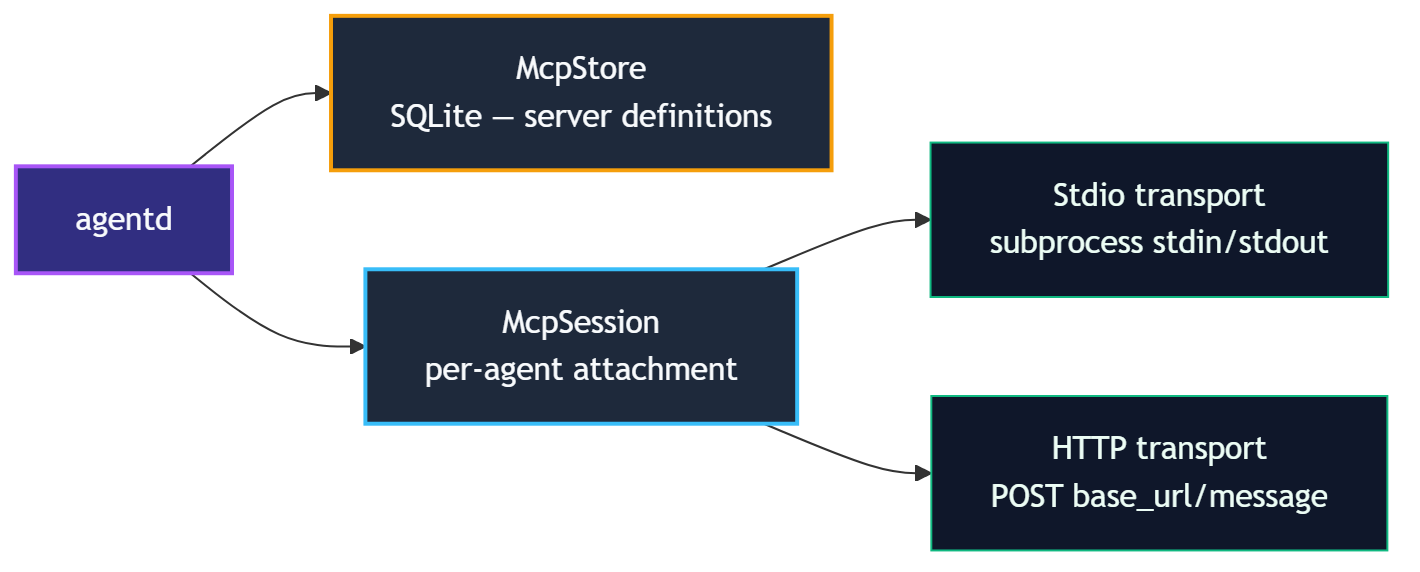
When an MCP server is attached to an agent, agentd:
- Spawns (Stdio) or connects to (HTTP) the server.
- Performs the JSON-RPC 2.0
initialize→notifications/initialized→tools/listhandshake. - Registers each discovered tool in the agent's
ToolRegistryunder the namespacemcp.<server-name>.<tool-name>. - The agent can immediately invoke those tools via
tool.invoke:mcp.<server-name>.*.
When the server is detached, all namespaced tools are removed and the connection is closed cleanly (shutdown + exit for Stdio; connection close for HTTP).
Transports
| Transport | Description |
|---|---|
stdio | agentd spawns a subprocess and communicates over its stdin/stdout |
http | agentd POSTs JSON-RPC messages to <base_url>/message |
Tool naming
Every MCP tool is namespaced to avoid collisions:
mcp.<server-name>.<original-tool-name>
Example: a server named github exposing list_prs becomes mcp.github.list_prs.
An agent must declare tool.invoke:mcp.github.* (or a more specific capability) to call those tools.
Credential handling
MCP server definitions may include environment variable templates that reference secrets via the {{secret:<name>}} handle syntax. The daemon resolves these handles at attach time; the plaintext value is passed to the subprocess environment but is never stored in the database or returned over IPC.
Lifecycle
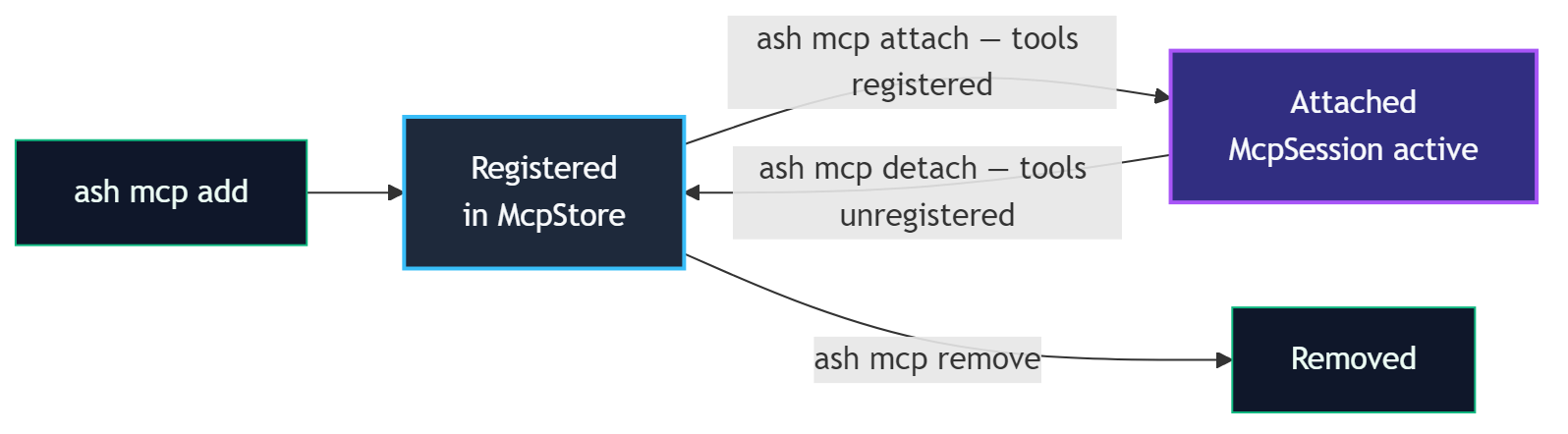
A server definition can be attached to multiple agents simultaneously; each attachment gets its own McpSession.
Manifest auto-attach
MCP servers listed in a manifest's mcp_servers field are automatically attached when the agent spawns. See Manifest Auto-Attach.
Next steps
- Registering MCP Servers:
ash mcp add/ash mcp list/ash mcp remove - Manifest Auto-Attach: declare servers in the manifest
- Dynamic Attach/Detach:
ash mcp attach/ash mcp detach
Registering MCP Servers
MCP server definitions are stored persistently in agentd's SQLite-backed McpStore. A registered definition is a blueprint; no connection is made until the server is attached to an agent.
Add a server
Stdio transport
Use stdio when the MCP server runs as a local subprocess. agentd spawns the process and communicates over its stdin/stdout.
ash mcp add my-server stdio \
--command /usr/local/bin/my-mcp-server \
--args "--port,8080,--verbose" \
--description "My local MCP tool server"
| Flag | Required | Description |
|---|---|---|
name | Yes (positional) | Unique server name used in tool namespacing and attach commands |
transport | Yes (positional) | stdio or http |
--command | Yes (stdio) | Absolute path to the executable |
--args | No | Comma-separated arguments passed to the command |
--description | No | Human-readable description shown in ash mcp list |
HTTP transport
Use http when the MCP server is already running (local or remote) and accepts HTTP POST requests.
ash mcp add remote-server http \
--url https://mcp.example.com/api \
--description "Remote analytics MCP server"
| Flag | Required | Description |
|---|---|---|
--url | Yes (http) | Base URL; agentd POSTs to <url>/message |
List registered servers
ash mcp list
Output includes: name, transport type, command/URL, description, and registered environment variable keys. Secret values are never displayed.
NAME TRANSPORT COMMAND/URL DESCRIPTION
my-server stdio /usr/local/bin/my-mcp-server My local MCP tool server
remote-server http https://mcp.example.com/api Remote analytics MCP server
Remove a server
ash mcp remove my-server
Removing a definition does not affect agents that currently have the server attached. Use ash mcp detach first if you want to disconnect running agents.
Environment variables and secrets
If the MCP subprocess needs credentials, inject them via environment variable templates:
# Register the secret first
ash secrets add github-token
# Then declare the env template in the manifest (see Manifest Auto-Attach)
# or pass it through a custom manifest's mcp_servers field
In the manifest mcp_servers field:
mcp_servers:
- name: github
transport: Stdio
command: /usr/local/bin/github-mcp
env_template:
- ["GITHUB_TOKEN", "{{secret:github-token}}"]
The handle {{secret:github-token}} is resolved to the plaintext value at attach time and injected into the subprocess environment. It is never stored in the database.
What happens at registration
When you run ash mcp add, agentd:
- Validates the definition (transport-specific required fields).
- Stores the definition in the
mcp_serversSQLite table with serializedargsandenv_template. - Returns a success confirmation.
No subprocess is spawned and no network connection is made until ash mcp attach (or manifest auto-attach at spawn time).
Manifest Auto-Attach
The simplest way to give an agent access to MCP tools is to declare the servers in its manifest. agentd attaches them automatically at spawn time, with no separate ash mcp attach command needed.
Declaring servers in a manifest
Add a mcp_servers list to spec:
apiVersion: scarab/v1
kind: AgentManifest
metadata:
name: research-agent
version: 1.0.0
spec:
trust_level: trusted
capabilities:
- tool.invoke:lm.complete
- tool.invoke:mcp.github.*
- tool.invoke:mcp.search.*
mcp_servers:
- name: github
transport: Stdio
command: /usr/local/bin/github-mcp
args: ["--read-only"]
env_template:
- ["GITHUB_TOKEN", "{{secret:github-token}}"]
description: "GitHub read-only MCP tools"
- name: search
transport: Http
url: https://search-mcp.internal/api
description: "Internal search server"
mcp_servers fields
| Field | Type | Description |
|---|---|---|
name | string | Unique server name; tools are namespaced as mcp.<name>.<tool> |
transport | Stdio | Http | Connection mechanism |
command | string (Stdio) | Path to executable |
args | string[] (Stdio) | Arguments passed to the executable |
url | string (Http) | Base URL for the HTTP endpoint |
env_template | [[key, value]] | Environment variables; values may use {{secret:<name>}} |
description | string | Optional human-readable description |
Capabilities and MCP tools
An agent must declare tool.invoke:mcp.<server-name>.* (or a specific tool pattern) in its capabilities to call the attached tools.
capabilities:
- tool.invoke:mcp.github.list_prs # specific tool
- tool.invoke:mcp.search.* # all tools from a server
- tool.invoke:mcp.* # all MCP tools (broad)
Without the matching tool.invoke capability, the agent can see the tools in ToolList but invocation is denied.
Spawn sequence with auto-attach
When agentd spawns an agent from a manifest containing mcp_servers:
- Agent process is created and enters the
Initstate. - For each entry in
mcp_servers, agentd runs the attach sequence:- Stdio: spawns subprocess, completes JSON-RPC handshake, calls
tools/list. - HTTP: connects, completes handshake, calls
tools/list.
- Stdio: spawns subprocess, completes JSON-RPC handshake, calls
- Discovered tools are registered as
mcp.<name>.<tool>in the agent'sToolRegistry. - Agent transitions to
Plan.
If an MCP server fails to attach at spawn time, the error is recorded in the audit log and the agent continues without those tools.
Pre-approval policy for secrets in env_template
If env_template references secrets, a matching pre-approval policy must exist:
spec:
secret_policy:
- label: "GitHub token for MCP"
secret_pattern: "github-token"
tool_pattern: "*" # resolved at attach, not per tool-invoke
Or register the policy at runtime before spawning:
ash secrets policy add \
--label "GitHub MCP" \
--secret "github-token" \
--tool "*"
Using auto-attached tools in agent code
Auto-attached tools are available as soon as the agent starts. Use the standard invoke_tool API:
#![allow(unused)] fn main() { let result = agent.invoke_tool( "mcp.github.list_prs", serde_json::json!({ "repo": "anomalyco/opencode", "state": "open" }), ).await?; }
Dynamic Attach and Detach
MCP servers can be attached to and detached from a running agent without restarting it. This is useful for temporarily granting access to additional tools or for debugging.
Attach a server to a running agent
ash mcp attach <agent-id> <mcp-name>
The server must already be registered via ash mcp add.
# Register the server definition (if not already done)
ash mcp add github stdio \
--command /usr/local/bin/github-mcp \
--description "GitHub tools"
# Attach to a running agent
ash mcp attach 550e8400-e29b-41d4-a716-446655440000 github
On success, agentd prints the list of tools that were added:
Attached mcp server 'github' to agent 550e8400...
Tools added:
mcp.github.list_prs
mcp.github.create_issue
mcp.github.get_repo
Operator override
The attach command checks that the target agent has the tool.invoke:mcp.<name>.* capability. An operator token bypasses this check:
ash mcp attach <agent-id> <mcp-name> --operator <token>
Use operator override with care; it grants tool access beyond the agent's declared capabilities.
Detach a server from a running agent
ash mcp detach <agent-id> <mcp-name>
agentd:
- Sends
shutdown+exitnotifications to the server (Stdio) or closes the HTTP session. - Unregisters all
mcp.<name>.*tools from the agent'sToolRegistry. - Returns the list of removed tools.
Detached mcp server 'github' from agent 550e8400...
Tools removed:
mcp.github.list_prs
mcp.github.create_issue
mcp.github.get_repo
Any in-flight tool invocations at the moment of detach will receive a NotAttached error.
Capability requirements
| Operation | Who needs the capability |
|---|---|
McpAttach | The agent itself must have tool.invoke:mcp.<name>.*, OR the caller provides an operator token |
McpDetach | No agent capability required; operator-initiated |
Multiple attachments
The same MCP server definition can be attached to multiple agents simultaneously. Each attachment creates an independent McpSession with its own subprocess or HTTP connection.
ash mcp attach agent-1 github
ash mcp attach agent-2 github # separate session, separate subprocess
Workflow example
# 1. Register definition once
ash mcp add analytics http \
--url https://analytics.internal/mcp \
--description "Analytics query server"
# 2. Check running agents
ash list
# 3. Attach to a specific agent for a debugging session
ash mcp attach <agent-id> analytics
# 4. Agent now calls mcp.analytics.* tools...
# 5. Detach when done
ash mcp detach <agent-id> analytics
Audit log
All attach and detach operations are recorded in the audit log:
ash audit --agent <agent-id>
Entries include: timestamp, operation (McpAttach/McpDetach), server name, and tools added/removed.
Installing Agents
The Agent Store is agentd's persistent registry of named agent definitions. Installing an agent registers its manifest and install directory so it can be spawned by name, without having to provide a manifest file path each time.
Install an agent
ash agent install path/to/manifest.yaml
agentd reads the manifest file, validates it, and stores the definition in the agent_definitions SQLite table.
With a custom install directory
By default, agentd uses /var/lib/scarab-runtime/agents/<name> as the install directory. Override it with --dir:
ash agent install path/to/manifest.yaml \
--dir /opt/my-agents/report-agent
The install directory is where the agent binary and any supporting files live. agentd records this path and uses it when spawning the agent.
What gets stored
| Field | Source |
|---|---|
name | metadata.name from the manifest |
version | metadata.version from the manifest |
runtime | Defaults to rust; set per-manifest if needed |
manifest_yaml | Full raw YAML of the manifest |
install_dir | Provided via --dir or default path |
List installed agents
ash agent list
# alias:
ash agent ls
Output:
NAME VERSION RUNTIME INSTALL DIR INSTALLED AT
report-agent 1.0.0 rust /var/lib/scarab-runtime/agents/report 2026-01-15T10:00:00Z
hello-agent 2.1.0 rust /opt/my-agents/hello 2026-01-10T08:30:00Z
Remove an installed agent
ash agent remove report-agent
Removing a definition from the store does not affect agents that are currently running. Use ash kill <agent-id> to stop running instances first.
Capability sheet
Print a Markdown-formatted capability summary for a manifest file. Does not require agentd to be running:
ash agent capability-sheet path/to/manifest.yaml
This renders a human-readable table of the agent's declared capabilities, trust level, resource limits, and network policy, which is useful for security review before installation.
Install directory layout
A typical install directory contains:
/var/lib/scarab-runtime/agents/my-agent/
├── manifest.yaml ← copy of the manifest
├── my-agent ← compiled agent binary
└── config/ ← optional agent-specific config files
The manifest's command field should reference the binary relative to the install directory, or as an absolute path.
System vs. user installs
| Location | Used for |
|---|---|
/etc/scarab-runtime/agents/ | System-wide manifests (managed by package manager or admin) |
~/.config/scarab-runtime/agents/ | User-local manifests |
Custom --dir | Project-specific installs |
The ash agent install command registers the definition in agentd's runtime store regardless of where the files live on disk.
Running Agents by Name
Once an agent is installed in the Agent Store, it can be spawned by name rather than by providing a manifest file path. This is the standard way to run production agents.
Spawn an installed agent
ash agent run <name>
Example:
ash agent run report-agent
agentd:
- Looks up
report-agentin the Agent Store. - Deserializes its stored manifest YAML.
- Spawns the agent process from the
install_dir, injectingSCARAB_AGENT_ID,SCARAB_SOCKET,SCARAB_TASK, andSCARAB_MODEL. - Returns the newly assigned agent ID.
Spawned agent 'report-agent' → 550e8400-e29b-41d4-a716-446655440000
Override the task at run time
Use --task to override the spec.task declared in the manifest for this particular run:
ash agent run report-agent \
--task "Generate the Q4 2026 financial summary report"
The SCARAB_TASK environment variable is set to the override value. The manifest's stored spec.task is unchanged.
Difference from ash spawn
| Command | Manifest source |
|---|---|
ash spawn path/to/manifest.yaml | Reads YAML from disk each time |
ash agent run <name> | Uses manifest stored in the Agent Store |
Use ash spawn for development and one-off runs. Use ash agent run for production workflows where the manifest has been reviewed and installed.
Agent-to-agent spawning by name
An agent can spawn another installed agent programmatically using the SpawnChildAgentByName IPC request. This requires the agent.spawn capability:
spec:
capabilities:
- agent.spawn
In Rust code:
#![allow(unused)] fn main() { use libagent::ipc::Request; let req = Request::SpawnChildAgentByName { calling_agent_id: agent.id(), name: "worker-agent".to_string(), task_override: Some("Process batch #42".to_string()), cap_override: None, // use worker-agent's full declared caps }; let response = agent.send_request(req).await?; }
cap_override, if provided, must be a subset of the calling agent's own capabilities; an agent cannot grant more than it has.
Monitoring spawned agents
After spawning, use the returned agent ID to monitor progress:
# Check lifecycle state
ash info <agent-id>
# Stream observation log
ash obs query <agent-id> --limit 100
# View full execution timeline
ash replay timeline <agent-id>
Stopping a named agent
ash kill <agent-id>
This sends a Terminate lifecycle transition regardless of how the agent was spawned.
Runtimes
Every agent definition in the Agent Store has a runtime field that records the execution environment used to run the agent binary. This metadata helps agentd and operators understand how to spawn and manage agents.
Runtime field
The runtime field is stored alongside the agent definition when it is installed:
ash agent install manifest.yaml # defaults to "rust"
The field defaults to rust for all manifests installed via ash agent install.
Current runtime values
| Value | Description |
|---|---|
rust | Native compiled Rust binary (default) |
Additional runtimes (Python, WASM, container) are planned for future phases.
Rust runtime (default)
Rust agents are compiled to a native binary and spawned directly by agentd as a child process. The binary:
- Is located at
spec.commandin the manifest, resolved relative toinstall_dir. - Receives
SCARAB_AGENT_ID,SCARAB_SOCKET,SCARAB_TASK, andSCARAB_MODELvia environment variables. - Communicates with agentd over a Unix domain socket using the libagent SDK.
Build and install workflow
# 1. Build the agent binary
cargo build --release -p my-agent
# 2. Create the install directory
mkdir -p /var/lib/scarab-runtime/agents/my-agent
# 3. Copy the binary
cp target/release/my-agent /var/lib/scarab-runtime/agents/my-agent/
# 4. Install the manifest
ash agent install etc/agents/my-agent.yaml \
--dir /var/lib/scarab-runtime/agents/my-agent
The manifest's command field should point to the binary:
spec:
command: my-agent # relative to install_dir, or absolute path
command and args in manifests
The command and args manifest fields control what agentd spawns:
spec:
command: target/debug/example-agent
args:
- "--config"
- "/etc/my-agent/config.toml"
If command is a relative path, it is resolved relative to install_dir. If omitted, agentd derives a default binary path from install_dir/<name>.
Listing installed agents with runtimes
ash agent list
The RUNTIME column in the output shows the recorded runtime for each installed agent. This is informational metadata; agentd uses spec.command from the stored manifest to determine what to actually execute.
Future runtimes (planned)
| Runtime | Description |
|---|---|
python | Python agents using a libagent Python SDK |
wasm | WebAssembly agents running in a WASI sandbox |
container | OCI container images as agent processes |
When additional runtimes are available, ash agent install will detect or accept a --runtime flag to record the appropriate value.
API Gateway
The API Gateway is an HTTP server embedded in agentd that exposes the full agent management API over REST. It allows external services, CI pipelines, dashboards, and remote operators to interact with a running agentd instance without a direct Unix socket connection.
The gateway shares the same DaemonState as the IPC server; there is no second socket hop. Every request translates directly into an IPC command and receives the same capability enforcement and audit logging.
Starting the API Gateway
The gateway starts automatically when agentd launches. By default it binds to 127.0.0.1:8080.
# Start agentd (gateway included)
cargo run --bin agentd
# Bind to a different address
AGENTD_API_ADDR=0.0.0.0:9090 cargo run --bin agentd
Verify the gateway is up:
curl http://127.0.0.1:8080/health
# {"status":"ok","version":"...","uptime_secs":42}
Authentication
All endpoints except GET /health require a Bearer token in the Authorization header:
Authorization: Bearer <token>
Tokens are 64-character hex strings (32 random bytes). Only the SHA-256 hash is stored in SQLite; the plaintext is shown once at creation time and is never retrievable again.
Each token is bound to an agent ID at creation time. All HTTP requests made with that token are attributed to the bound agent for capability checks and audit log entries.
Creating a Token
ash api-key create --name "ci-pipeline" --agent-id 550e8400-e29b-41d4-a716-446655440000
Created API key 'ci-pipeline'
Agent: 550e8400-e29b-41d4-a716-446655440000
Token: a3f8c2e1d4b7... (64 hex chars)
Save this token. It will not be shown again.
See ash api-key for the full CLI reference.
HTTP Endpoints
Health
GET /health
Returns daemon version and uptime. No authentication required.
curl http://127.0.0.1:8080/health
{"status":"ok","version":"0.1.0","uptime_secs":120}
Agents
GET /agents
List all running agents.
curl -H "Authorization: Bearer <token>" http://127.0.0.1:8080/agents
[
{
"id": "550e8400-e29b-41d4-a716-446655440000",
"name": "report-agent",
"state": "Plan",
"trust_level": "sandboxed"
}
]
POST /agents
Spawn a new agent. Accepts two body formats:
Spawn from inline manifest YAML:
curl -X POST \
-H "Authorization: Bearer <token>" \
-H "Content-Type: application/json" \
-d '{"manifest_yaml": "apiVersion: scarab/v1\nkind: AgentManifest\n..."}' \
http://127.0.0.1:8080/agents
Spawn by installed name (from agent store):
curl -X POST \
-H "Authorization: Bearer <token>" \
-H "Content-Type: application/json" \
-d '{"name": "report-agent", "task_override": "Summarize Q1 results"}' \
http://127.0.0.1:8080/agents
Returns HTTP 201 with the spawned agent's ID:
{"id": "550e8400-e29b-41d4-a716-446655440000"}
GET /agents/:id
Get details for a single agent. Returns HTTP 404 if the agent does not exist.
curl -H "Authorization: Bearer <token>" \
http://127.0.0.1:8080/agents/550e8400-e29b-41d4-a716-446655440000
DELETE /agents/:id
Terminate a running agent.
curl -X DELETE \
-H "Authorization: Bearer <token>" \
http://127.0.0.1:8080/agents/550e8400-e29b-41d4-a716-446655440000
Tools
GET /agents/:id/tools
List tools available to an agent.
curl -H "Authorization: Bearer <token>" \
http://127.0.0.1:8080/agents/550e8400-e29b-41d4-a716-446655440000/tools
POST /agents/:id/tools/:name
Invoke a tool on behalf of an agent. The request body is optional JSON input for the tool.
curl -X POST \
-H "Authorization: Bearer <token>" \
-H "Content-Type: application/json" \
-d '{"message": "hello"}' \
http://127.0.0.1:8080/agents/550e8400-e29b-41d4-a716-446655440000/tools/echo
Audit
GET /agents/:id/audit
Query the audit trail for an agent. Supports filtering by entry count and time range.
curl -H "Authorization: Bearer <token>" \
"http://127.0.0.1:8080/agents/550e8400-e29b-41d4-a716-446655440000/audit?limit=50&since=2026-01-01T00:00:00Z&until=2026-12-31T23:59:59Z"
| Query Parameter | Type | Description |
|---|---|---|
limit | integer | Maximum number of entries to return |
since | RFC3339 | Return entries at or after this timestamp |
until | RFC3339 | Return entries at or before this timestamp |
Memory
GET /agents/:id/memory/:key
Read a memory key for an agent.
curl -H "Authorization: Bearer <token>" \
http://127.0.0.1:8080/agents/550e8400-e29b-41d4-a716-446655440000/memory/last-run-result
Observations
GET /agents/:id/observations
Query the observation log for an agent.
curl -H "Authorization: Bearer <token>" \
http://127.0.0.1:8080/agents/550e8400-e29b-41d4-a716-446655440000/observations
Live Event Stream
GET /events
Server-Sent Events (SSE) stream of live audit entries across all agents. Useful for real-time dashboards and alerting.
curl -H "Authorization: Bearer <token>" \
-H "Accept: text/event-stream" \
http://127.0.0.1:8080/events
Each event is a JSON-serialized AuditEntry:
data: {"id":"...","agent_id":"...","action":"ToolInvoke","timestamp":"...","prev_hash":"...","hash":"..."}
data: {"id":"...","agent_id":"...","action":"LifecycleTransition","timestamp":"...","prev_hash":"...","hash":"..."}
The stream sends keep-alive pings when idle. Clients should handle reconnections.
| Query Parameter | Description |
|---|---|
_cursor | Cursor for resuming a stream (reserved, currently unused) |
CORS
Cross-origin requests are controlled by the AGENTD_API_CORS_ORIGINS environment variable:
| Value | Behavior |
|---|---|
| Not set / empty | Allow all origins (*) |
* | Allow all origins |
https://dashboard.example.com,https://ci.example.com | Allow listed origins only |
Allowed methods and headers are always unrestricted.
# Allow only a specific dashboard origin
AGENTD_API_CORS_ORIGINS=https://dashboard.example.com cargo run --bin agentd
Environment Variables
| Variable | Default | Description |
|---|---|---|
AGENTD_API_ADDR | 127.0.0.1:8080 | HTTP bind address for the API gateway |
AGENTD_API_CORS_ORIGINS | (allow all) | Comma-separated list of allowed CORS origins |
AGENTD_API_TOKEN_DB | /tmp/agentd_api_tokens.db | SQLite path for the API token store |
See Environment Variables for the full reference.
Endpoint Summary
| Method | Path | Auth | Description |
|---|---|---|---|
GET | /health | None | Daemon version and uptime |
GET | /agents | Bearer | List all agents |
POST | /agents | Bearer | Spawn an agent (inline manifest or by name) |
GET | /agents/:id | Bearer | Get agent details |
DELETE | /agents/:id | Bearer | Terminate an agent |
GET | /agents/:id/tools | Bearer | List available tools |
POST | /agents/:id/tools/:name | Bearer | Invoke a tool |
GET | /agents/:id/audit | Bearer | Query audit trail |
GET | /agents/:id/memory/:key | Bearer | Read a memory key |
GET | /agents/:id/observations | Bearer | Query observation log |
GET | /events | Bearer | SSE stream of live audit entries |
CLI Reference: Agents
Commands for spawning, listing, inspecting, and terminating agents.
ash spawn
Spawn a new agent from a manifest file.
ash spawn <manifest>
| Argument | Description |
|---|---|
manifest | Path to the agent manifest YAML file |
Example:
ash spawn etc/agents/report-agent.yaml
ash validate
Validate an agent manifest file locally. Does not require agentd to be running.
ash validate <manifest>
Checks the manifest for structural validity (required fields, enum values, capability format). Exits 0 on success, non-zero with error messages on failure.
ash list / ash ls
List all running agents.
ash list
ash ls # alias
Output columns: AGENT ID, NAME, VERSION, STATE, TRUST.
ash info
Get detailed information about a specific agent.
ash info <agent-id>
Output includes: agent ID, name, version, trust level, lifecycle state, capabilities, parent agent (if any), and spawn time.
ash kill
Terminate a running agent.
ash kill <agent-id>
Sends a Terminate transition to the agent. The agent completes any in-progress action before shutting down.
ash transition
Manually override an agent's lifecycle state. Intended for admin/debug use.
ash transition <agent-id> <state>
Valid states: plan, act, observe, terminate.
ash discover
Discover agents by capability pattern.
ash discover <agent-id> [pattern]
| Argument | Description |
|---|---|
agent-id | Agent ID performing the discovery (must have agent.discover capability) |
pattern | Optional glob pattern to filter by capability, e.g. bus.* |
ash ping
Check if agentd is running and responsive.
ash ping
Exits 0 if agentd responds, non-zero otherwise.
ash status
Show daemon status including version, uptime, and running agent count.
ash status
Global flags
All ash commands accept:
| Flag | Default | Description |
|---|---|---|
--socket | /run/agentd/agentd.sock | Path to agentd Unix socket |
--version | - | Print ash version |
CLI Reference: Audit
Commands for querying the tamper-evident audit log.
ash audit
Query the audit log, with optional filtering.
ash audit [--agent <agent-id>] [--limit <n>]
| Flag | Default | Description |
|---|---|---|
--agent, -a | (all agents) | Filter entries by agent ID |
--limit, -l | 20 | Maximum number of entries to show |
Example: show last 50 entries for a specific agent:
ash audit --agent 550e8400-e29b-41d4-a716-446655440000 --limit 50
Example: show the 20 most recent entries across all agents:
ash audit
Output format
Each audit entry includes:
| Field | Description |
|---|---|
timestamp | RFC3339 UTC timestamp |
agent_id | UUID of the agent that generated the entry |
event | Event type (e.g. ToolInvoke, StateTransition, CapabilityGrant, SecretUse) |
detail | Event-specific detail (tool name, old/new state, etc.) |
Secret values are never included in audit entries; they appear as [REDACTED:<name>].
Event types
| Event | Description |
|---|---|
Spawn | Agent was spawned |
StateTransition | Lifecycle state changed |
ToolInvoke | Tool was invoked (includes tool name, success/failure) |
CapabilityGrant | A capability grant was issued or revoked |
SecretUse | A secret handle was resolved (name only, never value) |
HumanApproval | An HITL request was approved or denied |
McpAttach | MCP server was attached |
McpDetach | MCP server was detached |
AnomalyDetected | Anomaly detector fired |
Terminate | Agent was terminated |
Audit log guarantees
- Entries are append-only and stored in an in-memory ring buffer (configurable size).
- Secret values are scrubbed before entries are written.
- All auto-approved secret uses include the matching policy ID for traceability.
CLI Reference: Tools
Commands for listing, inspecting, invoking, and managing tool registration proposals.
ash tools list
List available tools, optionally filtered by what an agent can access.
ash tools list [--agent <agent-id>]
| Flag | Description |
|---|---|
--agent, -a | Agent ID; returns only tools accessible to that agent given its capabilities |
Without --agent, returns all registered tools (built-in + dynamically registered + any MCP-attached tools).
Example:
ash tools list --agent 550e8400-e29b-41d4-a716-446655440000
ash tools schema
Show the JSON input and output schemas for a tool.
ash tools schema <tool-name> [--agent <agent-id>]
| Argument/Flag | Description |
|---|---|
tool-name | Name of the tool (e.g. lm.complete, fs.read) |
--agent, -a | Agent ID for capability checks (optional for built-ins) |
Example:
ash tools schema lm.complete
ash tools schema mcp.github.list_prs --agent <agent-id>
ash tools invoke
Invoke a tool directly on behalf of an agent.
ash tools invoke <agent-id> <tool-name> <input-json>
| Argument | Description |
|---|---|
agent-id | UUID of the agent invoking the tool |
tool-name | Name of the tool |
input-json | JSON string matching the tool's input schema |
Example:
ash tools invoke <agent-id> echo '{"message": "hello"}'
ash tools invoke <agent-id> fs.read '{"path": "/home/agent/notes.txt"}'
The agent must have the matching tool.invoke:<tool-name> capability.
ash tools proposed
List pending dynamic tool registration proposals.
ash tools proposed
Dynamic tools can be proposed by agents at runtime. Each proposal must be approved by an operator before the tool is available.
ash tools approve
Approve a pending tool registration proposal.
ash tools approve <proposal-id>
The proposal ID is shown by ash tools proposed.
ash tools deny
Deny (reject) a pending tool registration proposal.
ash tools deny <proposal-id>
The proposal is discarded and the requesting agent receives a denial.
CLI Reference: Blackboard (bb)
Commands for the shared key-value blackboard.
The blackboard is a daemon-global shared key-value store. Any agent with bb.read / bb.write capabilities can read and write it. Values are JSON and may have optional TTLs.
ash bb read
Read a value from the blackboard.
ash bb read <agent-id> <key>
Returns the current JSON value and its version number. Returns an error if the key does not exist.
Example:
ash bb read <agent-id> shared/config
ash bb write
Write a value to the blackboard.
ash bb write <agent-id> <key> <value-json> [--ttl <seconds>]
| Argument/Flag | Description |
|---|---|
agent-id | Agent ID performing the write (must have bb.write) |
key | Arbitrary string key (supports /-separated namespacing by convention) |
value-json | JSON value to store |
--ttl | Optional time-to-live in seconds; key expires automatically |
Examples:
ash bb write <agent-id> status/phase '"running"'
ash bb write <agent-id> config/batch-size 100 --ttl 3600
ash bb cas
Compare-and-swap: atomically update a key only if the current value matches the expected value.
ash bb cas <agent-id> <key> <expected-json> <new-value-json> [--ttl <seconds>]
Use "null" as expected-json to only succeed when the key does not exist.
Example:
# Set "locked" to true only if it is currently false
ash bb cas <agent-id> task/lock false true
Returns success if the swap was applied, or an error with the current value if the expected value did not match.
ash bb delete
Delete a key from the blackboard.
ash bb delete <agent-id> <key>
Requires bb.write capability. No-op if the key does not exist.
ash bb list
List blackboard keys matching an optional glob pattern.
ash bb list <agent-id> [--pattern <glob>]
| Flag | Description |
|---|---|
--pattern | Glob pattern to filter keys (e.g. status/*, config/**) |
Examples:
ash bb list <agent-id>
ash bb list <agent-id> --pattern "status/*"
CLI Reference: Message Bus (bus)
Commands for the publish-subscribe message bus.
The message bus enables asynchronous agent-to-agent communication via topics. Agents publish messages to topics; other agents subscribe to topic patterns and receive messages via their mailbox.
ash bus publish
Publish a message to a topic.
ash bus publish <agent-id> <topic> <payload-json>
| Argument | Description |
|---|---|
agent-id | Publishing agent ID (must have bus.publish) |
topic | Topic string (e.g. tasks/created, results/batch-42) |
payload-json | JSON payload |
Example:
ash bus publish <agent-id> tasks/new '{"task_id": "abc", "priority": 1}'
ash bus subscribe
Subscribe an agent to a topic pattern.
ash bus subscribe <agent-id> <topic-pattern>
| Argument | Description |
|---|---|
agent-id | Subscribing agent ID (must have bus.subscribe) |
topic-pattern | Glob pattern matching topics (e.g. tasks/*, results/**) |
Example:
ash bus subscribe <agent-id> "tasks/*"
Messages published to any topic matching the pattern are delivered to the agent's mailbox.
ash bus unsubscribe
Remove a subscription.
ash bus unsubscribe <agent-id> <topic-pattern>
The exact topic-pattern string must match a previously registered subscription.
ash bus poll
Drain pending messages from an agent's mailbox.
ash bus poll <agent-id>
Returns all queued messages that have not yet been consumed by the agent. Messages are returned in delivery order.
Output per message:
| Field | Description |
|---|---|
topic | The topic the message was published to |
payload | JSON payload |
published_at | RFC3339 timestamp |
from_agent_id | Publisher's agent ID |
Topic naming conventions
- Use
/-separated hierarchical names:domain/entity/event - Wildcards in subscriptions:
*matches one segment,**matches multiple - Examples:
tasks/created,metrics/cpu/**,alerts/*
CLI Reference: Workspace
Commands for managing overlay filesystem snapshots per agent.
Each agent has an overlay filesystem workspace. Snapshots capture the current state of the overlay so it can be reviewed or rolled back. See Workspace Snapshots for background.
ash workspace snapshot
Force an immediate snapshot of an agent's current workspace state.
ash workspace snapshot <agent-id>
Captures the current overlay layer as a named snapshot. Returns the snapshot index.
ash workspace history
List all available snapshots for an agent.
ash workspace history <agent-id>
Output per snapshot:
| Field | Description |
|---|---|
index | Snapshot number (0 = oldest) |
created_at | RFC3339 timestamp |
description | Auto-generated or operator-provided label |
ash workspace diff
Show files changed in the current overlay versus the last snapshot.
ash workspace diff <agent-id>
Displays a list of added, modified, and deleted files relative to the most recent snapshot.
ash workspace rollback
Roll back an agent's workspace to a previous snapshot.
ash workspace rollback <agent-id> <index>
| Argument | Description |
|---|---|
agent-id | Target agent |
index | Snapshot index to restore (from ash workspace history) |
The current overlay state is discarded and replaced with the contents of the specified snapshot. The agent must be in a quiescent state (not mid-action) for rollback to proceed safely.
ash workspace commit
Promote the current overlay to a permanent snapshot and clear the upper layer.
ash workspace commit <agent-id>
This is a "checkpoint" operation: the current working state is saved as a new immutable snapshot and the mutable overlay layer is reset. Useful before a risky sequence of operations.
CLI Reference: Memory
Commands for persistent agent memory (key-value store with versioning).
Each agent has its own persistent memory namespace. Unlike the blackboard (which is daemon-global and shared), memory is private to an agent and survives across restarts. See Persistent Memory for background.
ash memory read
Read a key from an agent's persistent memory.
ash memory read <agent-id> <key>
Returns the current value, version number, and optional expiry. Returns an error if the key does not exist.
Example:
ash memory read <agent-id> state/current-phase
ash memory write
Write a key to persistent memory.
ash memory write <agent-id> <key> <value-json> [--ttl <seconds>]
| Argument/Flag | Description |
|---|---|
agent-id | Agent ID (must have memory.write) |
key | Arbitrary string key |
value-json | JSON value to store |
--ttl | Optional time-to-live in seconds |
Example:
ash memory write <agent-id> progress/items-processed 42
ash memory write <agent-id> cache/result '"done"' --ttl 86400
ash memory cas
Compare-and-swap: update a key atomically only if it is at the expected version.
ash memory cas <agent-id> <key> <expected-version> <value-json> [--ttl <seconds>]
| Argument | Description |
|---|---|
expected-version | Integer version number; the write is applied only if the current version matches |
value-json | New JSON value |
Use version 0 to create a key only if it does not exist.
Example:
# Increment safely: read version first, then CAS
ash memory read <agent-id> counter # → value: 5, version: 3
ash memory cas <agent-id> counter 3 6 # → succeeds if still at version 3
ash memory delete
Delete a key from persistent memory.
ash memory delete <agent-id> <key>
ash memory list
List keys in an agent's persistent memory matching an optional glob pattern.
ash memory list <agent-id> [--pattern <glob>]
Examples:
ash memory list <agent-id>
ash memory list <agent-id> --pattern "progress/*"
CLI Reference: Observation Logs (obs)
Commands for querying an agent's structured observation log.
Each agent accumulates an observation log: a timestamped stream of structured entries recording the agent's reasoning, actions, and results. See Observation Logs for background.
ash obs query
Query an agent's observation log with flexible filtering.
ash obs query <agent-id> \
[--target <target-agent-id>] \
[--since <rfc3339>] \
[--until <rfc3339>] \
[--keyword <text>] \
[--limit <n>]
| Flag | Default | Description |
|---|---|---|
agent-id (positional) | - | Agent performing the query (must have obs.query capability) |
--target | same as agent-id | Target agent whose log to query; allows a supervisor to read a child's log |
--since | (no lower bound) | Only show entries at or after this RFC3339 timestamp |
--until | (no upper bound) | Only show entries at or before this RFC3339 timestamp |
--keyword | (no filter) | Substring filter applied to entry content |
--limit | 50 | Maximum number of entries to return |
Examples:
# Last 50 entries for an agent
ash obs query <agent-id>
# Query a child agent's log from a supervisor
ash obs query <supervisor-id> --target <child-id>
# Entries in the last hour containing "error"
ash obs query <agent-id> \
--since "$(date -u -d '1 hour ago' +%Y-%m-%dT%H:%M:%SZ)" \
--keyword error
# Time-bounded slice
ash obs query <agent-id> \
--since 2026-01-15T10:00:00Z \
--until 2026-01-15T11:00:00Z \
--limit 200
Output format
Each observation entry includes:
| Field | Description |
|---|---|
timestamp | RFC3339 UTC timestamp |
kind | Entry type (e.g. Plan, ToolResult, Reasoning, Error) |
content | Structured JSON or text content of the observation |
Secret values are scrubbed from all observation entries before storage.
Capabilities required
| Operation | Required capability |
|---|---|
| Query own log | obs.query |
| Query another agent's log | obs.query + must be a declared supervisor of the target |
CLI Reference: Replay Debugger
Commands for replaying and rolling back an agent's execution timeline.
The replay debugger merges an agent's audit log, observation log, and workspace snapshot history into a unified chronological timeline. See Replay Debugger for background.
ash replay timeline
Show the full merged execution timeline for an agent.
ash replay timeline <agent-id> \
[--since <rfc3339>] \
[--until <rfc3339>]
| Argument/Flag | Description |
|---|---|
agent-id | Target agent |
--since | Only show events at or after this RFC3339 timestamp |
--until | Only show events at or before this RFC3339 timestamp |
Example:
ash replay timeline <agent-id>
ash replay timeline <agent-id> \
--since 2026-01-15T10:00:00Z \
--until 2026-01-15T11:00:00Z
Timeline entry fields:
| Field | Description |
|---|---|
timestamp | RFC3339 UTC |
source | audit, observation, or snapshot |
event | Event type |
detail | Event-specific detail |
The timeline interleaves all three sources in strict chronological order, giving a complete picture of what the agent did, what it observed, and what its workspace looked like at each point.
ash replay rollback
Roll back an agent's workspace to a previous snapshot (replay-debugger shorthand).
ash replay rollback <agent-id> <index>
This is equivalent to ash workspace rollback but accessed through the replay interface. Use ash replay timeline to identify the snapshot index you want to restore.
Example workflow:
# 1. Review the timeline to find where things went wrong
ash replay timeline <agent-id>
# 2. Identify the snapshot index just before the bad action
# (snapshot entries appear inline in the timeline)
# 3. Roll back to that snapshot
ash replay rollback <agent-id> 3
Use cases
- Root cause analysis: trace exactly what sequence of tool calls led to an undesired outcome.
- Time-travel debugging: restore workspace state to any point and re-run with different inputs.
- Compliance review: produce a complete audit-quality record of an agent's actions for a given time window.
CLI Reference: Scheduler
Commands for managing agent scheduling: deadlines, priorities, and cost budgets.
The scheduler tracks resource usage (token cost, wall time) per agent and per tool, and uses declared deadlines and priorities to influence execution order. See Scheduler for background.
ash scheduler stats
Show global scheduler statistics: per-tool usage and a summary of all agents.
ash scheduler stats
Output includes:
- Tool stats: invocation counts, total token cost, average latency per tool.
- Agent summaries: agent ID, name, priority, deadline (if set), total cost so far, and current state.
ash scheduler info
Show detailed scheduling information for a specific agent.
ash scheduler info <agent-id>
Output includes: priority, deadline, cost budget, tokens consumed, CPU time, and current scheduler state.
ash scheduler set-deadline
Set a deadline for an agent.
ash scheduler set-deadline <agent-id> <deadline>
| Argument | Description |
|---|---|
agent-id | Target agent |
deadline | RFC3339 timestamp (e.g. 2026-12-31T00:00:00Z) |
The scheduler uses the deadline to prioritize agents approaching their time limit. An agent that misses its deadline is recorded in the audit log (it is not automatically terminated).
Example:
ash scheduler set-deadline <agent-id> 2026-06-01T12:00:00Z
ash scheduler clear-deadline
Remove a deadline from an agent.
ash scheduler clear-deadline <agent-id>
The agent returns to normal priority-based scheduling.
ash scheduler set-priority
Override an agent's scheduling priority.
ash scheduler set-priority <agent-id> <priority>
| Argument | Description |
|---|---|
priority | Integer from 1 (lowest) to 100 (highest) |
Higher-priority agents are preferred when the daemon is resource-constrained. The default priority is 50.
Example:
ash scheduler set-priority <agent-id> 90 # high-priority agent
ash scheduler set-priority <agent-id> 10 # low-priority background agent
CLI Reference: Capability Grants
Commands for listing and revoking runtime capability grants.
Capability grants allow a supervisor agent to extend specific capabilities to a child agent at runtime, beyond what the child's manifest declares. See Capability Grants for background.
ash grants list
List active capability grants for an agent.
ash grants list <agent-id>
Output per grant:
| Field | Description |
|---|---|
grant_id | UUID of the grant (used for revocation) |
capability | Capability string granted (e.g. fs.write:/home/agent/**) |
granted_by | Agent ID of the grantor |
granted_at | RFC3339 timestamp |
expires_at | Expiry timestamp, or never |
Example:
ash grants list 550e8400-e29b-41d4-a716-446655440000
ash grants revoke
Immediately revoke a capability grant.
ash grants revoke <agent-id> <grant-id>
| Argument | Description |
|---|---|
agent-id | Target agent whose grant is being revoked |
grant-id | Grant UUID from ash grants list |
Revocation is immediate. Any subsequent tool invocations by the agent that relied on the revoked capability will be denied.
Example:
ash grants revoke <agent-id> a1b2c3d4-e5f6-7890-abcd-ef1234567890
Grant lifecycle
Grants are created programmatically by supervisor agents using the GrantCapability IPC request, or via the agent SDK:
#![allow(unused)] fn main() { // In a supervisor agent agent.grant_capability(child_id, "fs.write:/tmp/outputs/**", None).await?; }
The None argument means no expiry (grant persists until explicitly revoked or the child terminates).
Grants are automatically revoked when the grantee agent terminates.
Audit trail
All grant operations (issue and revoke) are recorded in the audit log:
ash audit --agent <agent-id>
CLI Reference: Hierarchy
Commands for viewing the agent hierarchy tree and managing escalations.
Agents in Scarab-Runtime form a supervisor/child hierarchy: an agent that spawns another becomes its supervisor. Escalations are requests from a child agent to its supervisor for help or approval. See Hierarchy and Escalations for background.
ash hierarchy show
Render the current agent hierarchy as a tree.
ash hierarchy show
Example output:
root-agent (550e8400) [plan]
├── worker-1 (a1b2c3d4) [act]
│ └── sub-worker (b5c6d7e8) [observe]
└── worker-2 (f9e8d7c6) [plan]
Each node shows: name, agent ID (truncated), and current lifecycle state.
ash hierarchy escalations
List agents with pending escalations (unresolved requests to supervisors).
ash hierarchy escalations
Output per pending escalation:
| Field | Description |
|---|---|
escalation_id | UUID |
from_agent_id | Child agent requesting escalation |
to_agent_id | Supervisor agent (or operator if no supervisor) |
kind | Escalation type (e.g. CapabilityRequest, HumanApproval, Stuck) |
detail | Human-readable description of the escalation |
created_at | RFC3339 timestamp |
Responding to escalations
Escalations are typically resolved by the supervisor agent programmatically. For escalations that bubble up to the operator level (no supervisor, or supervisor is unresponsive), use:
# Approve a pending HITL request (which may be tied to an escalation)
ash approve <request-id>
# Or deny it
ash deny <request-id>
See HITL Approvals for the full human-in-the-loop workflow.
Hierarchy depth limits
To prevent runaway recursion, agentd enforces a maximum hierarchy depth (configurable in agentd.toml). Attempts to spawn beyond the limit are rejected with a HierarchyDepthExceeded error.
CLI Reference: Anomaly Detection
Commands for viewing anomaly detection events.
The anomaly detector monitors agent behavior for patterns that deviate from expected norms: unusually high tool invocation rates, repeated failures, excessive resource consumption, or suspicious capability usage. See Anomaly Detection for background.
ash anomaly list
List recent anomaly detection events.
ash anomaly list [--agent <agent-id>] [--limit <n>]
| Flag | Default | Description |
|---|---|---|
--agent | (all agents) | Filter events by agent ID |
--limit | 20 | Maximum number of events to show |
Examples:
# Last 20 anomaly events across all agents
ash anomaly list
# Filter to a specific agent, show more events
ash anomaly list --agent 550e8400-e29b-41d4-a716-446655440000 --limit 50
Output format
Each anomaly event includes:
| Field | Description |
|---|---|
event_id | UUID |
agent_id | Agent that triggered the event |
detected_at | RFC3339 UTC timestamp |
kind | Anomaly type (see below) |
severity | low, medium, high, critical |
detail | Human-readable description |
Anomaly kinds
| Kind | Description |
|---|---|
HighToolInvocationRate | Agent exceeded the per-minute tool call threshold |
RepeatedToolFailure | Same tool failed more than N times in a row |
CapabilityEscalationAttempt | Agent attempted to use a capability it does not hold |
ResourceExhaustion | Agent approached or hit its memory/CPU limits |
UnexpectedStateTransition | Agent lifecycle state changed in an unexpected way |
CostBudgetExceeded | Agent exceeded its declared cost budget |
Integration with audit log
All anomaly events are also written to the audit log. Use ash audit to see them alongside other events:
ash audit --agent <agent-id>
Automatic responses
Depending on the severity, agentd may automatically:
- Log the event (all severities)
- Pause the agent pending operator review (
high) - Terminate the agent (
critical)
Automatic response behavior is configured in agentd.toml.
CLI Reference: Secrets
Commands for managing the Sealed Credential Store.
Secrets are sensitive values (API keys, tokens, passwords) encrypted with AES-256-GCM and stored in a SQLite database. At runtime, decrypted values live exclusively in agentd's heap memory as Zeroizing<String>; they are never included in IPC responses, never written to observation logs, and never appear in audit entries (only [REDACTED:<name>] placeholders are recorded).
See Secrets Overview for background on the full architecture.
ash secrets unlock
Unlock the encrypted store. On first run (no KDF params exist yet), this initialises the store with the supplied passphrase. On subsequent runs, it derives the master key from the stored salt, decrypts all blobs, and loads them into the runtime store.
ash secrets unlock
The passphrase is read via an echo-disabled prompt.
First run:
Enter master passphrase: [hidden]
Secret store initialised and unlocked.
Subsequent starts:
Enter master passphrase: [hidden]
Secret store unlocked. 3 secret(s) loaded.
Until
unlocksucceeds, all{{secret:<name>}}handle substitutions returnStoreLocked.
ash secrets lock
Immediately zeroize all in-memory plaintext. Subsequent secret resolutions return StoreLocked until ash secrets unlock is called again.
ash secrets lock
The encrypted database is not modified. Use this before stepping away from a running daemon or handing off a session.
ash secrets rekey
Rotate the master key. All encrypted blobs are re-encrypted in a single atomic SQLite transaction. The old passphrase is verified before any changes are made.
ash secrets rekey
Prompts (all echo-disabled):
Enter current passphrase: [hidden]
Enter new passphrase: [hidden]
Confirm new passphrase: [hidden]
Master key rotated. All secrets re-encrypted.
The daemon remains fully operational throughout. After rekey completes, the in-memory store is refreshed under the new key.
ash secrets add
Register a new secret in agentd's sealed store.
ash secrets add <name> [--description <text>]
| Argument/Flag | Description |
|---|---|
name | Logical name used in {{secret:<name>}} handles |
--description | Optional human-readable description |
The secret value is read via an echo-disabled (hidden) prompt. If the store is currently unlocked, the value is also encrypted and persisted to SQLite immediately.
Example:
ash secrets add openai-api-key --description "OpenAI production API key"
# Prompts: Enter secret value: [hidden]
ash secrets list
List all registered secret names. Values are never shown.
ash secrets list
Output: name, description (if set), and registered-at timestamp.
NAME DESCRIPTION REGISTERED AT
openai-api-key OpenAI production API key 2026-01-15T10:00:00Z
db-password Production database password 2026-01-10T08:00:00Z
ash secrets remove
Remove a registered secret.
ash secrets remove <name>
The plaintext is zeroized from heap memory and the encrypted blob is deleted from the SQLite store. Any agent that subsequently tries to resolve {{secret:<name>}} will receive a SecretNotFound error.
ash secrets grant
Grant a specific agent delegation access to a named secret. The agent will be able to use the secret in tool calls even if it does not have a standing secret.use:<name> capability, subject to existing pre-approval policies.
ash secrets grant <name> --to-agent <agent-id> [--ttl <seconds>]
| Argument/Flag | Description |
|---|---|
name | Name of the secret to delegate |
--to-agent | UUID of the agent receiving the grant |
--ttl | Optional TTL in seconds. If omitted, the grant is valid until explicitly revoked or the daemon restarts. |
Example:
ash secrets grant openai-api-key --to-agent f47ac10b-58cc-4372-a567-0e02b2c3d479 --ttl 3600
# Grant ID: 9b1deb4d-...
# Secret 'openai-api-key' delegated to agent f47ac10b-... (expires in 3600s)
Grants are ephemeral: they live only in daemon memory and do not survive a restart. Re-grant after
ash secrets unlockif needed.
ash secrets revoke
Revoke a previously issued delegation grant.
ash secrets revoke <grant-id>
The grant is removed immediately. The target agent can no longer use the delegated secret.
Example:
ash secrets revoke 9b1deb4d-3b7d-4bad-9bdd-2b0d7b3dcb6d
# Grant 9b1deb4d-... revoked.
ash secrets policy add
Add a runtime pre-approval policy for automated secret resolution.
ash secrets policy add \
--label <text> \
[--secret <glob>] \
[--tool <glob>] \
[--host <glob>] \
[--expires <rfc3339>] \
[--max-uses <n>] \
[--trust-level <level>]
| Flag | Default | Description |
|---|---|---|
--label | - | Human-readable name for this policy (required) |
--secret | * | Glob matching secret names |
--tool | * | Glob matching tool names |
--host | (any) | Optional glob matching destination host |
--expires | (never) | RFC3339 expiry timestamp |
--max-uses | (unlimited) | Maximum auto-approvals before policy is exhausted |
--trust-level | (any) | Minimum trust level floor (untrusted/sandboxed/trusted/privileged) |
Policies are persisted to SQLite and survive daemon restarts.
Examples:
# Unlimited access for any agent using openai-key via web.fetch to api.openai.com
ash secrets policy add \
--label "OpenAI standard access" \
--secret "openai-api-key" \
--tool "web.fetch" \
--host "api.openai.com"
# Time-limited policy expiring at end of day
ash secrets policy add \
--label "Nightly batch" \
--secret "db-password" \
--tool "sandbox.exec" \
--expires "2026-01-16T06:00:00Z"
ash secrets policy list
List all registered pre-approval policies.
ash secrets policy list
Output: policy ID, label, secret pattern, tool pattern, host pattern, expiry, use count.
ash secrets policy show
Print full details for a single policy, including the current use count.
ash secrets policy show <policy-id>
Example:
ash secrets policy show a1b2c3d4-e5f6-7890-abcd-ef1234567890
# ID: a1b2c3d4-e5f6-7890-abcd-ef1234567890
# Label: OpenAI standard access
# Secret: openai-api-key
# Tool: web.fetch
# Host: api.openai.com
# Expires: never
# Max uses: unlimited
# Use count: 42
# Created by: operator
# Created at: 2026-01-15T10:00:00Z
ash secrets policy remove
Remove a pre-approval policy by UUID.
ash secrets policy remove <policy-id>
Immediately revokes the policy. Subsequent secret resolutions that would have matched this policy are denied.
CLI Reference: MCP
Commands for registering and managing MCP (Model Context Protocol) server definitions and attachments.
See MCP Overview for background on how MCP integration works.
ash mcp add
Register an MCP server definition in agentd.
ash mcp add <name> <transport> \
[--command <path>] \
[--args <csv>] \
[--url <url>] \
[--description <text>]
| Argument/Flag | Required | Description |
|---|---|---|
name | Yes | Unique server name; tools namespaced as mcp.<name>.<tool> |
transport | Yes | stdio or http |
--command | Stdio only | Absolute path to the executable |
--args | No | Comma-separated arguments passed to the command |
--url | HTTP only | Base URL; agentd POSTs to <url>/message |
--description | No | Human-readable description |
Examples:
# Stdio server
ash mcp add github stdio \
--command /usr/local/bin/github-mcp \
--args "--read-only,--timeout,30" \
--description "GitHub read-only tools"
# HTTP server
ash mcp add analytics http \
--url https://mcp.analytics.internal/api \
--description "Analytics query server"
ash mcp list / ash mcp ls
List all registered MCP server definitions.
ash mcp list
Output: name, transport, command/URL, description. Secret values in env_template are never shown; only key names are listed.
ash mcp remove
Remove a registered MCP server definition.
ash mcp remove <name>
Does not affect currently attached sessions. Detach from running agents first if desired.
ash mcp attach
Dynamically attach an MCP server to a running agent.
ash mcp attach <agent-id> <mcp-name> [--operator <token>]
| Argument/Flag | Description |
|---|---|
agent-id | UUID of the target agent |
mcp-name | Name of a registered MCP server |
--operator | Operator token; bypasses agent capability check |
On success, prints the list of tools added under mcp.<name>.*.
ash mcp detach
Detach an MCP server from a running agent.
ash mcp detach <agent-id> <mcp-name>
Closes the MCP session and unregisters all mcp.<name>.* tools from the agent's tool registry.
CLI Reference: Agent Store (agent)
Commands for managing the agent install store: installing, listing, running, and removing agent definitions.
See Installing Agents and Running by Name for background.
ash agent install
Install (register) an agent definition in agentd's Agent Store.
ash agent install <manifest> [--dir <path>]
| Argument/Flag | Description |
|---|---|
manifest | Path to the agent manifest YAML file |
--dir | Install directory; defaults to /var/lib/scarab-runtime/agents/<name> |
Example:
ash agent install etc/agents/report-agent.yaml \
--dir /opt/agents/report-agent
ash agent list / ash agent ls
List all installed agents in the Agent Store.
ash agent list
ash agent ls # alias
Output columns: NAME, VERSION, RUNTIME, INSTALL DIR, INSTALLED AT.
ash agent remove
Remove an installed agent definition.
ash agent remove <name>
Does not affect running instances. Use ash kill <agent-id> to stop running agents first.
ash agent run
Spawn an installed agent by name.
ash agent run <name> [--task <text>]
| Argument/Flag | Description |
|---|---|
name | Agent name as registered via ash agent install |
--task | Override spec.task for this run; sets SCARAB_TASK env var |
Examples:
ash agent run report-agent
ash agent run report-agent \
--task "Generate Q4 2026 financial summary"
Returns the spawned agent ID.
ash agent capability-sheet
Print a Markdown capability sheet for a manifest file.
ash agent capability-sheet <manifest>
Does not require agentd to be running. Renders a human-readable table of:
- Trust level
- Declared capabilities
- Resource limits
- Network policy
- Secret policy rules
Useful for security review before installing or spawning an agent.
Example:
ash agent capability-sheet etc/agents/report-agent.yaml
CLI Reference: API Keys
Commands for creating and managing API tokens that grant HTTP access to the agentd API Gateway.
See API Gateway for the full HTTP API reference.
ash api-key create
Create a new API token and bind it to an agent.
ash api-key create --name <name> --agent-id <uuid>
| Flag | Required | Description |
|---|---|---|
--name | Yes | Human-readable label for this token |
--agent-id | Yes | UUID of the agent this token is bound to |
On success, prints the token once. The plaintext token is never stored; only its SHA-256 hash is persisted. Save it immediately.
Created API key 'my-token'
Agent: 550e8400-e29b-41d4-a716-446655440000
Token: a3f8c2e1d4b7... (64 hex chars)
Save this token. It will not be shown again.
Every HTTP request authenticated with this token is attributed to the bound agent. The bound agent's ID is used for capability checks and audit log entries.
Example:
ash api-key create --name "ci-pipeline" --agent-id 550e8400-e29b-41d4-a716-446655440000
ash api-key list / ash api-key ls
List all registered API keys. Token values are never shown; only the key name, bound agent, and creation timestamp are listed.
ash api-key list
ash api-key ls # alias
Output columns: NAME, AGENT ID, CREATED.
NAME AGENT ID CREATED
ci-pipeline 550e8400-e29b-41d4-a716-446655440000 2026-02-22T10:00:00Z
monitoring a1b2c3d4-e5f6-7890-abcd-ef1234567890 2026-02-21T08:30:00Z
ash api-key revoke
Revoke an API key by name. The token immediately becomes invalid for all future requests.
ash api-key revoke <name>
| Argument | Description |
|---|---|
name | Name of the key to revoke (as given to api-key create) |
Example:
ash api-key revoke ci-pipeline
Revocation is permanent. To restore access, create a new key with ash api-key create.
CLI Reference: HITL Approvals (pending, approve, deny)
Commands for human-in-the-loop (HITL) approval of pending tool requests.
When an agent attempts to invoke a tool that requires human approval (marked as sensitive in its schema, or matched by a trust-level policy), the request is held in a pending queue until an operator approves or denies it. See HITL Approvals for background.
ash pending
List all pending tool approval requests.
ash pending
Output per request:
| Field | Description |
|---|---|
request_id | UUID of the request, used to approve or deny it |
agent_id | Agent that submitted the request |
tool_name | Tool to be invoked |
input | Tool input (JSON); sensitive values are shown as [REDACTED] |
submitted_at | RFC3339 timestamp |
status | Always Pending in this list |
ash approve
Approve and execute a pending tool request.
ash approve <request-id> [--operator <token>]
| Argument/Flag | Description |
|---|---|
request-id | UUID from ash pending |
--operator | Optional operator identity token for the audit trail |
On approval, agentd immediately executes the tool on behalf of the waiting agent and returns the result to it. The agent resumes from the Act state.
Example:
ash approve a1b2c3d4-e5f6-7890-abcd-ef1234567890
ash approve a1b2c3d4-e5f6-7890-abcd-ef1234567890 --operator alice@example.com
ash deny
Deny (cancel) a pending tool request.
ash deny <request-id> [--operator <token>]
On denial, the agent receives a ToolError::HumanDenied response. The agent is responsible for handling this error in its plan-act-observe loop (e.g. by aborting the task or trying an alternative approach).
Example:
ash deny a1b2c3d4-e5f6-7890-abcd-ef1234567890 --operator alice@example.com
Workflow
# 1. Check what's waiting
ash pending
# 2. Review the request details (agent, tool, input)
# 3. Approve or deny
ash approve <request-id>
# or
ash deny <request-id>
Audit trail
All approvals and denials are recorded in the audit log with:
- Operator identity (if
--operatorwas provided) - Request ID
- Tool name and agent ID
- Timestamp
Related: tool proposal approvals
Dynamic tool registration proposals (not invocations) use a separate command:
ash tools proposed # list proposals
ash tools approve <id> # approve registration
ash tools deny <id> # deny registration
Manifest Reference
Complete reference for all fields in a Scarab-Runtime agent manifest.
Top-level structure
apiVersion: scarab/v1 # Required. Must be exactly "scarab/v1".
kind: AgentManifest # Required. Must be exactly "AgentManifest".
metadata: # Required.
name: <string>
version: <semver>
description: <string> # Optional.
spec: # Required.
...
metadata
| Field | Required | Description |
|---|---|---|
name | Yes | Unique agent name. Used in ash agent run, hierarchy display, and audit entries. |
version | Yes | SemVer string (e.g. 1.0.0). |
description | No | Human-readable description. |
spec.trust_level
Required. Controls the sandbox permissions and capability ceiling.
| Value | Description |
|---|---|
untrusted | Maximum isolation. No filesystem or network access. |
sandboxed | Limited access within a sandbox. Default for most agents. |
trusted | Broader access. Can write files and use local network. |
privileged | Full access. Reserved for system agents. |
Trust levels form a strict ordering: untrusted < sandboxed < trusted < privileged. An agent cannot hold capabilities that exceed its trust level.
spec.capabilities
Required. List of capability strings the agent may use.
capabilities:
- fs.read
- fs.write:/home/agent/workspace/**
- tool.invoke:lm.complete
- tool.invoke:web.*
- secret.use:openai-key
- mcp.github.*
Format: <domain>.<action>[:<scope>]. Scope supports glob matching (* = one segment, ** = multiple segments).
See the Capability Reference for the full list.
spec.task
Optional. The agent's goal or instruction. Injected as SCARAB_TASK at spawn time.
task: "Summarize the latest news about renewable energy in 3 bullet points."
Can be overridden at runtime with ash agent run <name> --task <text>.
spec.model
Optional. Preferred LLM model identifier passed to lm.complete. Injected as SCARAB_MODEL.
model: "anthropic/claude-opus-4-6"
If absent, the OS router selects a model (future phase).
spec.runtime
Optional. Execution runtime. Default: rust.
| Value | Description |
|---|---|
rust | Native compiled Rust binary. Uses spec.command. |
python3.12 | Python 3.12 in a managed venv. Uses spec.entrypoint. |
python3.11 | Python 3.11 in a managed venv. Uses spec.entrypoint. |
node22 | Node.js 22.x. Uses spec.entrypoint. |
spec.command
Optional. Path to the agent binary (Rust runtime). Absolute or relative to install_dir.
command: target/debug/my-agent
Mutually exclusive with spec.entrypoint.
spec.entrypoint
Optional. Path to the Python or Node script (non-Rust runtimes). Relative to install_dir.
entrypoint: src/agent.py
spec.args
Optional. Arguments passed to the agent binary/script.
args:
- "--config"
- "/etc/my-agent/config.toml"
spec.packages
Optional. Packages to install into the runtime environment at first spawn.
packages:
- requests
- numpy==1.26.0
For Python: pip packages. For Node: npm packages. Cached by SHA-256 of the sorted list.
spec.resources
Optional. Resource limits enforced via cgroups v2.
resources:
memory_limit: 512Mi # Default: 256Mi
cpu_shares: 200 # Default: 100 (relative weight)
max_open_files: 128 # Default: 64 (file descriptor limit)
| Field | Default | Description |
|---|---|---|
memory_limit | 256Mi | Memory limit string: 256Mi, 1Gi, 512M, etc. |
cpu_shares | 100 | cgroup cpu.shares relative weight |
max_open_files | 64 | RLIMIT_NOFILE file descriptor limit |
spec.network
Optional. Network access policy enforced via nftables.
network:
policy: allowlist # none | local | allowlist | full
allowlist:
- "api.openai.com:443"
- "*.example.com:443"
policy value | Description |
|---|---|
none | No outbound network access (default) |
local | Loopback and LAN only |
allowlist | Only the listed host:port entries |
full | Unrestricted outbound access (requires trusted or higher) |
allowlist entries are host:port strings; host supports glob patterns.
spec.lifecycle
Optional. Restart and timeout behavior.
lifecycle:
restart_policy: on-failure # never | on-failure | always
max_restarts: 3 # Default: 3
timeout_secs: 3600 # Default: 3600 (1 hour). Must be > 0.
| Field | Default | Description |
|---|---|---|
restart_policy | on-failure | When to restart the agent |
max_restarts | 3 | Maximum restart attempts before giving up |
timeout_secs | 3600 | Wall-clock timeout; agent is terminated if exceeded. Must be > 0. |
spec.workspace
Optional. Overlay filesystem workspace configuration.
workspace:
retention: delete # delete | archive | persist
max_snapshots: 50 # Default: 50. 0 = unlimited.
snapshot_policy: before_act # before_act | after_observe | manual
| Field | Default | Description |
|---|---|---|
retention | delete | What to do with the workspace on terminate: delete, archive, persist |
max_snapshots | 50 | Maximum retained snapshots (oldest are pruned) |
snapshot_policy | before_act | When to auto-snapshot: before_act, after_observe, or manual |
spec.scheduler
Optional. Scheduling hints.
scheduler:
priority: 50 # Default: 50. Range: 1 (lowest) – 100 (highest).
cost_budget: 5.0 # Default: unlimited. Must be > 0 if set.
| Field | Default | Description |
|---|---|---|
priority | 50 | Scheduling priority 1–100 |
cost_budget | (none) | Lifetime cost budget in abstract units; agent is suspended when exceeded |
spec.planning_mode
Optional. How plan deviations are handled.
planning_mode: advisory # advisory | strict
| Value | Description |
|---|---|
advisory | Plan deviations are logged but not blocked (default) |
strict | Plan deviations cause the action to be rejected |
spec.secret_policy
Optional. Pre-approval policies applied automatically at spawn time. Secrets must still be registered separately with ash secrets add.
secret_policy:
- label: "Standard OpenAI access"
secret_pattern: "openai-key" # glob
tool_pattern: "web.fetch" # glob
host_pattern: "api.openai.com" # optional glob
expires_at: "2027-01-01T00:00:00Z" # optional ISO-8601
max_uses: 1000 # optional
agent_matcher: # optional; default: any
type: any # any | by_id | by_name_glob | by_trust_level
| Field | Required | Description |
|---|---|---|
label | Yes | Human-readable policy name shown in audit entries |
secret_pattern | Yes | Glob matching secret names |
tool_pattern | Yes | Glob matching tool names |
host_pattern | No | Glob matching destination host (for web.fetch) |
expires_at | No | ISO-8601 expiry; policy stops applying after this time |
max_uses | No | Auto-disable after N approvals |
agent_matcher | No | Which agents this rule applies to (default: any) |
agent_matcher types
| Type | Extra field | Description |
|---|---|---|
any | - | Applies to all agents (default) |
by_id | id: <uuid> | Applies to one specific agent |
by_name_glob | pattern: <glob> | Applies to agents whose name matches |
by_trust_level | level: <trust-level> | Applies to agents at or above the given trust level |
spec.mcp_servers
Optional. Names of MCP servers (registered via ash mcp add) to auto-attach at spawn time. Inline server definitions are also supported.
mcp_servers:
- github # pre-registered name
- name: inline-server # inline definition
transport: stdio
command: my-mcp-server
Server definitions (command, URL, credentials) live in agentd's MCP store, not in the manifest. See Manifest Auto-Attach.
Phase 9 Fields
spec.injection_policy
Optional. Prompt injection defence policy applied to all lm.* tool calls made by this agent (Phase 9.1).
injection_policy: dual_validate # none | delimiter_only | dual_validate
| Value | Description |
|---|---|
none | No protection. Suitable for fully-trusted agents on internal data only. |
delimiter_only | Wrap external content in <external_content>…</external_content> delimiters (default for trusted) |
dual_validate | Same as delimiter_only, plus a secondary classifier LLM call screens for injection patterns (default for untrusted/sandboxed) |
When absent, the default is derived from trust_level: untrusted/sandboxed → dual_validate, trusted → delimiter_only, privileged → none.
spec.model_policy
Optional. Determines how agentd selects a model for lm.* tool calls when the agent does not provide one explicitly (Phase 9.3). Default: explicit.
model_policy: cheapest # explicit | cheapest | fastest | most_capable
| Value | Description |
|---|---|
explicit | Use the model from spec.model or the per-call model field as-is (default) |
cheapest | Select the lowest-cost model within the remaining cost budget |
fastest | Select the model with the lowest latency hint |
most_capable | Select the highest-capability model within budget |
See SCARAB_DEFAULT_MODEL for the fallback when policy is explicit and no model is set.
spec.sensitive
Optional. Mark this agent as handling sensitive data from spawn time (Phase 9.2). Default: false.
sensitive: true
When true, the agent starts with the sensitive flag set permanently. Combined with the tainted flag (set automatically when an Input-category tool is called), this triggers the runtime exfiltration gate for all Output-category tool calls (e.g. net.send, email.send).
spec.control_schema
Optional. JSON Schema (draft-07) validated against every write to a control.* blackboard key made by this agent (Phase 9.2.3). Writes that fail validation are rejected before any reader sees them.
control_schema:
type: object
required: [action]
properties:
action:
type: string
enum: [approve, reject, escalate]
reason:
type: string
null or absent means no schema enforcement on control writes.
Complete annotated example
apiVersion: scarab/v1
kind: AgentManifest
metadata:
name: report-agent
version: 1.2.0
description: Fetches data and produces a daily analytics report.
spec:
trust_level: trusted
task: "Generate the daily analytics report for {{date}}."
model: "anthropic/claude-opus-4-6"
runtime: rust
command: report-agent
capabilities:
- tool.invoke:lm.complete
- tool.invoke:web.fetch
- tool.invoke:fs.write:/home/agent/reports/**
- secret.use:analytics-api-key
- obs.append
- memory.read:*
- memory.write:*
resources:
memory_limit: 1Gi
cpu_shares: 200
max_open_files: 128
network:
policy: allowlist
allowlist:
- "api.analytics.example.com:443"
lifecycle:
restart_policy: on-failure
max_restarts: 2
timeout_secs: 7200
workspace:
retention: archive
max_snapshots: 10
snapshot_policy: before_act
scheduler:
priority: 70
cost_budget: 10.0
secret_policy:
- label: "Analytics API - daily report"
secret_pattern: "analytics-api-key"
tool_pattern: "web.fetch"
host_pattern: "api.analytics.example.com"
mcp_servers:
- github
# Phase 9 fields
injection_policy: delimiter_only
model_policy: cheapest
sensitive: false
Capability Reference
Complete reference for all capability strings recognized by Scarab-Runtime.
Format
<domain>.<action>[:<scope>]
*in scope matches one path segment or name segment.**matches zero or more segments.- Exact strings match literally.
Filesystem capabilities (fs)
| Capability | Description |
|---|---|
fs.read | Read any file on the host filesystem |
fs.read:<path> | Read files matching the path glob (e.g. fs.read:/home/agent/**) |
fs.write | Write to any file (requires trusted or higher) |
fs.write:<path> | Write files matching the path glob (e.g. fs.write:/home/agent/workspace/**) |
fs.list | List directory contents anywhere |
fs.list:<path> | List directories matching the path glob |
fs.delete | Delete any file |
fs.delete:<path> | Delete files matching the path glob |
Tool invocation capabilities (tool)
| Capability | Description |
|---|---|
tool.invoke:<tool-name> | Invoke a specific tool |
tool.invoke:* | Invoke any registered tool |
tool.invoke:mcp.<server>.* | Invoke all tools from an attached MCP server |
tool.invoke:mcp.* | Invoke any MCP tool |
Built-in tool names
| Tool name | Description |
|---|---|
echo | Echo a message |
lm.complete | LLM text completion |
lm.embed | Text embedding |
fs.read | Read a file |
fs.write | Write a file |
fs.list | List a directory |
fs.delete | Delete a file |
web.fetch | HTTP GET |
web.search | DuckDuckGo web search |
sandbox.exec | Execute code in a sandboxed namespace |
agent.info | Get info about the current agent |
sensitive-op | Invoke a sensitive operation (requires HITL or operator approval) |
Network capabilities (net)
| Capability | Description |
|---|---|
net.connect:<host>:<port> | Connect to a specific host and port |
net.connect:*:<port> | Connect to any host on the given port |
net.local | Access local network (loopback + LAN) |
net.fetch:* | Unrestricted HTTP fetch (requires trusted+) |
Secret capabilities (secret)
| Capability | Description |
|---|---|
secret.use:<name> | Use the named secret in tool call arguments |
secret.use:<glob> | Use secrets matching the glob (e.g. secret.use:openai-*) |
secret.use:* | Use any secret (privileged agents only) |
Memory capabilities (memory)
| Capability | Description |
|---|---|
memory.read:<namespace> | Read persistent memory keys in a namespace |
memory.read:* | Read all memory keys |
memory.write:<namespace> | Write persistent memory keys in a namespace |
memory.write:* | Write all memory keys |
Blackboard capabilities (bb)
| Capability | Description |
|---|---|
bb.read | Read any blackboard key |
bb.read:<pattern> | Read keys matching a glob pattern |
bb.write | Write to any blackboard key |
bb.write:<pattern> | Write keys matching a glob pattern |
Message bus capabilities (bus)
| Capability | Description |
|---|---|
bus.publish | Publish messages to any topic |
bus.publish:<pattern> | Publish to topics matching a glob pattern |
bus.subscribe | Subscribe to any topic pattern |
bus.subscribe:<pattern> | Subscribe to specific topic patterns |
Observation capabilities (obs)
| Capability | Description |
|---|---|
obs.append | Append entries to the agent's own observation log |
obs.query | Query own observation log (and supervised agents' logs) |
Agent management capabilities (agent)
| Capability | Description |
|---|---|
agent.spawn | Spawn child agents (by manifest or by name) |
agent.kill | Terminate child agents |
agent.discover | Discover other agents by capability pattern |
agent.grant | Grant capabilities to child agents |
Sandbox execution (sandbox)
| Capability | Description |
|---|---|
sandbox.exec | Execute code in a throwaway namespace sandbox |
Wildcard (privileged only)
| Capability | Description |
|---|---|
*.* | All capabilities (reserved for privileged system agents) |
Trust level minimums
Some capabilities require a minimum trust level regardless of what the manifest declares:
| Capability | Minimum trust level |
|---|---|
net.fetch:* | trusted |
fs.write (unrestricted) | trusted |
secret.use:* | privileged |
*.* | privileged |
Environment Variables
Environment variables injected by agentd at agent spawn time and used by the libagent SDK.
Injected by agentd
These variables are always set when agentd spawns an agent process.
| Variable | Always set | Description |
|---|---|---|
SCARAB_AGENT_ID | Yes | UUID of the running agent instance |
SCARAB_SOCKET | Yes | Absolute path to the agentd Unix domain socket |
SCARAB_TASK | If spec.task is set | The agent's declared goal or task string |
SCARAB_MODEL | If spec.model is set | Preferred LLM model identifier |
SCARAB_AGENT_ID
A UUID (version 4) uniquely identifying this agent instance. A new UUID is assigned on every spawn, including restarts.
SCARAB_AGENT_ID=550e8400-e29b-41d4-a716-446655440000
Used by Agent::from_env() in libagent to establish the agent's identity on the IPC socket.
SCARAB_SOCKET
Absolute path to the Unix domain socket over which the agent communicates with agentd.
SCARAB_SOCKET=/run/agentd/agentd.sock
Default socket path: /run/agentd/agentd.sock. Override via ash --socket <path> when starting ash, or configure in agentd.toml.
SCARAB_TASK
The agent's task string from spec.task in the manifest, or the --task override from ash agent run.
SCARAB_TASK=Summarize the latest news about renewable energy in 3 bullet points.
Not set if spec.task is absent and no --task override was provided. Read with:
#![allow(unused)] fn main() { let task = std::env::var("SCARAB_TASK").unwrap_or_default(); }
SCARAB_MODEL
The preferred LLM model identifier from spec.model in the manifest.
SCARAB_MODEL=anthropic/claude-opus-4-6
Not set if spec.model is absent. The agent passes this to lm.complete:
#![allow(unused)] fn main() { let model = std::env::var("SCARAB_MODEL").ok(); }
Reading variables in Rust
The Agent::from_env() constructor reads SCARAB_AGENT_ID and SCARAB_SOCKET automatically:
use libagent::agent::Agent; #[tokio::main] async fn main() { let mut agent = Agent::from_env().await.expect("failed to connect to agentd"); let task = std::env::var("SCARAB_TASK").unwrap_or_else(|_| "default task".to_string()); let model = std::env::var("SCARAB_MODEL").unwrap_or_else(|_| "default-model".to_string()); // agent is ready to use }
agentd configuration variables
These control agentd's own behavior and are set in the operator's shell before starting agentd, or in agentd.toml.
| Variable | Description |
|---|---|
AGENTD_SOCKET | Override the default socket path |
AGENTD_LOG | Log level: error, warn, info, debug, trace |
AGENTD_DB_PATH | SQLite database directory for persistent stores |
AGENTD_API_ADDR | HTTP bind address for the API gateway (default: 127.0.0.1:8080) |
AGENTD_API_CORS_ORIGINS | Comma-separated allowed CORS origins; empty or * allows all |
AGENTD_API_TOKEN_DB | SQLite path for the API token store (default: /tmp/agentd_api_tokens.db) |
AGENTD_API_ADDR
Overrides the HTTP bind address for the embedded API gateway.
AGENTD_API_ADDR=0.0.0.0:9090
Default: 127.0.0.1:8080. Set to 0.0.0.0:<port> to accept connections from remote hosts.
AGENTD_API_CORS_ORIGINS
Controls which browser origins are permitted to make cross-origin requests to the API gateway.
AGENTD_API_CORS_ORIGINS=https://dashboard.example.com,https://ci.example.com
When empty or set to *, all origins are allowed. Allowed methods and headers are always unrestricted.
AGENTD_API_TOKEN_DB
Path to the SQLite database used to store API token hashes.
AGENTD_API_TOKEN_DB=/var/lib/agentd/api_tokens.db
Default: /tmp/agentd_api_tokens.db. In production, set this to a persistent path.
Agent LLM variables
These are read by agent binaries (not by agentd) to control model behaviour.
| Variable | Set by | Description |
|---|---|---|
SCARAB_CLASSIFIER_MODEL | Operator | OpenRouter model used as the secondary injection classifier when injection_policy: dual_validate (Phase 9.1). Default: anthropic/claude-haiku-4-5. |
SCARAB_DEFAULT_MODEL | Operator | Fallback model when spec.model_policy: explicit and no explicit model is provided (Phase 9.3). Default: anthropic/claude-haiku-4-5. |
SCARAB_CLASSIFIER_MODEL
Overrides the classifier model used for dual-model prompt injection detection. The classifier receives the untrusted content and responds with SAFE or UNSAFE. Lighter/cheaper models are typically sufficient.
export SCARAB_CLASSIFIER_MODEL=openai/gpt-4o-mini
SCARAB_DEFAULT_MODEL
Fallback model for lm.complete and lm.chat when policy is explicit and neither the tool call input nor SCARAB_MODEL provides a model.
export SCARAB_DEFAULT_MODEL=anthropic/claude-sonnet-4-6
ash configuration variables
| Variable | Description |
|---|---|
ASH_SOCKET | Default socket path for ash (overridden by --socket flag) |
Error Codes
Reference for errors returned by agentd, the libagent client, and tool invocations.
IPC-level errors
These are returned as Response::Error { message } over the Unix socket when the daemon cannot process a request.
| Error message pattern | Cause |
|---|---|
agent not found: <id> | The specified agent ID does not exist or has already terminated |
permission denied | The requesting agent lacks the required capability |
invalid request | The request payload is malformed or missing required fields |
secret not found: <name> | A {{secret:<name>}} handle references an unregistered secret |
no matching policy | A secret resolution attempt has no active pre-approval policy |
policy expired | The matching pre-approval policy has passed its expires_at timestamp |
policy exhausted | The matching pre-approval policy has used all its max_uses allowances |
mcp server not found: <name> | ash mcp attach referenced an unregistered MCP server name |
agent store: not found: <name> | ash agent run referenced an uninstalled agent name |
hierarchy depth exceeded | Agent tried to spawn a child beyond the maximum hierarchy depth |
capability escalation denied | SpawnChildAgent cap_override contains capabilities not held by the caller |
invalid manifest: <detail> | Manifest YAML failed validation |
unsupported api version: <v> | Manifest apiVersion is not scarab/v1 |
lifecycle timeout_secs=0 is invalid | Manifest declares a zero timeout |
Tool result statuses
Every tool invocation returns a ToolResult with a status field.
| Status | Description |
|---|---|
success | Tool executed and returned a result |
denied | The agent's capability set does not include tool.invoke:<tool> |
not_found | The requested tool name is not registered in the agent's ToolRegistry |
error | Tool executed but encountered a runtime error (see output for details) |
Common error status messages
| Tool | Error | Cause |
|---|---|---|
fs.read | file not found | The specified path does not exist |
fs.read | permission denied | Path is outside the agent's fs.read:<scope> capability |
fs.write | path not writable | Path is outside the agent's fs.write:<scope> capability |
fs.delete | path not deletable | Path is outside the agent's fs.delete:<scope> capability |
web.fetch | network policy violation | Target host not allowed by the agent's network.policy |
web.fetch | connection refused | Remote host rejected the connection |
web.search | scrape error | DuckDuckGo Lite returned an unexpected HTML structure |
lm.complete | model not available | SCARAB_MODEL references an unavailable model |
sandbox.exec | exec failed | The sandboxed command could not be spawned |
sandbox.exec | timeout | Sandboxed execution exceeded the time limit |
sensitive-op | human denied | Operator denied the HITL approval request |
sensitive-op | approval timeout | No operator response within approval_timeout_secs |
Client-side errors (ClientError)
Errors returned by the libagent AgentdClient before a response is received from the daemon.
| Variant | Description |
|---|---|
ConnectionFailed(io::Error) | Could not connect to the agentd Unix socket. Check that agentd is running and SCARAB_SOCKET is correct. |
EncodeError(serde_json::Error) | Failed to serialize the request to JSON, or failed to deserialize the response. Indicates a version mismatch or corrupt frame. |
UnexpectedEof | The socket stream closed before the full response frame was received. agentd may have crashed or restarted. |
Manifest validation errors
Returned by ash validate and by AgentManifest::from_yaml().
| Error | Cause |
|---|---|
unsupported API version: <v> | apiVersion is not scarab/v1 |
expected kind 'AgentManifest', got '<k>' | kind field is wrong |
agent name cannot be empty | metadata.name is blank |
invalid capability in manifest: <cap> | A capability string cannot be parsed |
capability 'net.fetch:*' requires trust_level >= trusted | Over-privileged capability for the declared trust level |
lifecycle timeout_secs=0 is invalid | Timeout must be > 0 |
scheduler cost_budget must be > 0 | Cost budget must be a positive number |
Anomaly events (not errors, but important signals)
These are not errors in the IPC sense but are recorded as anomaly events:
| Event | Trigger |
|---|---|
HighToolInvocationRate | Tool calls per minute exceeded threshold |
RepeatedToolFailure | Same tool failed N consecutive times |
CapabilityEscalationAttempt | Agent used a denied capability |
ResourceExhaustion | Memory or CPU limit approached |
CostBudgetExceeded | Scheduler cost budget exhausted |
See ash anomaly list to view events.
Glossary
Key terms used throughout Scarab-Runtime documentation.
agentd The central daemon process that manages agent lifecycles, enforces sandboxing, dispatches tool calls, and maintains all persistent stores. Agents communicate with agentd over a Unix domain socket using the libagent IPC protocol.
Agent An autonomous process that follows the Plan → Act → Observe lifecycle loop. An agent is spawned from a manifest, holds a set of capabilities, and interacts with the world exclusively through tool invocations.
Agent Store
agentd's persistent registry of installed agent definitions. Operators install agents with ash agent install and spawn them by name with ash agent run.
ash The Scarab-Runtime command-line shell. The primary operator interface to agentd, used to spawn agents, inspect state, manage secrets, query logs, and more.
Audit log
A tamper-evident append-only record of significant events in agentd: agent spawns, tool invocations, state transitions, secret uses, and operator actions. Queried with ash audit.
Blackboard
A daemon-global shared key-value store. Any agent with bb.read/bb.write capabilities can read and write it. Useful for inter-agent communication and shared state. Values are JSON and support TTLs and compare-and-swap.
Capability
A declarative permission token in the format <domain>.<action>[:<scope>]. Capabilities are declared in a manifest and enforced at every tool invocation. Example: fs.write:/home/agent/**.
Capability grant A runtime extension of an agent's capabilities, issued by a supervisor agent. Grants allow temporary or narrowly-scoped permissions beyond what the manifest declares. Revocable at any time.
cgroups v2
Linux Control Groups version 2. Used by agentd to enforce per-agent resource limits (memory_limit, cpu_shares, max_open_files).
HITL (Human-in-the-Loop)
A workflow pattern where an agent's tool request is held in a pending queue until a human operator approves or denies it. Used for sensitive operations. Managed with ash pending, ash approve, and ash deny.
IPC (Inter-Process Communication) The protocol between agents and agentd. Uses JSON-encoded messages framed with a 4-byte length prefix, transported over a Unix domain socket.
libagent
The Rust SDK library that agent binaries link against. Provides Agent::from_env(), invoke_tool(), observe(), transition(), memory_get(), memory_set(), and more.
Lifecycle states
The states an agent transitions through: Init → Plan → Act → Observe → Plan (loop). An agent can transition to Terminate from any state except Init.
Manifest
A YAML file declaring an agent's identity, trust level, capabilities, resource limits, network policy, and lifecycle behavior. The apiVersion must be scarab/v1 and kind must be AgentManifest.
MCP (Model Context Protocol) An open standard protocol for AI agents to call tools exposed by external processes or HTTP services. agentd's Phase 8.1 integration allows operators to register MCP servers and attach them to agents.
McpSession An active connection between agentd and an MCP server for a specific agent attachment. Each attachment creates an independent session with its own subprocess or HTTP connection.
Message bus
A publish-subscribe system for asynchronous agent-to-agent communication. Agents publish JSON messages to topics; subscribers receive them via a mailbox and drain it with bus.poll.
Namespace (Linux) Linux kernel feature used to isolate agent processes. agentd uses PID, mount, network, IPC, and UTS namespaces to contain each agent.
Observation log
A structured, timestamped log of an agent's reasoning, tool calls, and results. Private to each agent (supervisors can query children's logs). Queried with ash obs query.
Operator
A human or automated system that interacts with agentd via the ash CLI. Responsible for spawning agents, managing secrets, approving HITL requests, and monitoring the system.
Overlay filesystem A layered filesystem where each agent has a writable upper layer on top of a read-only base. Changes are isolated to the agent's workspace and can be snapshotted and rolled back.
Plan (lifecycle state)
The state in which an agent reasons about its next action. The agent calls agent.plan() to produce an action plan before entering the Act state.
Pre-approval policy
A rule that grants automatic approval for secret resolution without requiring per-use human confirmation. Policies can be declared in the manifest (spec.secret_policy) or added at runtime with ash secrets policy add.
Replay debugger
A tool for post-hoc analysis of an agent's execution. Merges audit log, observation log, and workspace snapshot history into a unified timeline. Accessed via ash replay timeline.
Secret
A sensitive credential value (API key, token, password) stored in agentd's in-memory Sealed Credential Store. Never written to disk. Referenced in tool arguments using {{secret:<name>}} handles.
Sealed Credential Store
agentd's in-memory store for secrets. Values exist only in heap memory, are never serialized to disk, and are never included in IPC responses. Only [REDACTED:<name>] placeholders appear in logs.
Seccomp-BPF A Linux kernel feature (Secure Computing Mode with Berkeley Packet Filter) used to restrict the system calls available to agent processes. One of the five security layers in agentd's sandbox.
Supervisor An agent that spawned one or more child agents. A supervisor can read a child's observation log, receive escalations, and grant capabilities to the child.
Trust level
A coarse-grained permission tier: untrusted < sandboxed < trusted < privileged. Declared in the manifest. Determines the ceiling for capabilities the agent may hold and the sandbox enforcement level.
Workspace The overlay filesystem directory allocated to each agent. Contains all files the agent creates or modifies during its execution. Can be snapshotted, diffed, rolled back, and archived.
{{secret:<name>}}
The handle syntax for referencing a secret in tool call arguments. agentd resolves the handle to the plaintext value inside the tool dispatch layer; the agent's LLM context never sees the plaintext.